네트워크 기초
OSI L1~L7 + 장비·토폴로지
Session 4 · Day 1 — TA가 알아야 할 네트워크 전 계층 한 권
본문 108 슬라이드 · 강의 시간 약 150분 · TA(Technical Architect) 양성 과정
강사 박수현 · 🚀 젠아이랩스(GenAI Labs)
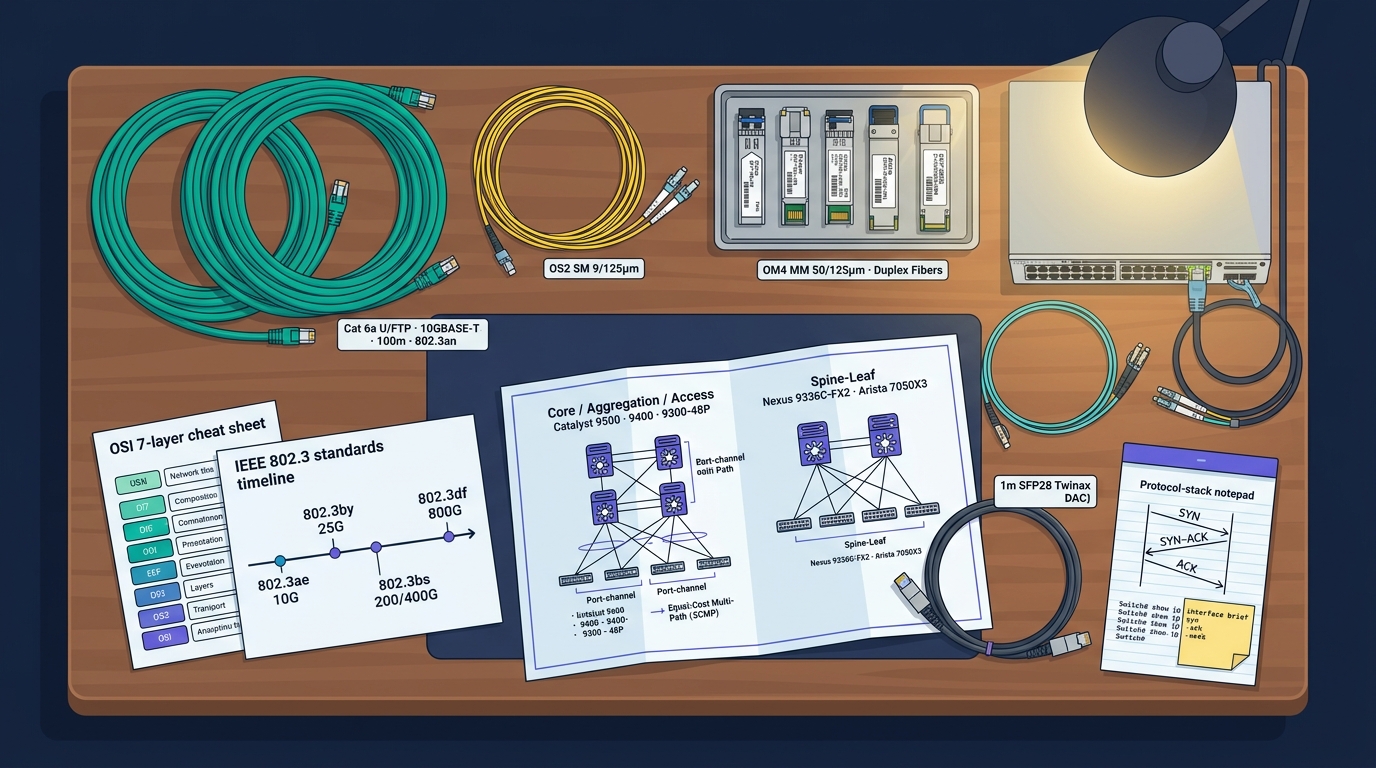
🎨 이미지 프롬프트: "Editorial wide cinematic illustration on dark navy background — a large wooden desk overhead view; on the desk sit thick coiled Cat 6a U/FTP cables in teal jacket (with a small printed label 'Cat 6a U/FTP · 10GBASE-T · 100m · 802.3an') and a coil of OS2 SM 9/125µm yellow fiber patch cords plus an aqua OM4 MM 50/125µm duplex; a tray of pluggable optical modules glinting under warm lamplight — 'Cisco SFP-10G-SR', 'Finisar QSFP28-100G-SR4', 'Arista QSFP-DD-400G-DR4', 'OSFP-800G 2×400GBASE-DR4' — each with a tiny printed PN sticker and matching DOM label; a printed OSI 7-layer cheat sheet next to an IEEE 802.3 timeline (802.3ae 10G · 802.3by 25G · 802.3bs 200/400G · 802.3df 800G); a folded network topology blueprint showing Core / Aggregation / Access (Catalyst 9500 · 9400 · 9300-48P) and Spine-Leaf (Nexus 9336C-FX2 · Arista 7050X3) side by side with port-channel and ECMP annotations; a small toy-sized 1RU rack switch labeled 'Cisco Catalyst 9300-48P' with blinking green/amber link LEDs and a console RJ45 dongle; a 1m SFP28 Twinax DAC coiled beside an LC duplex pair; a protocol-stack notepad with a hand-drawn TCP 3-way handshake (SYN / SYN-ACK / ACK) plus a sticky note showing
Switch# show ip interface briefoutput; soft cinematic light, teal #00b894 and purple #6c5ce7 accents, 16:9"
Session 4 · Day 1 — TA가 알아야 할 네트워크 전 계층 한 권
세션 4 — 회차 메타데이터
📋 세션 정보
- 회차: 4 / 15 — Day 1 · 네트워크 기초
- 소속: Day 1 — IT 인프라 큰 그림 + 서버·NW 기초
- 카테고리: is-technical (인프라 기초)
- 예상 분량: 본문 108 슬라이드 + 이미지 18장
- 강의 시간: 약 150분
- 강사: 박수현 — 젠아이랩스(GenAI Labs) CEO / CTO
🎯 핵심 메시지
네트워크는 7계층 · 100+ 프로토콜 · 수십 가지 장비의 약속 집합. TA는 이 약속을 다이어그램·표·결정 매트릭스로 풀어낸다.
🧭 학습 목표 (Learning Objectives)
- OSI 7 / TCP/IP 4 계층 — 캡슐화·데이터 단위·장비 매핑
- L1 물리 — Cat 5e~8·SM/MM 광·SFP~OSFP 비교
- WiFi — 802.11 a~be·2.4/5/6 GHz·WPA3·AP 설계
- L2 — Ethernet·MAC·ARP·STP·LACP·VLAN·L2 보안
- L3 — IP·CIDR·ICMP·라우팅(Static·OSPF·BGP·IS-IS)
- L4 — TCP/UDP/QUIC·3-Way·혼잡제어
- L5~L7 — DNS·DHCP·HTTP·TLS·SSH·SNMP·LDAP
- 장비·토폴로지 — 3-Tier vs Spine-Leaf·ToR·OOB
강의 지도 — 세션 4 본문 10개 PART
A. OSI / TCP/IP 모델
- 7 / 4 계층 + 매핑
- 캡슐화·디캡슐화
- 데이터 단위 (Frame·Packet·Segment)
- 계층별 장비 매핑
B. L1 물리 계층
- Cat 5e~8 동선
- 광 SM/MM, 커넥터
- SFP~OSFP 모듈
- 거리·100G/400G/800G
C. WiFi
- 802.11 a/b/g/n/ac/ax/be
- 2.4·5·6 GHz · 채널 폭
- MIMO·OFDMA·Beamforming
- WPA3·EAP·AP 배치
D. L2 데이터링크
- Ethernet·MAC·ARP
- STP / RSTP / MSTP
- LACP·LLDP
- VLAN·L2 보안
E. L3 네트워크
- IP·CIDR·VLSM·ICMP
- 라우팅 기본
- OSPF·BGP·IS-IS·EIGRP
- ECMP·PBR
F. L4 전송
- TCP·UDP·SCTP·QUIC
- 3-Way / 4-Way
- 혼잡제어 (Reno·CUBIC·BBR)
- 포트 분류
G. L5~L7 응용
- DNS·DHCP·NTP·LDAP
- HTTP/1.1·2·3·TLS
- SMTP/POP3/IMAP·FTP/SFTP·SSH·SNMP
H. 장비 · I. 토폴로지 · J. 실전
- Hub~LB·WAF·FW
- 3-Tier vs Spine-Leaf
- 산출물·결정 10가지
PART A
OSI 7 Layer + TCP/IP — 모든 네트워크의 공통 어휘
7개 계층의 약속이 모여 우리가 보는 모든 통신이 된다.
OSI 7 Layer — 7개 계층의 책임
암기 트릭: "All People Seem To Need Data Processing" (위→아래) — Please Do Not Touch Steve's Pet Alligator (아래→위).
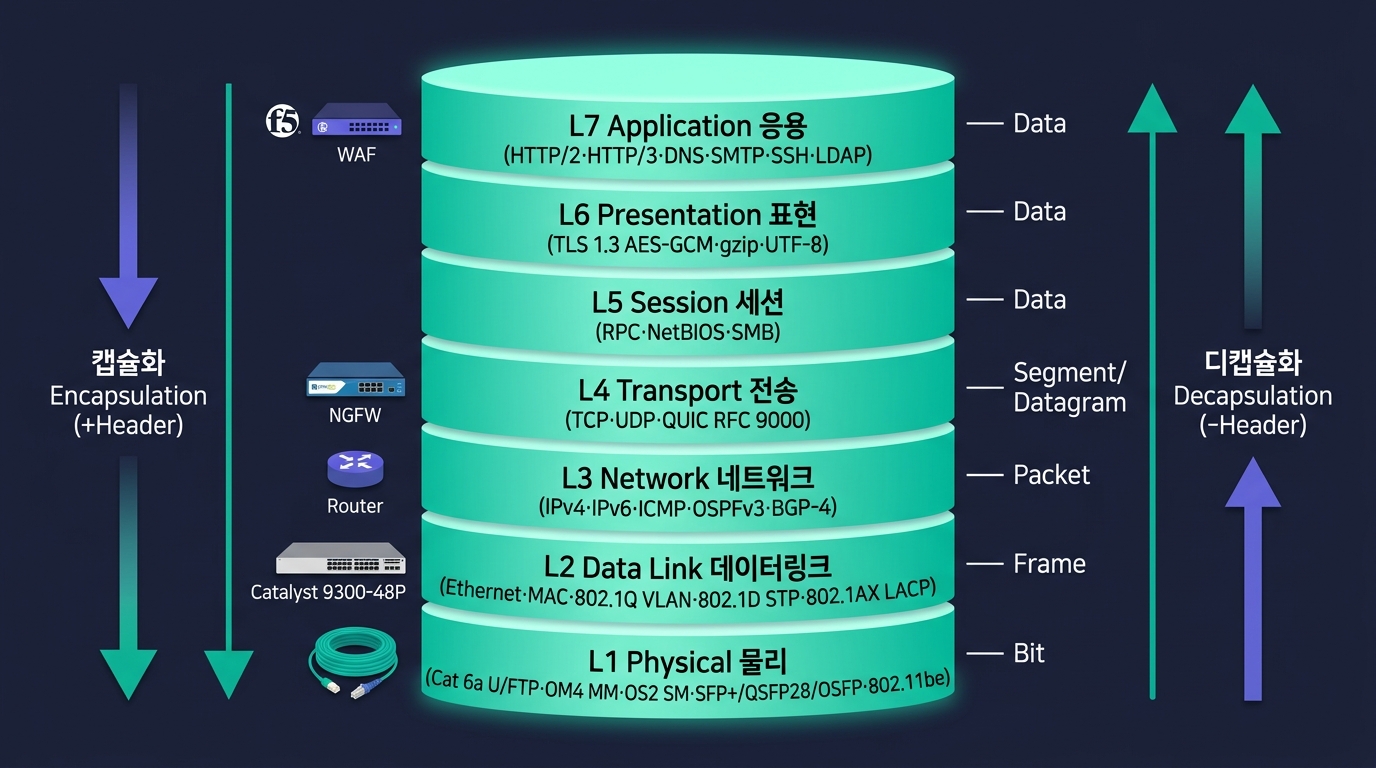
OSI 7 Layer 스택 (삽화)
TCP/IP 4 Layer — 실제 구현 모델
| TCP/IP 계층 | OSI 매핑 | 대표 프로토콜 | 대표 장비 |
|---|---|---|---|
| Application | L5+L6+L7 | HTTP·HTTPS·DNS·DHCP·SMTP·SSH·FTP·LDAP·SNMP | LB(L7)·WAF·Proxy |
| Transport | L4 | TCP·UDP·SCTP·QUIC | LB(L4)·Firewall |
| Internet | L3 | IP·ICMP·ARP*·OSPF·BGP | Router·L3 Switch |
| Network Access | L1+L2 | Ethernet·WiFi·PPP·VLAN(802.1Q)·MAC | L2 Switch·Hub·AP·케이블·SFP |
현장에서는 TCP/IP 4 계층이 실제 표준. OSI 7 계층은 개념·교육·트러블슈팅 용어. ARP는 L2와 L3의 경계.
패킷 캡슐화 (Encapsulation) — 송신 시 위→아래
| 계층 | 추가되는 헤더 | 데이터 단위 |
|---|---|---|
| L7~L5 | Application 헤더 | Data |
| L4 | TCP/UDP 헤더 (Src/Dst Port) | Segment (TCP) / Datagram (UDP) |
| L3 | IP 헤더 (Src/Dst IP·TTL·Protocol) | Packet |
| L2 | Ethernet 헤더 (Src/Dst MAC·EtherType) + FCS | Frame |
| L1 | (헤더 없음) | Bit (전기·광·전파) |
디캡슐화 (Decapsulation) — 수신 시 아래→위
🔍 각 계층 검증
- L2: 목적지 MAC == 내 MAC? FCS 무결성?
- L3: TTL > 0? IP Header Checksum?
- L4: Port가 LISTEN 중인가? Seq 정상?
- L7: 응용이 받을 수 있는 형식?
🎙️ TA의 관점
- 장애 발생 시 Bottom-up: 케이블 → Link → IP → Port → 응용 순서로 격리
- MTU 불일치 → L3 Fragmentation → 성능 폭락
- L4 Reset(RST) 폭주 → 응용/방화벽 의심
- L7 Slow Response → APM으로 절단점 추적
계층별 장비 매핑 — 어느 계층에서 일하는가
| OSI 계층 | 데이터 단위 | 주요 장비 | 핵심 결정 |
|---|---|---|---|
| L7 | Data | WAF · L7 LB · API Gateway · Reverse Proxy | URL/Header 라우팅·SSL Term |
| L6 | Data | TLS Offloader · HSM | 인증서·암호 스위트 |
| L5 | Data | (특수) | RPC·SMB 세션 |
| L4 | Segment | L4 LB · Firewall · NAT GW | 5-Tuple·Connection Track |
| L3 | Packet | Router · L3 Switch · IPS · VPN GW | 라우팅 테이블·ACL |
| L2 | Frame | L2 Switch · Bridge · Wireless AP | MAC 테이블·VLAN |
| L1 | Bit | Hub · Repeater · Media Converter · 케이블·광 모듈 | 거리·속도·물리 표준 |
현장 단순화: L1 = 케이블/광, L2 = 스위치, L3 = 라우터, L4 = 방화벽/L4 LB, L7 = WAF/L7 LB. 장애 격리도 이 5개 축으로 나눠 본다.
PART B
L1 물리 계층 — 케이블·광·SFP의 세계
물리 표준이 잘못되면 그 위의 모든 계층이 무너진다.
동선 표준 — Cat 5e · 6 · 6a · 7 · 8 비교
| 표준 | 최대 속도 | 최대 거리 | 주파수 | 차폐 | 주 용도 |
|---|---|---|---|---|---|
| Cat 5e | 1 Gbps | 100m | 100 MHz | UTP | 일반 사무 (구식) |
| Cat 6 | 1 Gbps (100m) / 10 Gbps (55m) | 100m / 55m | 250 MHz | UTP/STP | 표준 사무실 |
| Cat 6a ⭐ | 10 Gbps | 100m | 500 MHz | F/UTP·STP | 데이터센터 ToR 표준 |
| Cat 7 | 10 Gbps | 100m | 600 MHz | S/FTP (개별·전체 차폐) | 산업·고간섭 환경 |
| Cat 7a | 10 Gbps | 100m | 1000 MHz | S/FTP | 특수 (드물게 사용) |
| Cat 8 | 25/40 Gbps | 30m | 2000 MHz | S/FTP | 데이터센터 단거리 (Server↔ToR) |
현장 표준 결정: 사무 = Cat 6, 데이터센터 ToR = Cat 6a, 단거리 25/40G = Cat 8 또는 DAC, 25G 이상 장거리 = 광 (Fiber).
차폐 구조 — UTP · FTP · STP · S/FTP
🧵 차폐 종류
- UTP (Unshielded Twisted Pair) — 차폐 없음, 가장 저렴, 일반 사무
- FTP / F/UTP (Foiled) — 전체 외부 알루미늄 호일, 중간 가격
- STP / S/UTP (Shielded, 편조망) — 외부 편조망 차폐
- S/FTP / SF/FTP — 페어 개별 호일 + 외부 편조망 (최고 등급)
⚠️ 차폐 도입 시 부담
- 가격 1.5~3배 ↑
- 케이블 굵기 ↑ (Bend Radius 큼)
- 반드시 양 끝 접지 — 안 하면 오히려 안테나
- 굵어서 트레이 점유율 증가
🎙️ TA의 선택 기준
| 환경 | 추천 |
|---|---|
| 일반 사무실 | UTP Cat 6 |
| 데이터센터 일반 | F/UTP Cat 6a |
| 산업·공장·송전소 인근 | S/FTP Cat 6a/7 |
| 의료 영상·고감도 측정실 | S/FTP Cat 7 |
| 데이터센터 25/40G 단거리 | S/FTP Cat 8 또는 DAC |
현장 메모: 한국 공공 사업은 화재·차폐 등급 (CMP·CMR·LSZH) 도 함께 명시되는 경우가 많음.
🎨 이미지 프롬프트: "Editorial cross-section comparison illustration on dark navy background — four labeled cable cutaway panels in a 2x2 grid showing twisted-pair shielding constructions: (1) 'UTP' Cat 6 with 4 unshielded twisted copper pairs in colored insulation (blue, orange, green, brown) wrapped in a thin gray PVC jacket; (2) 'F/UTP (FTP)' Cat 6a with the same 4 pairs wrapped together by a single aluminum foil sheath and a thin drain wire, teal outer jacket; (3) 'S/UTP (STP)' showing 4 pairs encased in a braided copper shield mesh, black jacket; (4) 'S/FTP' Cat 7 — each individual twisted pair wrapped in its own aluminum foil, all four foil-wrapped pairs then enclosed by an outer braided copper shield, LSZH purple jacket. Each panel shows a clean engineering cutaway with thin callout lines labeling 'Conductor 23 AWG', 'Pair Foil', 'Overall Braid Shield', 'Drain Wire', 'Outer Jacket'. Bottom strip lists 'IEC 61156 / ISO/IEC 11801' and EMI rejection bars (UTP low → S/FTP high). Soft technical lighting, monospaced labels, teal #00b894 and purple #6c5ce7 accents, 16:9"
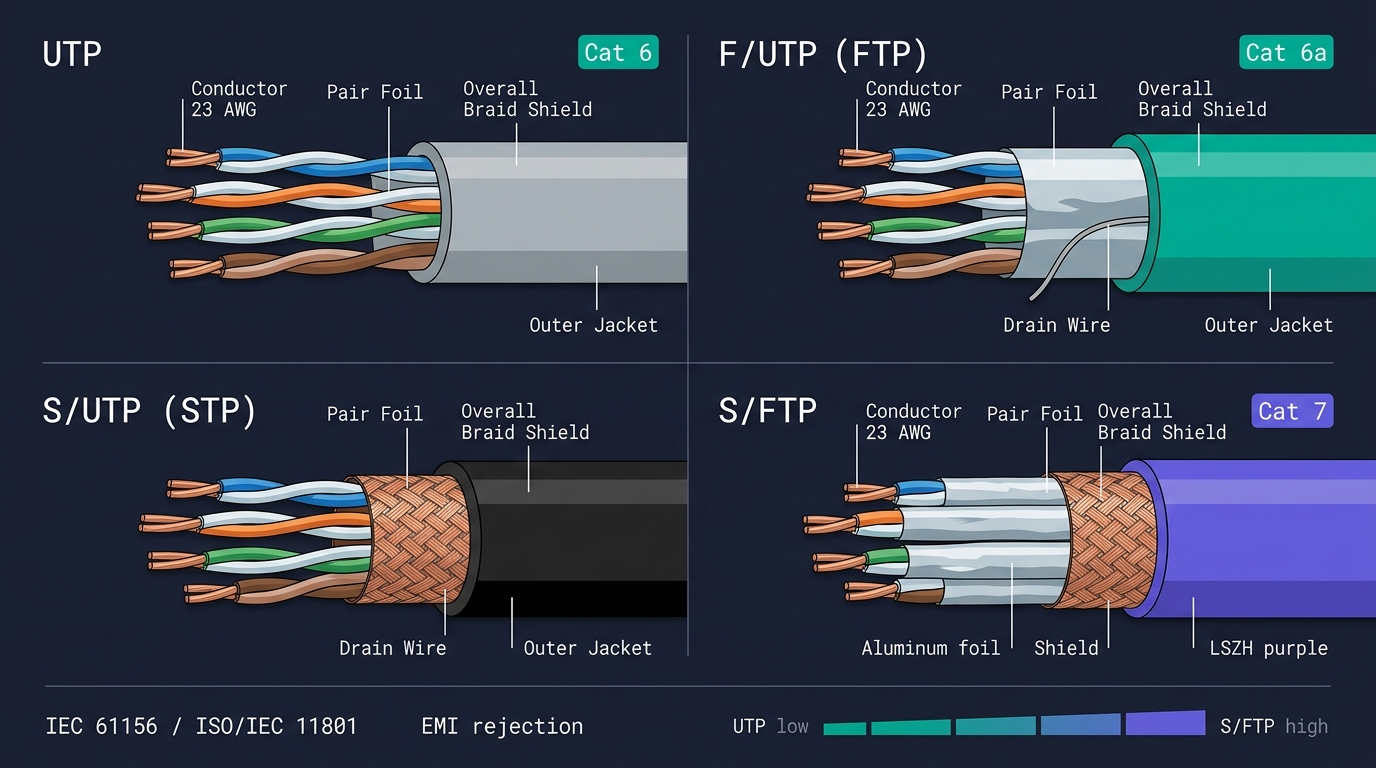
차폐 구조 — UTP · FTP · STP · S/FTP
광 케이블 — Single-Mode vs Multi-Mode
| 구분 | Single-Mode (SM) | Multi-Mode (MM) |
|---|---|---|
| 코어 / 클래드 | 9 / 125 μm | 50 / 125 μm (또는 62.5) |
| 광원 | Laser (1310/1550 nm) | LED/VCSEL (850/1300 nm) |
| 최대 거리 | 10 km ~ 80 km+ | 100m ~ 550m |
| 대역폭·속도 | 100G/400G/800G 장거리 | 10G/40G/100G 단거리 |
| 케이블 색상 | 노란색 | OM3 아쿠아·OM4 아쿠아·OM5 라임그린 |
| 단가 | 광원 비싸지만 케이블 저렴 | 광원 저렴, 케이블 약간 비쌈 |
| 용도 | DC 간·캠퍼스·WAN | 데이터센터 내 단거리 |
MM 등급 — OM1 · OM2 · OM3 · OM4 · OM5
| 등급 | 색상 | 10G | 40G | 100G | 비고 |
|---|---|---|---|---|---|
| OM1 (62.5/125) | Orange | 33m | — | — | 구식 |
| OM2 (50/125) | Orange | 82m | — | — | 구식 |
| OM3 | Aqua | 300m | 100m | 70m | 표준 |
| OM4 | Aqua | 400m | 150m | 100m | DC 표준 |
| OM5 | Lime Green | 550m | 440m | 150m | SWDM 지원 (신규) |
🎨 이미지 프롬프트: "Editorial fiber-optic cross-section illustration on dark navy background — split into two large side-by-side cutaway panels. Left panel 'Single-Mode (OS2)': yellow LSZH outer jacket with a 9µm glass core / 125µm cladding cross-section magnified in an inset circle; a horizontal ray-trace shows a single laser mode traveling in a nearly straight line down the core with label '1310 / 1550 nm Laser · DFB', tagged 'Reach 10 km — 80 km+ · 100G/400G/800G long-haul'. Right panel 'Multi-Mode (OM3 / OM4 / OM5)': aqua jacket (with a lime-green OM5 stripe) showing 50µm core / 125µm cladding; ray-trace shows multiple bouncing light modes reflecting off the core-cladding boundary at varying angles ('Modal dispersion'), labeled '850 nm VCSEL', tagged 'OM3 300m · OM4 400m · OM5 550m @ 10G · DC short-reach'. Below each panel small color swatches: yellow jacket vs aqua/lime jacket. Center divider lists IEC 60793-2 / ITU-T G.652 (SM) and G.651.1 (MM). Clean technical editorial style, thin callout lines, monospaced labels, teal #00b894 and purple #6c5ce7 accents, 16:9"
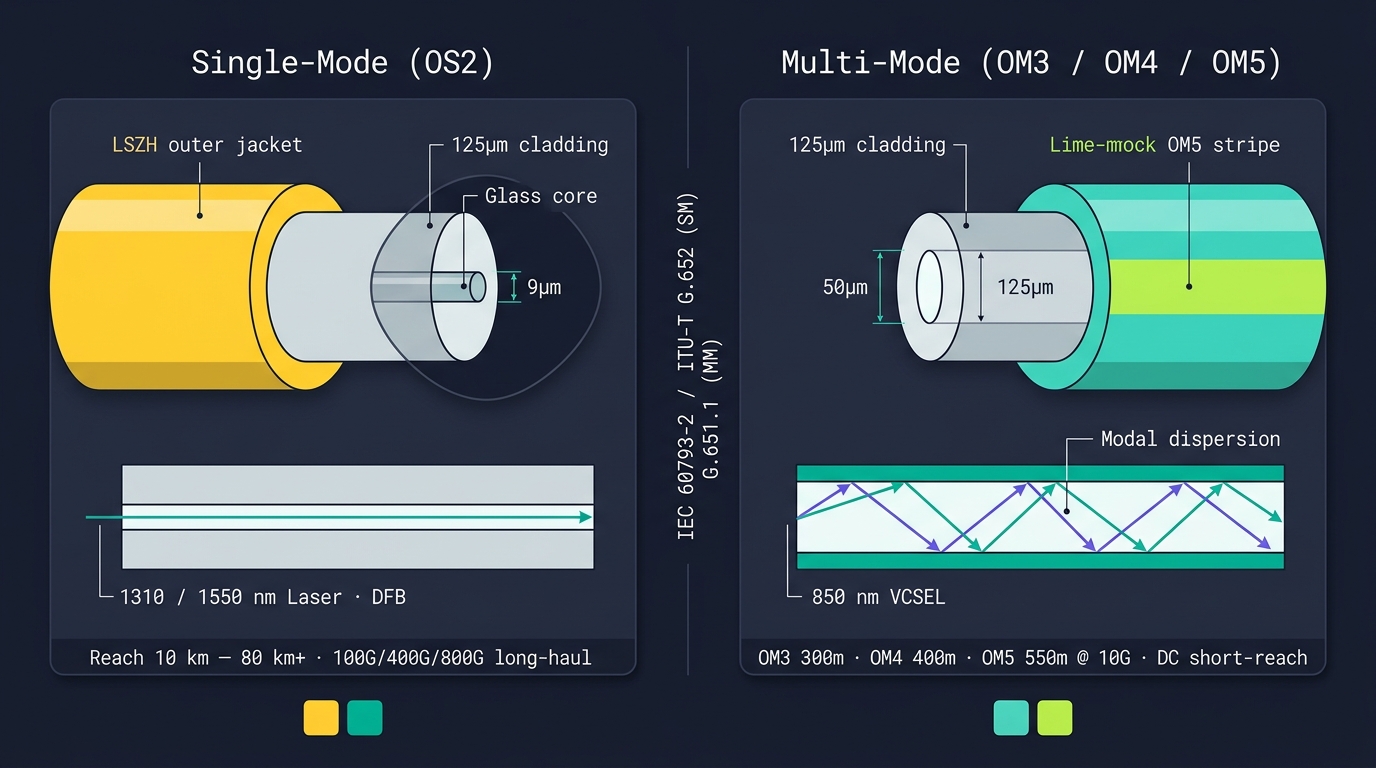
광 케이블 — Single-Mode vs Multi-Mode
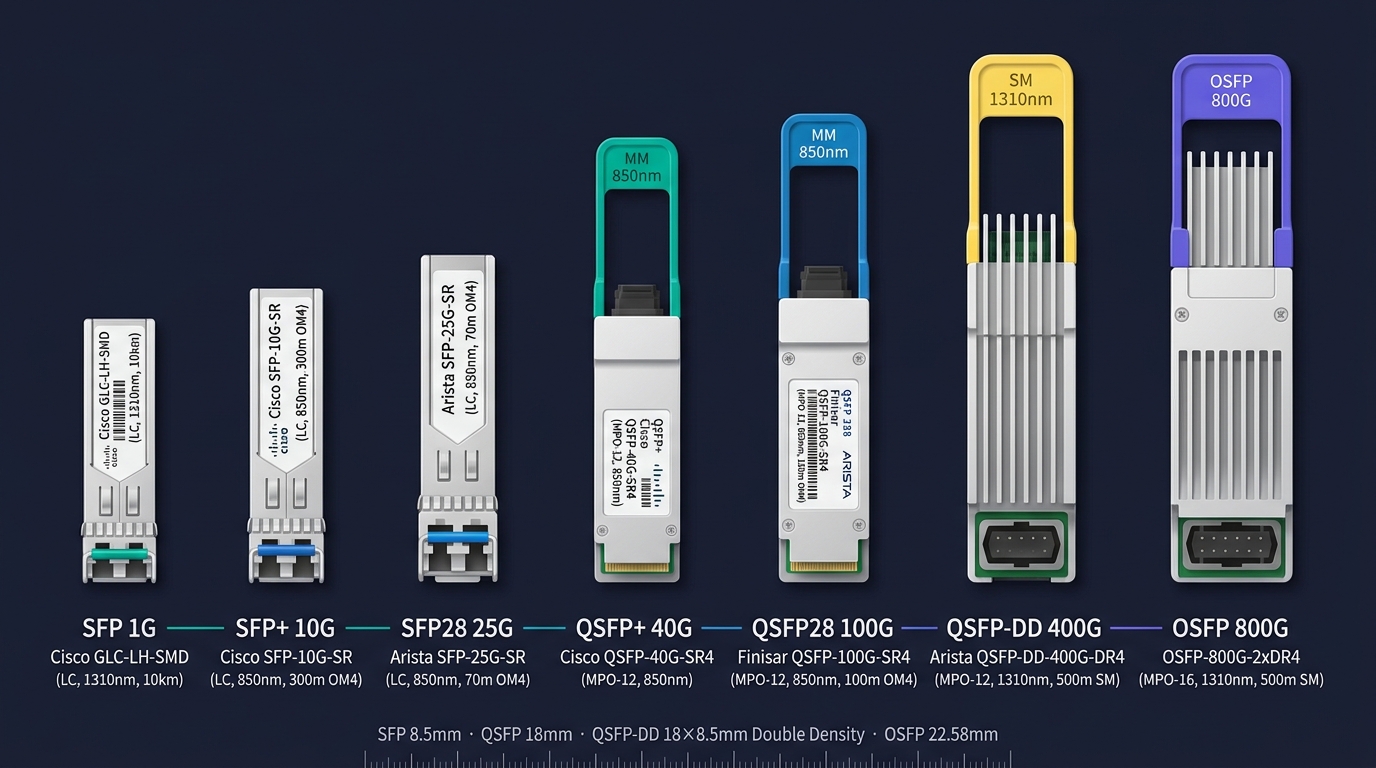
광 모듈 라인업 (삽화)
광 모듈 — SFP · SFP+ · SFP28 · QSFP 계열 · OSFP
| 모듈 | 속도 | 폼팩터 | 커넥터 | 등장 시기 | 주 용도 |
|---|---|---|---|---|---|
| SFP | 1 Gbps | Small | LC | 2001 | 1G 액세스 |
| SFP+ | 10 Gbps | Small | LC | 2009 | 현장 가장 흔함 |
| SFP28 | 25 Gbps | Small | LC | 2014 | 서버 NIC ↔ ToR |
| SFP56 | 50 Gbps | Small | LC | 2018 | 신규·드물게 |
| QSFP+ | 40 Gbps (4×10G) | Quad | MPO 또는 LC×4 | 2010 | DC Aggregation |
| QSFP28 | 100 Gbps (4×25G) | Quad | MPO 또는 LC | 2015 | DC Spine 표준 |
| QSFP56 | 200 Gbps | Quad | MPO | 2018 | 고밀도 DC |
| QSFP-DD | 400 Gbps (8×50G) | Double Density | MPO-16 | 2019 | 차세대 Spine |
| OSFP | 800 Gbps | Octal SFP | MPO-16 | 2022 | AI/GPU 클러스터 |
| OSFP-XD | 1.6 Tbps | XD | MPO | 2025+ | 초대형 AI |
모듈 = NIC와 스위치의 약속. 같은 SFP+ 슬롯이라도 벤더 정품/호환 코드가 다르면 작동 안 함 — BOM에 벤더 PN(Part Number) 정확히 명시.
광 거리 표준 — SR · LR · ER · ZR
| 약자 | 풀네임 | 거리 | 광 종류 | 파장 | 비고 |
|---|---|---|---|---|---|
| SR | Short Reach | 100m (OM4) / 70m (OM3) | MM | 850 nm | DC 내부 표준 |
| LR | Long Reach | 10 km | SM | 1310 nm | 캠퍼스·DC 간 |
| ER | Extended Reach | 40 km | SM | 1550 nm | WAN |
| ZR | Z Reach | 80 km | SM | 1550 nm | 광역 WAN |
| ZR+ | 확장 ZR | 120 km+ | SM | Coherent | 차세대 광역 |
100G/400G 표준 (IEEE 802.3) 예시
| 표준 | 속도 | 매체 | 거리 |
|---|---|---|---|
| 100GBASE-SR4 | 100G | MM (MPO) | 100m |
| 100GBASE-LR4 | 100G | SM (LC) | 10km |
| 100GBASE-ER4 | 100G | SM (LC) | 40km |
| 400GBASE-SR8 | 400G | MM (MPO-16) | 100m |
| 400GBASE-LR4 | 400G | SM (LC) | 10km |
| 400GBASE-ZR | 400G | SM (Coherent) | 80~120km |
케이블 결정 매트릭스 — Cat 6a · Cat 8 · 광 SR·LR
| 시나리오 | 거리 | 속도 | 권고 매체 | 이유 |
|---|---|---|---|---|
| 사무실 ↔ 액세스 SW | <100m | 1G | Cat 6 | 가성비, 1G가 충분 |
| 사무실 ↔ 액세스 SW (신규) | <100m | 10G | Cat 6a | 미래 대비 |
| 데이터센터 Server ↔ ToR | <3m | 10/25G | DAC (Direct Attach Copper) | 저전력·저지연·저비용 |
| Server ↔ ToR (랙 내) | <5m | 25G | Cat 8 또는 DAC | 단거리 표준 |
| ToR ↔ Spine (랙 간) | <100m | 100G | OM4 MPO + SR4 | 데이터센터 표준 |
| DC 동·층간 | 100m~10km | 100G | SM LC + LR4 | 거리 확장 |
| DC ↔ DC (50km) | 10~80km | 100G | SM + ER4 | 캠퍼스 |
| WAN 광역 (서울↔부산) | 80km+ | 100G/400G | SM + ZR 또는 통신사 회선 | 장거리 |
| AP ↔ 단말 (무선) | 실내 | WiFi 6E/7 | 무선 | 모빌리티 |
PART C
WiFi — 802.11 표준의 진화
무선은 유선의 보조가 아니라, 사무실·캠퍼스의 1차 액세스 매체다.
802.11 진화 — a/b/g/n/ac/ax/be
| 표준 | 브랜드 | 연도 | 주파수 | 최대 속도 (이론) | 채널 폭 |
|---|---|---|---|---|---|
| 802.11a | (Wi-Fi 1/2 없음) | 1999 | 5 GHz | 54 Mbps | 20 MHz |
| 802.11b | (구식) | 1999 | 2.4 GHz | 11 Mbps | 22 MHz |
| 802.11g | (구식) | 2003 | 2.4 GHz | 54 Mbps | 20 MHz |
| 802.11n | Wi-Fi 4 | 2009 | 2.4 / 5 GHz | 600 Mbps | 20/40 MHz |
| 802.11ac | Wi-Fi 5 | 2014 | 5 GHz | ~3.5 Gbps | 20/40/80/160 MHz |
| 802.11ax | Wi-Fi 6 | 2019 | 2.4 / 5 GHz | ~9.6 Gbps | 20/40/80/160 MHz |
| 802.11ax | Wi-Fi 6E | 2021 | + 6 GHz | ~9.6 Gbps | 20~160 MHz |
| 802.11be | Wi-Fi 7 | 2024 | 2.4/5/6 GHz | ~46 Gbps | 320 MHz, 4K-QAM, MLO |
현재 기업 표준: 신규 = Wi-Fi 6/6E, 2026~ = Wi-Fi 7. 단말이 지원해야 의미 있음 (iPhone 16·Galaxy S24 부터 Wi-Fi 7).
주파수 대역 — 2.4 · 5 · 6 GHz 비교
| 대역 | 채널 수 | 거리·관통성 | 간섭 | 속도 | 비고 |
|---|---|---|---|---|---|
| 2.4 GHz | 3개 (1·6·11) | 멀리·잘 통과 | 심함 (BT·전자레인지·이웃 AP) | 낮음 | IoT·구식 단말 |
| 5 GHz | 25개+ | 중간 | 중간 (DFS 채널 일부) | 높음 | 사무·기업 표준 |
| 6 GHz ⭐ | 59개 (20MHz) | 짧음·관통 약함 | 거의 없음 (신규 대역) | 최고 | Wi-Fi 6E/7 |
채널 폭 — 20·40·80·160·320 MHz
| 채널 폭 | 처리량 (이론) | 단점 |
|---|---|---|
| 20 MHz | 기준 | 가장 안정, 좁음 |
| 40 MHz | 2배 | 채널 절반 소모 |
| 80 MHz | 4배 | 간섭 심해짐 |
| 160 MHz | 8배 | 5/6 GHz 만 가능 |
| 320 MHz | 16배 | 6 GHz Wi-Fi 7 전용 |
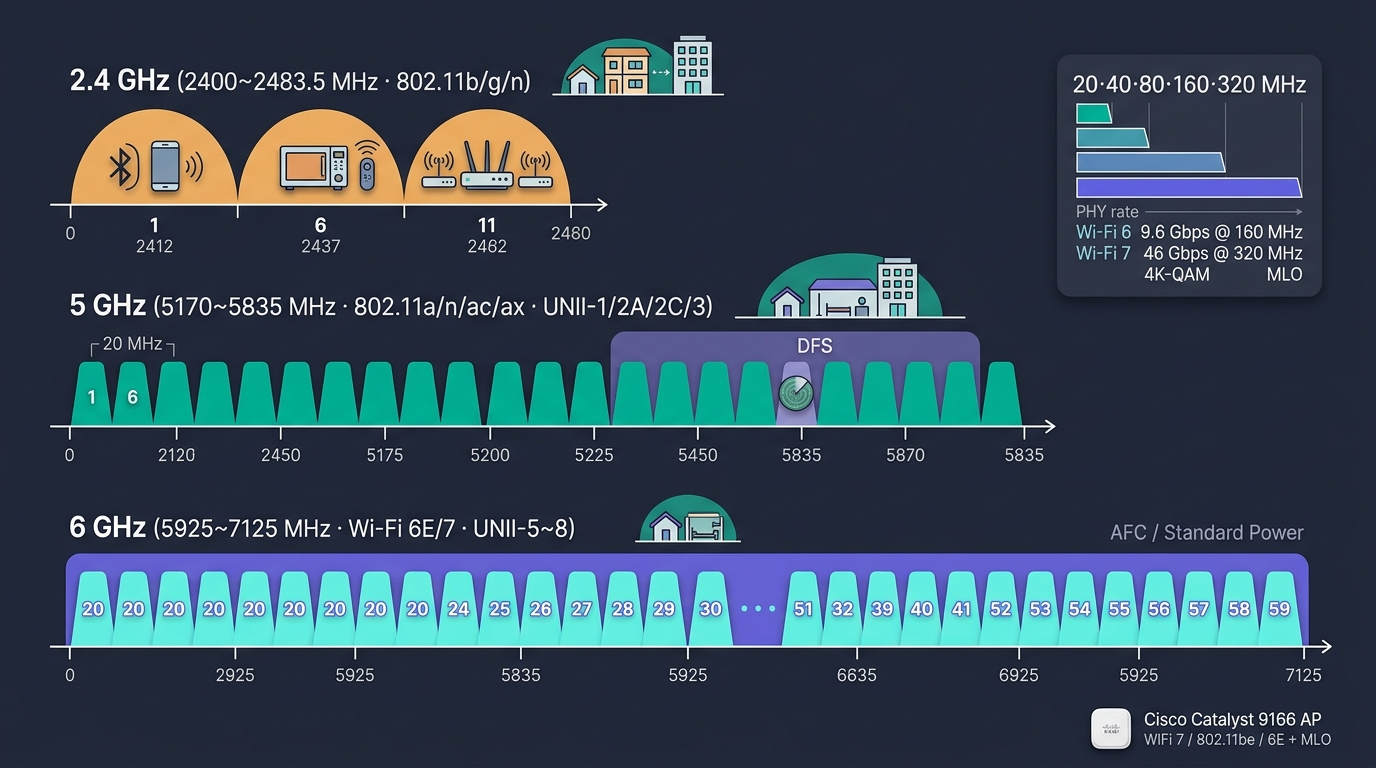
WiFi 주파수·채널 (삽화)
WiFi 보안 — WEP · WPA · WPA2 · WPA3 + EAP
1. 암호 표준 4세대
| 표준 | 연도 | 암호 | 키 길이 | 취약점 | 현재 권고 |
|---|---|---|---|---|---|
| WEP | 1997 | RC4 | 64/128 | 수분 내 해독 | 즉시 폐기 |
| WPA | 2003 | TKIP | 128 | 알려진 취약점 | 사용 금지 |
| WPA2 | 2004 | AES-CCMP | 128 | KRACK(2017) | 패치 시 가능, 권고 X |
| WPA3 ⭐ | 2018 | AES-GCMP-256·SAE | 128/192 | (현재 안전) | 신규 표준 |
2. 인증 모드 — Personal vs Enterprise
| 모드 | 키 방식 | 적합 |
|---|---|---|
| WPA2/3-Personal (PSK) | 사전 공유 키 (Wi-Fi 비밀번호) | 가정·소규모 |
| WPA2/3-Enterprise (802.1X) | EAP + RADIUS | 기업·캠퍼스 표준 |
3. EAP 방식 비교
| 방식 | 인증 요소 | 비고 |
|---|---|---|
| EAP-TLS | 클라이언트·서버 인증서 양방향 | 가장 안전 |
| PEAP (MS) | 사용자명/비밀번호 + 서버 인증서 | 일반 기업 |
| EAP-TTLS | PEAP 변형 | 유닉스 진영 |
| EAP-FAST | Cisco PAC | 레거시 |
AP 배치 원칙 — 간격 · 간섭 · 채널 계획
📐 배치 원칙
- AP 간 간격: 10~15m (사무실), 6~10m (고밀도)
- 천장 중앙 설치 — 벽 부착보다 신호 균일
- 층간 간섭: 위/아래층 AP와 채널 분리
- AP 1대당 동시 단말 — Wi-Fi 6: 100~150, Wi-Fi 7: 200+
- 롤링 RF 측정 (사전 Site Survey)
- PoE+/PoE++ 전원 — Wi-Fi 6/7은 30W+
📡 채널 계획
- 2.4 GHz: 1·6·11 만 사용 (Non-Overlap)
- 5 GHz: 자동 채널 할당 (DFS 제외)
- 6 GHz: 새 대역, 간섭 적음 → 자유롭게
🏢 가정용 vs 엔터프라이즈
| 항목 | 가정용 | 엔터프라이즈 |
|---|---|---|
| 가격 | 5~20만 원 | 80~300만 원/대 |
| 단말 수용 | ~50 | 200+ |
| 802.1X | X | ⭕ |
| Roaming | 단순 | 802.11k/v/r 표준 |
| 컨트롤러 | (없음) | WLC 또는 Cloud Controller |
| 관리 | GUI | SNMP·CLI·API·NMS |
| 보안 | WPA2 | WPA2/3-Enterprise + RADIUS |
| 대표 | TP-Link·ASUS | Cisco · Aruba · Juniper Mist · Ruckus · 다산 |
🎨 이미지 프롬프트: "Editorial top-down office floor plan illustration on dark navy background — a wide rectangular open-plan office layout viewed from above showing desk clusters, meeting rooms, restrooms and a central corridor; 6 ceiling-mounted Wi-Fi access points (small white disc icons labeled 'AP-01' through 'AP-06') distributed evenly across the ceiling grid at roughly 12 m spacing with a thin annotation '≈ 12 m between APs'. Each AP radiates a soft circular Wi-Fi heatmap contour — bright teal core fading through cyan to dim purple at the edges, with overlapping coverage zones around the corridor; signal-strength legend at bottom-right shows '-50 dBm (strong) · -65 dBm · -75 dBm (weak)'. Channel labels above each AP follow the 2.4 GHz non-overlapping plan: 'CH 1', 'CH 6', 'CH 11', 'CH 1', 'CH 6', 'CH 11' arranged so no two adjacent APs share a channel. A small side panel notes 'Wi-Fi 6/6E · PoE++ · WPA3-Enterprise · 802.11k/v/r roaming'. Clean architectural editorial style, thin white grid lines, monospaced English labels, teal #00b894 and purple #6c5ce7 accents, 16:9"
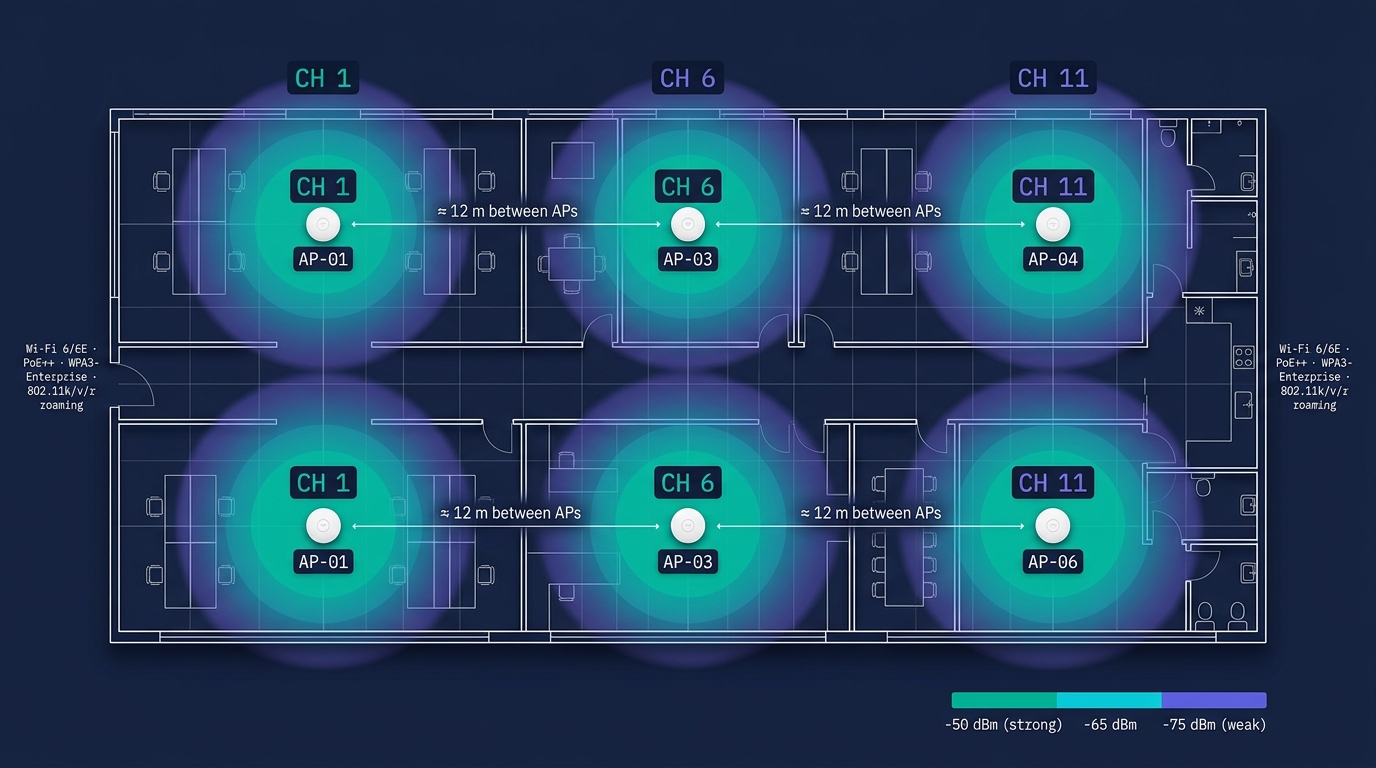
AP 배치 원칙 — 간격 · 간섭 · 채널 계획
PART D
L2 데이터링크 — Ethernet · MAC · ARP · STP · VLAN
L2는 같은 브로드캐스트 도메인 안의 약속. 여기서 사고는 곧 폭풍이 된다.
Ethernet 프레임 구조 — 바이트 단위
┌─────────┬─────────┬─────────┬──────┬─────────────┬──────┐
│Preamble │  Dst    │  Src    │ Type │   Payload   │ FCS  │
│  + SFD  │  MAC    │  MAC    │      │ 46~1500 B   │  4B  │
│   8 B   │  6 B    │  6 B    │ 2 B  │             │      │
└─────────┴─────────┴─────────┴──────┴─────────────┴──────┘
| 필드 | 크기 | 용도 |
|---|---|---|
| Preamble + SFD | 8 B | 동기화 비트 |
| Dst MAC | 6 B | 목적지 MAC 주소 |
| Src MAC | 6 B | 발신 MAC 주소 |
| EtherType | 2 B | 상위 프로토콜 (0x0800=IPv4, 0x86DD=IPv6, 0x8100=VLAN) |
| Payload | 46~1500 B | 실제 데이터 (기본 MTU 1500) |
| FCS (CRC32) | 4 B | 무결성 검사 |
MTU 1500 vs Jumbo Frame 9000 — 데이터센터 내부(스토리지·백업)는 Jumbo Frame 9000 으로 처리량 ↑. 단, 경로 전체가 동일 MTU 여야 함 (불일치 = 단편화).
MAC 주소 — 48bit + OUI
00:50:56:AB:CD:EF
└──────┘└──────┘
   OUI    NIC
 24bit   24bit
비트 구조
| 비트 | 용도 |
|---|---|
| 48bit 전체 | MAC 주소 (16진수 12자리) |
| 상위 24bit = OUI | IEEE 할당 제조사 식별자 |
| 하위 24bit | 제조사가 부여한 NIC 시리얼 |
대표 OUI 예시
| OUI | 제조사 | OUI | 제조사 |
|---|---|---|---|
| 00:50:56 | VMware | 00:15:5D | Microsoft (Hyper-V) |
| 00:0C:29 | VMware | F0:18:98 | Apple |
| 52:54:00 | QEMU/KVM | 00:1B:21 | Intel |
| 00:24:E8 | Dell | B8:27:EB | Raspberry Pi |
🎯 MAC 특수 비트
- I/G (8번째 비트) — 0: 유니캐스트, 1: 멀티캐스트/브로드캐스트
- U/L (7번째 비트) — 0: 글로벌(IEEE 할당), 1: 로컬 관리
- 브로드캐스트 = FF:FF:FF:FF:FF:FF
🎙️ TA의 활용
- DHCP 예약 — MAC 기반
- L2 보안 — Port Security MAC 제한
- 자산 관리 — MAC ↔ 사용자/장비 매핑
- 장애 분석 — OUI로 제조사 즉시 식별
L2 스위치 동작 — 학습 · 플러딩 · 포워딩
1️⃣ Learning (학습)
- 프레임 도착 시 Src MAC + 수신 포트를 MAC Table에 등록
- 기본 Aging Time = 300초
- 학습 = 자동·하드웨어 (ASIC)
2️⃣ Flooding (플러딩)
- Dst MAC이 MAC Table에 없으면 → 수신 포트 제외 모든 포트로 전송
- 브로드캐스트 (FF:FF...)도 동일
- 초기 통신 시 매번 발생
3️⃣ Forwarding (포워딩)
- Dst MAC이 MAC Table에 있으면 → 해당 포트로만 전송
- ASIC 와이어 스피드 처리
- L2 통신의 정상 상태
충돌 도메인 vs 브로드캐스트 도메인
| 구분 | 정의 | 분할 장비 |
|---|---|---|
| Collision Domain | 충돌 가능한 영역 | Switch 포트마다 분리 (Hub는 1개) |
| Broadcast Domain | 브로드캐스트 전파 영역 | VLAN 또는 L3 라우터로 분리 |
L2 스위치 토폴로지 — MAC Table 학습 흐름
| MAC | 학습 포트 | Aging |
|---|---|---|
| AA | Port 1 | 300s |
| BB | Port 2 | 300s |
| CC | Port 3 | 300s |
ARP 패밀리 — ARP · RARP · GARP · Proxy ARP
| 종류 | 방향 | 용도 |
|---|---|---|
| ARP | IP → MAC | "이 IP의 MAC은?" — 브로드캐스트 질의 |
| RARP | MAC → IP | 디스크리스 부팅 (거의 안 씀, BOOTP/DHCP로 대체) |
| GARP (Gratuitous ARP) | Self → Self | "나 이 IP·MAC 쓴다" — HA 절체·중복 IP 탐지 |
| Proxy ARP | 라우터가 대리 응답 | 같은 서브넷처럼 통신 (구식·문제 소지) |
ARP 동작 흐름
PC1 (10.0.0.1) → 브로드캐스트: "Who has 10.0.0.5?"
                        ↓
PC2 (10.0.0.5) → 유니캐스트 응답: "I am 10.0.0.5, MAC=BB:..."
                        ↓
PC1 ARP 캐시에 (10.0.0.5, BB:...) 저장 (TTL 약 4시간)
보안 위협 — ARP Spoofing: 공격자가 GARP 위조 발송 → 트래픽 중간 가로채기. 대응: Dynamic ARP Inspection (DAI) + DHCP Snooping 바인딩 테이블 + L3 ARP Inspection ACL.
STP (Spanning Tree Protocol) — 802.1D · 루프 방지
🌳 STP의 역할
- L2 토폴로지에 루프 = 브로드캐스트 스톰 (단 1~2초만에 NW 마비)
- STP가 자동으로 한 포트를 Blocking → 논리적 트리 형성
- 장애 시 Blocking 포트가 Forwarding으로 자동 전환
📜 BPDU (Bridge Protocol Data Unit)
- 스위치끼리 매 2초마다 교환
- Root Bridge ID, Path Cost, Sender ID 등 포함
🏆 Root Bridge 선출
- 가장 낮은 Bridge ID 가 Root
- Bridge ID = Priority (2B) + MAC (6B)
- 기본 Priority 32768 → 운영자가 Root로 만들 SW의 Priority 낮춤
- Root 선출은 자동, 운영자의 강제 지정 권장
🛤️ Path Cost
| 속도 | Cost (Long) |
|---|---|
| 10 Mbps | 2,000,000 |
| 100 Mbps | 200,000 |
| 1 Gbps | 20,000 |
| 10 Gbps | 2,000 |
| 100 Gbps | 200 |
STP — Port Role · State · 수렴 시간
Port Role (역할)
| 역할 | 설명 |
|---|---|
| Root Port (RP) | Root로 가는 최단 경로 포트 (스위치당 1개) |
| Designated Port (DP) | 한 세그먼트(케이블)당 1개의 Forwarding 포트 |
| Blocked / Non-Designated | 루프 방지를 위해 차단된 포트 |
Port State (802.1D 기준 — 느림)
802.1D STP 수렴 = 30~50초 → 사용자 입장에선 "끊김". 그래서 등장한 것이 RSTP·MSTP.
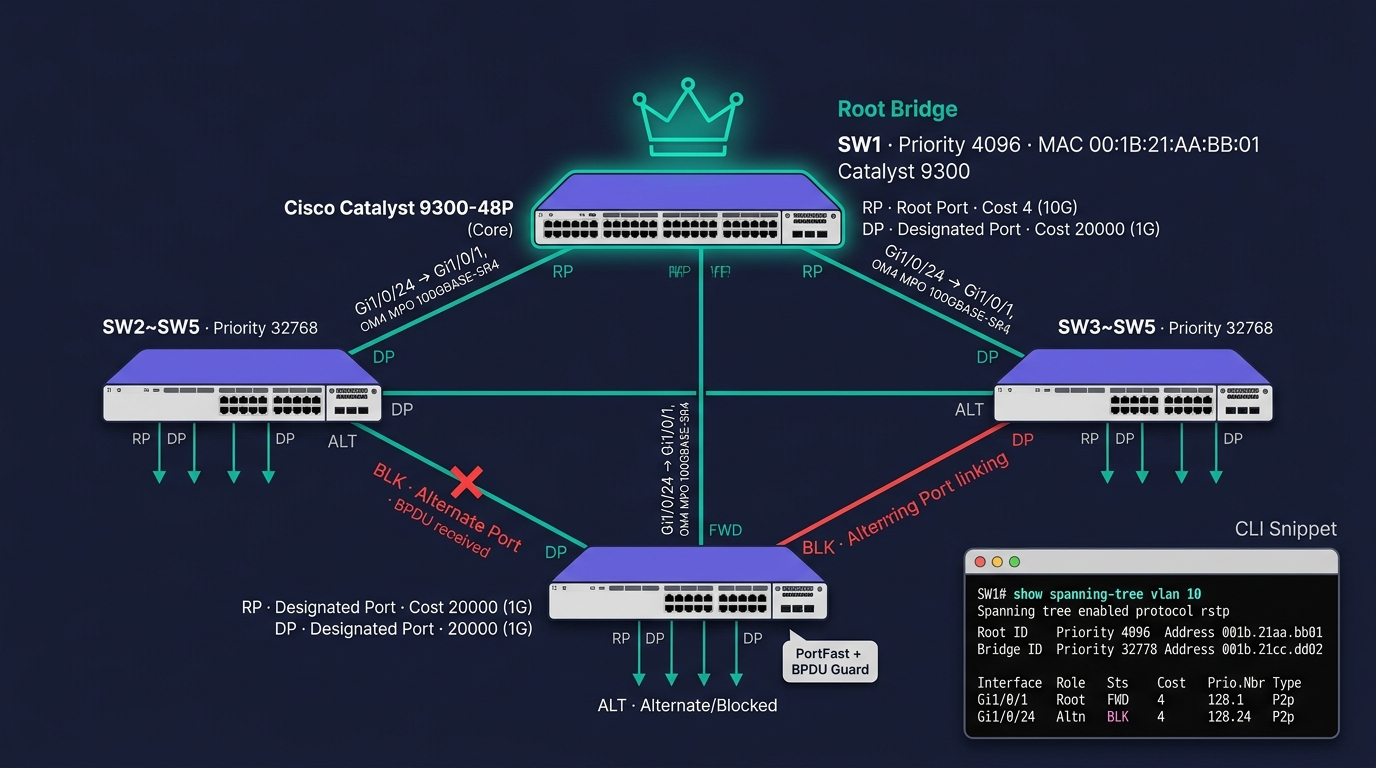
STP 토폴로지 (삽화)
LACP (Link Aggregation) — 802.3ad
🔗 LACP 개념
- 여러 물리 링크를 하나의 논리 링크로 묶음
- 대역폭 = 멤버 합 (4개 × 10G = 40G)
- 한 링크 장애 시 나머지로 계속 통신
- 로드밸런싱 알고리즘 — Src/Dst MAC·IP·Port 해시
⚙️ 모드
- Active — LACP 패킷 능동 송신
- Passive — 상대가 Active일 때만 응답
- On / Static — LACP 없이 정적 묶음 (권고 X)
🎯 LAG / Port-Channel / EtherChannel
| 벤더 | 명칭 |
|---|---|
| 표준 (IEEE) | LAG (Link Aggregation Group) |
| Cisco | Port-Channel / EtherChannel |
| Juniper | AE (Aggregated Ethernet) |
| Linux Bonding | mode=4 (802.3ad) |
🎙️ TA의 결정
- Active-Active 대역 확장 시 LACP 표준
- 다중 스위치 LACP = MLAG / vPC / Stack (Cisco vPC·Arista MLAG·HPE IRF)
- 단일 SW LAG → 멀티섀시 MLAG 로 진화
VLAN — 802.1Q 태깅
일반 Ethernet 프레임:
[ Dst MAC | Src MAC | Type=0x0800(IPv4) | Payload | FCS ]

VLAN 태그가 추가된 802.1Q 프레임:
[ Dst MAC | Src MAC | Type=0x8100(VLAN) | VLAN ID(12bit) + PCP(3bit) + DEI(1bit) | Type=0x0800 | Payload | FCS ]
                                          └────────────────── 4 bytes ──────────────────┘
🎯 VLAN ID 범위
- 0 — 예약 (Priority 전용)
- 1 — 기본 VLAN (Native, 운영 권고 X)
- 2~1001 — 일반 사용
- 1002~1005 — Token Ring/FDDI (구식 예약)
- 1006~4094 — Extended VLAN
- 4095 — 예약
- 실용 = 약 4,000개
🚦 PCP (Priority Code Point)
- 3bit = 0~7 우선순위
- L2 QoS (CoS)
- VoIP·영상은 보통 5~6
🚇 Trunk vs Access Port
| 포트 종류 | 특징 |
|---|---|
| Access Port | 단일 VLAN, 태그 제거하고 단말에 전달 |
| Trunk Port | 다중 VLAN, 태그 유지하고 다음 SW로 전달 |
| Native VLAN | Trunk 포트에서 태그 없이 전달되는 VLAN (기본 VLAN 1) |
| Voice VLAN | IP 전화 전용 자동 할당 VLAN |
⚠️ 보안 위험
- VLAN Hopping — Double Tag로 우회 → 대응: Native VLAN을 사용 안 하는 ID로
- Trunk Auto-Negotiation — 비활성, 명시적 Trunk만
Cisco IOS CLI — VLAN·Trunk 실제 명령
! ── 액세스 SW: VLAN 10 (Sales) / VLAN 20 (Engineer) 생성 ──
Switch> enable
Switch# configure terminal
Switch(config)# vlan 10
Switch(config-vlan)#  name SALES
Switch(config-vlan)# exit
Switch(config)# vlan 20
Switch(config-vlan)#  name ENG
Switch(config-vlan)# exit

! ── 단말 포트 (Gi1/0/1) 를 VLAN 10 액세스 포트로 ──
Switch(config)# interface GigabitEthernet1/0/1
Switch(config-if)#  switchport mode access
Switch(config-if)#  switchport access vlan 10
Switch(config-if)#  spanning-tree portfast
Switch(config-if)#  spanning-tree bpduguard enable
Switch(config-if)# exit

! ── 업링크 (Gi1/0/24) Trunk + Native VLAN 999 ──
Switch(config)# interface GigabitEthernet1/0/24
Switch(config-if)#  switchport mode trunk
Switch(config-if)#  switchport trunk encapsulation dot1q
Switch(config-if)#  switchport trunk allowed vlan 10,20,30
Switch(config-if)#  switchport trunk native vlan 999
Switch(config-if)# end

! ── 확인 명령 ──
Switch# show vlan brief
Switch# show interface trunk
Switch# show interface GigabitEthernet1/0/1 switchport
Switch# show mac addres6-table dynamic vlan 10
Switch# write memory     ! startup-config 저장
🎨 이미지 프롬프트: "Editorial terminal screenshot mockup on dark navy background — a wide retro green-on-black CRT-style PuTTY/iTerm window with a Cisco IOS XE prompt 'Switch(config)#' visible; window shows the configuration session creating VLAN 10 (name SALES) and VLAN 20 (name ENG), then descending into 'interface GigabitEthernet1/0/1' to set 'switchport mode access / switchport access vlan 10 / spanning-tree portfast / spanning-tree bpduguard enable', then into 'interface GigabitEthernet1/0/24' to set 'switchport mode trunk / switchport trunk encapsulation dot1q / switchport trunk allowed vlan 10,20,30 / switchport trunk native vlan 999', followed by a 'Switch# show vlan brief' output table with columns 'VLAN | Name | Status | Ports' filled with realistic values ('10 SALES active Gi1/0/1-12 / 20 ENG active Gi1/0/13-23 / 999 NATIVE-BLACKHOLE active —'), and a 'Switch# show interfaces trunk' snippet below showing Port Gi1/0/24, Mode on, Encapsulation 802.1q, Status trunking, Native vlan 999, Vlans allowed 10,20,30. Soft glow on the cursor, subtle scanlines, monospaced Consolas/Menlo font, a small terminal header bar reading 'ta@bastion: ~ — SSH 22 — Catalyst 9300-48P · IOS XE 17.9.4 (Cupertino)' (no vendor logo). A side post-it labeled '☑ portfast + bpduguard, Native VLAN 999 (VLAN Hopping 방어)'. Clean editorial mockup, teal #00b894 accents around the window frame, 16:9"
현장 팁: spanning-tree portfast + bpduguard enable 은 액세스 포트의 표준 세트. switchport trunk native vlan 999 로 Native VLAN 을 사용 안 하는 ID 로 옮겨 VLAN Hopping 방어.
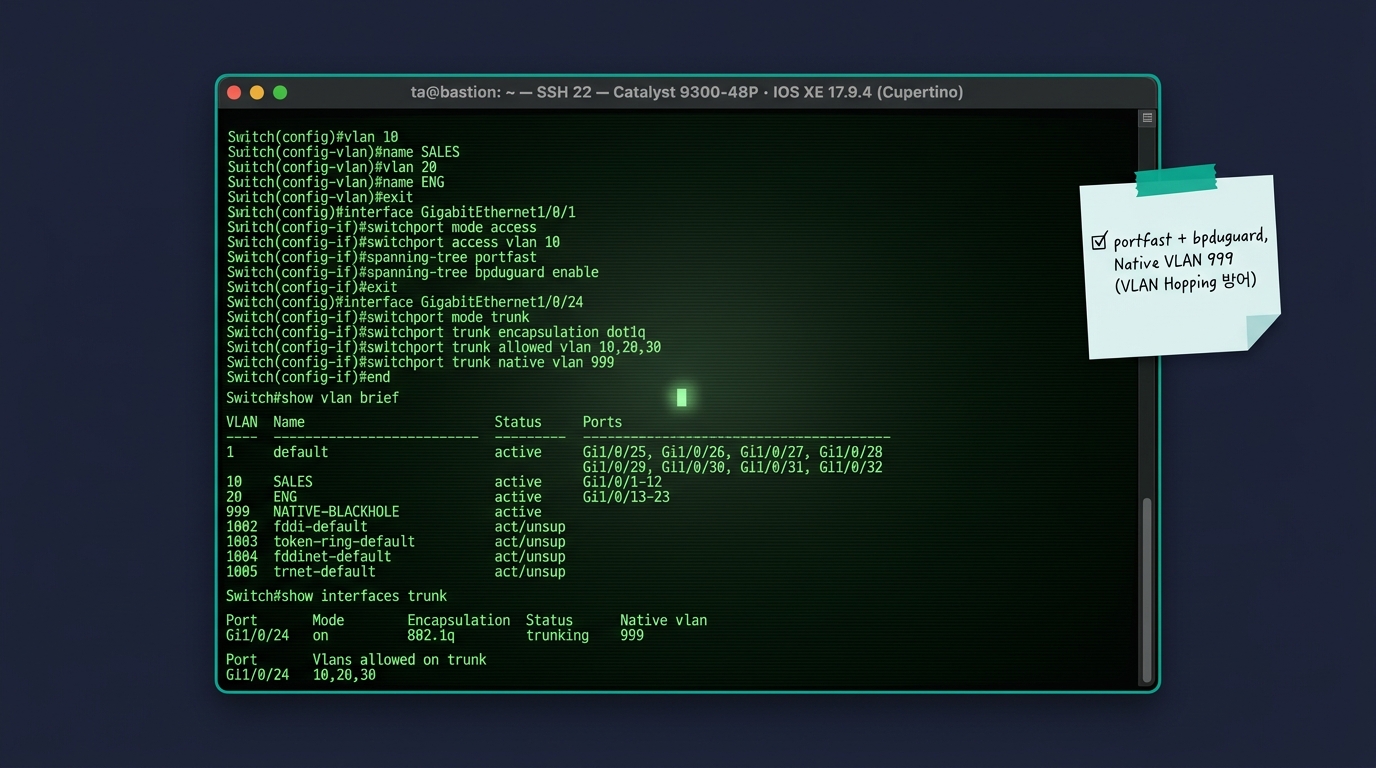
Cisco IOS CLI — VLAN·Trunk 실제 명령
L2 보안 — Port Security · DHCP Snooping · DAI
🔒 Port Security
- 포트당 허용 MAC 수 제한 (보통 1~2)
- 위반 시 Shutdown / Restrict / Protect
- 무단 SW 연결 차단
- Sticky MAC = 자동 학습 후 저장
🛡️ DHCP Snooping
- 신뢰(Trusted) = 진짜 DHCP 서버 포트만
- 그 외 포트는 DHCP Server 응답 차단
- 악성 DHCP 공격 방어
- 바인딩 테이블 (MAC-IP-포트-VLAN) 생성
🔎 Dynamic ARP Inspection (DAI)
- DHCP Snooping 바인딩 테이블 기반
- 위조 ARP 차단 → ARP Spoofing 방어
- MITM 방지
🚫 IP Source Guard
- DHCP Snooping 바인딩과 다른 Src IP 차단
- IP Spoofing 방어
🌪️ Storm Control
- 브로드캐스트/멀티캐스트/유니캐스트 폭주 임계 초과 시 차단
- L2 폭풍 방어
🚪 802.1X (Port-Based Auth)
- 단말 인증 후 포트 개방
- RADIUS 서버 + EAP
- NAC의 기반
🎯 Private VLAN
- 같은 VLAN 내 단말 간 격리
- Isolated·Community·Promiscuous
- 호스팅·DMZ에 유용
⚙️ MACsec (802.1AE)
- L2 암호화 (AES-GCM)
- 스위치 간 또는 호스트↔SW 암호화
- 군·금융 일부 도입
PART E
L3 네트워크 — IP · CIDR · 라우팅의 세계
L3는 다른 네트워크를 잇는 약속. TA의 가장 큰 설계 결정이 여기 모인다.
IPv4 패킷 헤더 — 20 bytes
 0                   1                   2                   3
 0 1 2 3 4 5 6 7 8 9 0 1 2 3 4 5 6 7 8 9 0 1 2 3 4 5 6 7 8 9 0 1
+-+-+-+-+-+-+-+-+-+-+-+-+-+-+-+-+-+-+-+-+-+-+-+-+-+-+-+-+-+-+-+-+
|Ver|IHL|   ToS   |          Total Length                       |
+-+-+-+-+-+-+-+-+-+-+-+-+-+-+-+-+-+-+-+-+-+-+-+-+-+-+-+-+-+-+-+-+
|         Identification        |Flags|     Fragment Offset     |
+-+-+-+-+-+-+-+-+-+-+-+-+-+-+-+-+-+-+-+-+-+-+-+-+-+-+-+-+-+-+-+-+
|     TTL       |    Protocol   |          Header Checksum      |
+-+-+-+-+-+-+-+-+-+-+-+-+-+-+-+-+-+-+-+-+-+-+-+-+-+-+-+-+-+-+-+-+
|                       Source IP Address                       |
+-+-+-+-+-+-+-+-+-+-+-+-+-+-+-+-+-+-+-+-+-+-+-+-+-+-+-+-+-+-+-+-+
|                    Destination IP Address                     |
+-+-+-+-+-+-+-+-+-+-+-+-+-+-+-+-+-+-+-+-+-+-+-+-+-+-+-+-+-+-+-+-+
|                    Options (optional)                          |
+-+-+-+-+-+-+-+-+-+-+-+-+-+-+-+-+-+-+-+-+-+-+-+-+-+-+-+-+-+-+-+-+
| 필드 | 의미 |
|---|---|
| Version | 4 또는 6 |
| TTL | 라우터 통과 시 -1, 0이면 폐기 (Loop 방지) |
| Protocol | 상위 프로토콜 (1=ICMP, 6=TCP, 17=UDP, 47=GRE, 50=ESP) |
| Src/Dst IP | 발신·목적지 IP (각 4 bytes = 32bit) |
| Total Length | 최대 65535 |
IPv4 — 클래스풀 → CIDR / VLSM
옛 클래스풀 (참고)
| 클래스 | 범위 | 기본 마스크 | 호스트 수 |
|---|---|---|---|
| A | 0.0.0.0 ~ 127.255.255.255 | /8 | 16,777,214 |
| B | 128.0.0.0 ~ 191.255.255.255 | /16 | 65,534 |
| C | 192.0.0.0 ~ 223.255.255.255 | /24 | 254 |
| D | 224.0.0.0 ~ 239.255.255.255 | — | 멀티캐스트 |
| E | 240.0.0.0 ~ 255.255.255.255 | — | 예약/실험 |
현재 = CIDR (Classless Inter-Domain Routing)
- 마스크를 /8 ~ /32 자유롭게 사용
- 예:
10.0.0.0/22= 4개 /24 = 1024 IP
VLSM (Variable Length Subnet Mask)
- 같은 큰 블록 안에서 서브넷마다 다른 크기
- 효율적 IP 분배 —
/24·/26·/30혼합 가능
사설 IP + 특수 주소 — RFC 1918 외
| 대역 | 표기 | 호스트 수 | 용도 |
|---|---|---|---|
| 10.0.0.0/8 | 10.0.0.0 ~ 10.255.255.255 | 16,777,216 | 대규모 사설 |
| 172.16.0.0/12 | 172.16.0.0 ~ 172.31.255.255 | 1,048,576 | 중규모 사설 |
| 192.168.0.0/16 | 192.168.0.0 ~ 192.168.255.255 | 65,536 | 소규모·가정 |
| 100.64.0.0/10 | CGNAT 전용 | 4,194,304 | 통신사 CGNAT |
| 169.254.0.0/16 | Link-Local (APIPA) | — | DHCP 실패 시 |
| 127.0.0.0/8 | Loopback | — | 자기 자신 |
| 224.0.0.0/4 | Multicast | — | D 클래스 |
| 255.255.255.255 | Broadcast | — | 한정 브로드캐스트 |
특수 주소 예시
| 주소 | 의미 |
|---|---|
| 0.0.0.0 | Default Route, "모든 IP" |
| 127.0.0.1 | localhost |
| 169.254.169.254 | (클라우드) 메타데이터 서비스 |
| 224.0.0.5 | OSPF AllSPFRouters |
| 224.0.0.18 | VRRP |
서브넷 계산 — 분할 · 집약
표기 변환
| CIDR | 서브넷 마스크 | 호스트 (가용) | 예시 |
|---|---|---|---|
| /24 | 255.255.255.0 | 254 | 192.168.1.0/24 |
| /25 | 255.255.255.128 | 126 | /24 → 2개 분할 |
| /26 | 255.255.255.192 | 62 | /24 → 4개 |
| /27 | 255.255.255.224 | 30 | /24 → 8개 |
| /28 | 255.255.255.240 | 14 | DMZ 소규모 |
| /29 | 255.255.255.248 | 6 | P2P 링크 |
| /30 | 255.255.255.252 | 2 | P2P 라우터 간 |
| /31 | 255.255.255.254 | 2 | P2P (RFC 3021) |
| /32 | 255.255.255.255 | 1 | Loopback·VIP |
분할 예시
10.0.0.0/22 (1024 IP) → 4개 /24
  10.0.0.0/24
  10.0.1.0/24
  10.0.2.0/24
  10.0.3.0/24

10.0.0.0/24 → 4개 /26
  10.0.0.0/26   (0~63)
  10.0.0.64/26  (64~127)
  10.0.0.128/26 (128~191)
  10.0.0.192/26 (192~255)
라우팅 기본 — Static vs Dynamic · 라우팅 테이블
🚦 Static Routing
- 운영자가 수동으로 경로 입력
- 변경 없는 소규모·DMZ·Default Route
- 장점: 단순, 예측 가능, 보안적
- 단점: 확장성 X, 장애 시 수동 변경
🤖 Dynamic Routing
- 라우터끼리 자동으로 경로 교환
- 대규모·다중 사이트
- 장점: 자동 우회, 확장
- 단점: 복잡, CPU 사용, 잘못된 설정 = 광역 사고
📋 Routing Table 구성
Destination  Next Hop      Interface  Metric  Protocol
10.0.0.0/24  Connected     eth0       0       Direct
10.0.1.0/24  10.0.0.254    eth0       1       Static
172.16.0.0/16 10.0.0.254   eth0       110     OSPF
0.0.0.0/0    10.0.0.254    eth0       1       Static (Default)
🏆 Longest Prefix Match
- 가장 긴 prefix(좁은 범위) 가 우선
/24가/16보다 우선- Default
0.0.0.0/0은 최후의 선택
라우팅 프로토콜 — Distance Vector vs Link State
| 분류 | 동작 원리 | 대표 | 현장 위상 |
|---|---|---|---|
| Distance Vector | 이웃에 자기 라우팅 테이블을 통째로 보냄, 홉 수 기반 | RIP | 소규모·교육용 (운영 거의 안 함) |
| Link State ⭐ | 전체 토폴로지 DB 공유, SPF (Dijkstra) 계산 | OSPF · IS-IS | 사실상 IGP 표준 |
IGP vs EGP
| 분류 | 범위 | 대표 |
|---|---|---|
| IGP (Interior) | AS 내부 — 사내·캠퍼스 | OSPF · IS-IS (Link State 2종) |
| EGP (Exterior) | AS 간 — ISP 간 라우팅 | BGP-4 (Path Vector, 사실상 유일) |
Administrative Distance (Cisco 기준)
| 프로토콜 | AD | 비고 |
|---|---|---|
| Connected | 0 | 직접 연결 |
| Static | 1 | 수동 |
| eBGP | 20 | AS 간 외부 광고 |
| OSPF | 110 | IGP 1순위 |
| IS-IS | 115 | ISP·통신사 |
| iBGP | 200 | AS 내부 동기화 |
OSPF — Open Shortest Path First (RFC 2328)
🎯 OSPF 특징
- Link State 알고리즘
- 전체 토폴로지 DB 공유 → 각자 SPF (Dijkstra) 계산
- 빠른 수렴 (수초)
- VLSM·CIDR 완벽 지원
- 인증 (MD5·SHA)
- AS 내부 표준 (IGP)
📦 패킷 종류
- Hello — 이웃 발견·유지
- DBD (DB Description) — DB 요약
- LSR (Link State Request)
- LSU (Link State Update) — LSA 운반
- LSAck — ACK
🏘️ Area 구조
- Area 0 (Backbone) — 모든 Area 가 연결되어야 함
- Area 1, 2, ... — Non-Backbone
- ABR (Area Border Router) — Area 간 경계
- ASBR (Autonomous System Border Router) — 외부 AS 연결
📜 LSA Type
| Type | 이름 | 광고 범위 |
|---|---|---|
| 1 | Router LSA | Area 내 |
| 2 | Network LSA | Area 내 |
| 3 | Summary LSA | Area 간 |
| 4 | ASBR Summary | Area 간 |
| 5 | External LSA | AS 전체 |
| 7 | NSSA External | NSSA Area |
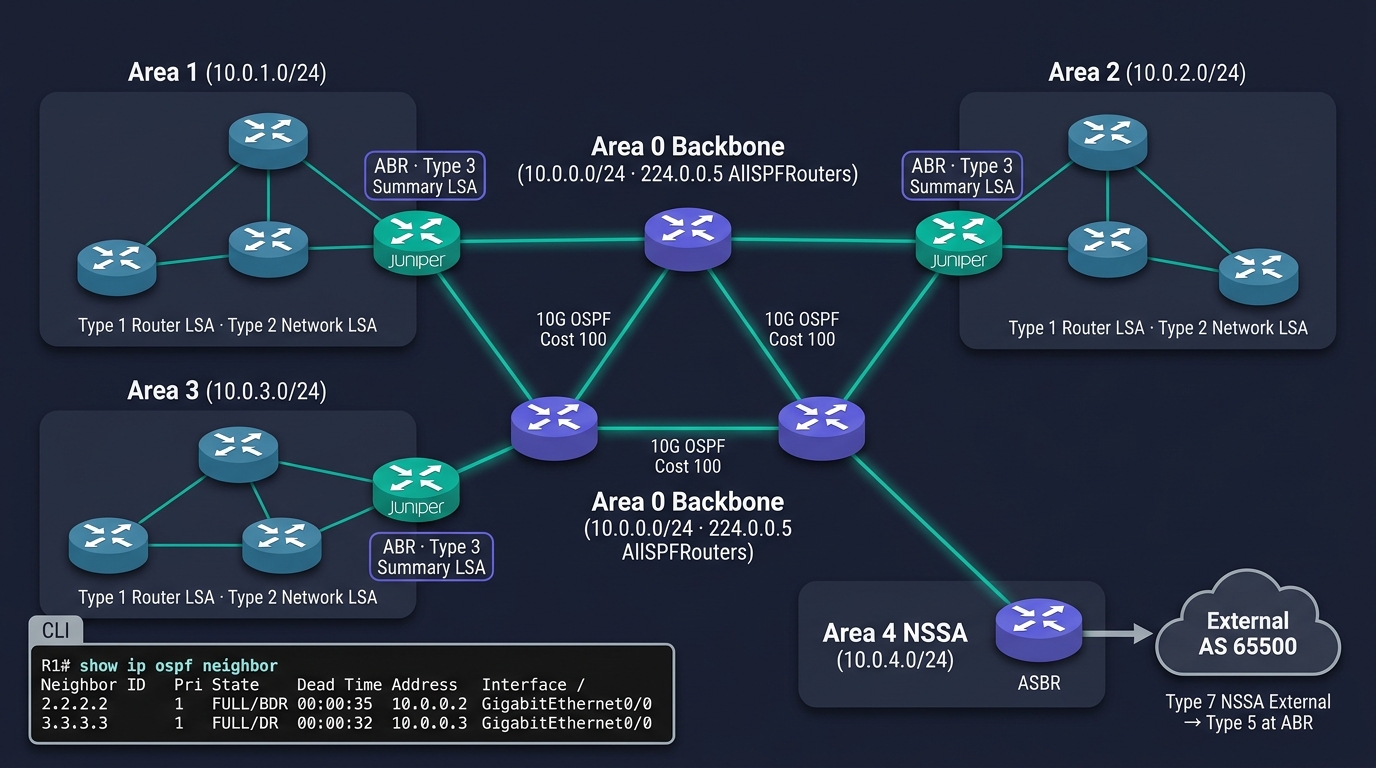
OSPF Area 다이어그램 (삽화)
OSPF·BGP 콘솔 — Cisco IOS 실제 명령
! ────────── OSPF 설정 (Area 0 Backbone) ──────────
R1# configure terminal
R1(config)# router ospf 1
R1(config-router)#  router-id 1.1.1.1
R1(config-router)#  network 10.0.0.0  0.0.0.255  area 0
R1(config-router)#  network 10.0.1.0  0.0.0.255  area 0
R1(config-router)#  passive-interface default
R1(config-router)#  no passive-interface GigabitEthernet0/0
R1(config-router)#  auto-cost reference-bandwidth 100000
R1(config-router)# exit

! 확인
R1# show ip ospf neighbor
R1# show ip ospf interface brief
R1# show ip route ospf

! ────────── BGP 설정 (eBGP + iBGP) ──────────
R1(config)# router bgp 65001
R1(config-router)#  bgp router-id 1.1.1.1
R1(config-router)#  neighbor 1.1.1.2  remote-as 65002      ! eBGP (KT)
R1(config-router)#  neighbor 1.1.1.2  description "KT-Edge"
R1(config-router)#  neighbor 10.0.0.2 remote-as 65001      ! iBGP
R1(config-router)#  neighbor 10.0.0.2 update-source Loopback0
R1(config-router)#  addres6-family ipv4 unicast
R1(config-router-af)#   network 203.0.113.0 mask 255.255.255.0
R1(config-router-af)#   neighbor 1.1.1.2  route-map IN-FROM-KT in
R1(config-router-af)#   neighbor 1.1.1.2  route-map OUT-TO-KT  out
R1(config-router-af)#   maximum-paths 4                    ! ECMP
R1(config-router-af)# end

! 확인
R1# show ip bgp summary
R1# show ip bgp neighbors 1.1.1.2 advertised-routes
R1# show ip bgp 0.0.0.0/0
R1# show ip route bgp
🎨 이미지 프롬프트: "Editorial terminal mockup on dark navy background — a wide green-on-black tmux/iTerm window split vertically with a Cisco IOS XR prompt 'RP/0/RSP0/CPU0:R1(config-router)#'; LEFT pane shows OSPFv2/v3 configuration on R1 ('router ospf 1 / router-id 1.1.1.1 / network 10.0.0.0 0.0.0.255 area 0 / passive-interface default / no passive-interface GigabitEthernet0/0/0 / auto-cost reference-bandwidth 100000') with syntax-highlighted keywords; RIGHT pane shows BGP-4 + MP-BGP configuration ('router bgp 65001 / bgp router-id 1.1.1.1 / neighbor 1.1.1.2 remote-as 4766 description \"KT-EDGE\" / neighbor 10.0.0.2 remote-as 65001 update-source Loopback0 / addres6-family ipv4 unicast / network 203.0.113.0/24 / maximum-paths 4'). At the bottom a stacked output:
R1# show ip ospf neighbortable with rows 'Neighbor ID Pri State Dead Time Address Interface / 2.2.2.2 1 FULL/BDR 00:00:35 10.0.0.2 Gi0/0/0', andR1# show ip bgp summarytable with rows 'Neighbor V AS MsgRcvd MsgSent TblVer InQ OutQ Up/Down State/PfxRcd / 1.1.1.2 4 4766 1842 1851 47 0 0 02:14:01 Established 943125 / 10.0.0.2 4 65001 412 415 47 0 0 01:08:33 Established 27'. A small bottom-right inset showsR1# show ip route bgpsummary 'B* 0.0.0.0/0 [20/0] via 1.1.1.2 (eBGP)'. Subtle scanlines, monospaced font, header bar 'ta@bastion → R1 — SSH 22 — Cisco ASR 9000 · IOS XR 7.10.2' (no vendor logo). Teal #00b894 frame accents, 16:9"
TA 팁: network 구문은 OSPF에서 광고 인터페이스 선택 (Wildcard Mask), BGP에서 광고할 prefix 지정 (Subnet Mask). 두 문법이 의미가 다름을 주의.
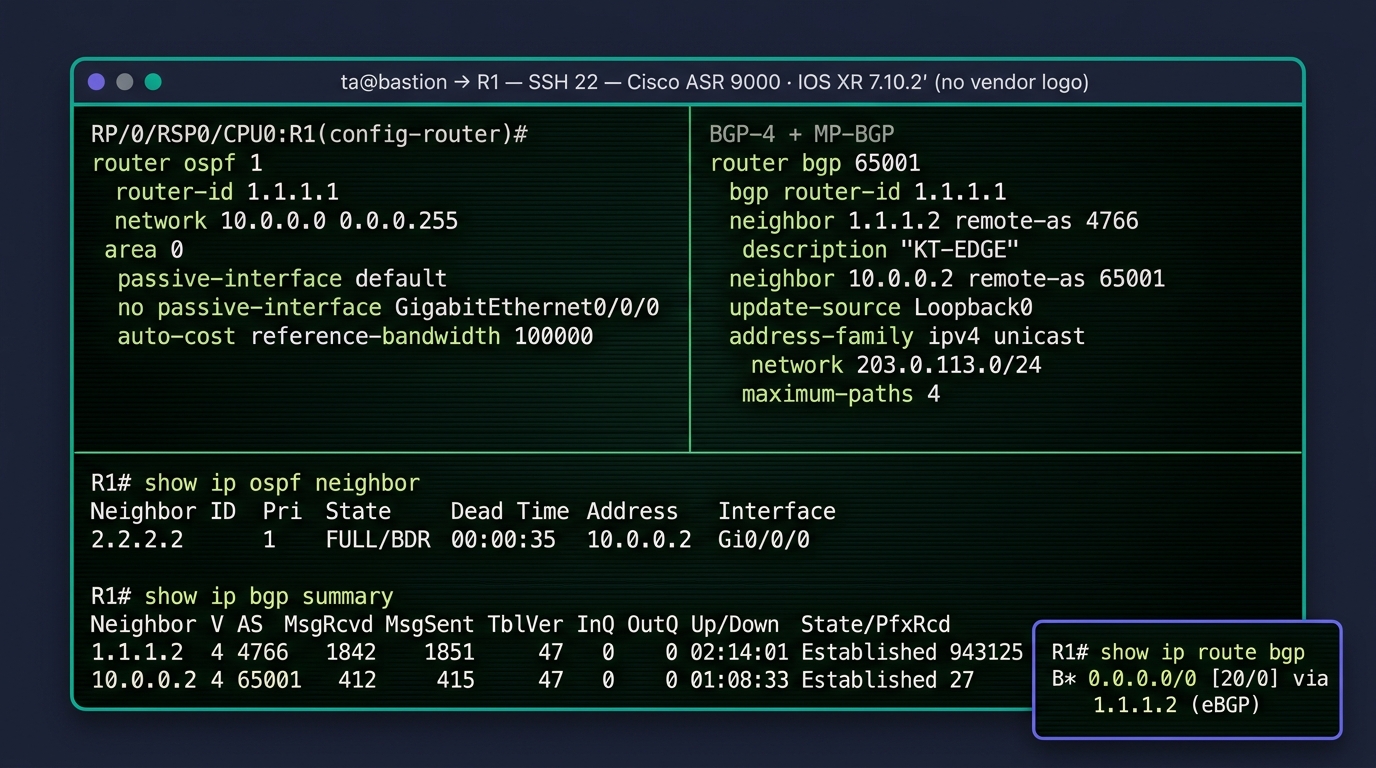
OSPF·BGP 콘솔 — Cisco IOS 실제 명령
BGP — Border Gateway Protocol (RFC 4271)
🌐 BGP 정체
- 인터넷을 잇는 사실상 유일한 EGP
- Path Vector — 목적지까지의 AS 경로 전체 광고
- TCP 179 포트 사용 (UDP X)
- 신뢰성·정책 기반
- 빠른 수렴 X, 안정성과 정책 우선
🏷️ AS (Autonomous System)
- 통일된 라우팅 정책 도메인
- AS 번호 16bit (~65535) / 32bit (확장)
- 사설 AS = 64512~65534
- 예: KT=4766, SKT=9318, AWS=16509, Cloudflare=13335
🤝 iBGP vs eBGP
| 구분 | iBGP | eBGP |
|---|---|---|
| 대상 | 같은 AS 내 | 다른 AS 간 |
| TTL | 보통 multi-hop 사용 | 기본 1 (인접) |
| 광고 정책 | iBGP 받은 건 iBGP에 재광고 X | 자유 |
| Full Mesh | 필요 → Route Reflector | — |
🪞 Route Reflector·Confederation
- RR — iBGP Full Mesh 회피, Reflector가 대신 광고
- Confederation — AS 내부를 작은 sub-AS로 분할
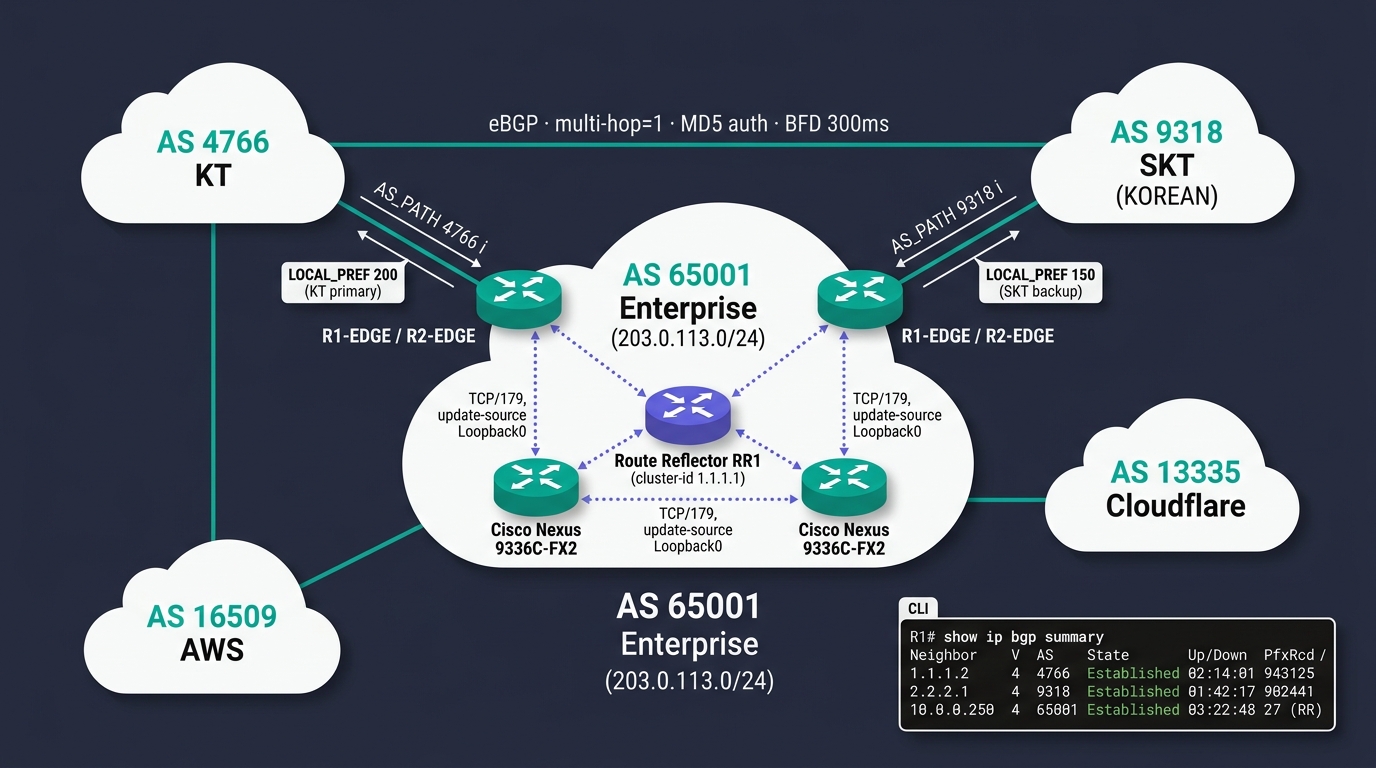
BGP AS 토폴로지 (삽화)
ECMP · PBR — 경로 다중화·정책 라우팅
🔀 ECMP (Equal-Cost Multi-Path)
- 동일 메트릭 경로 여러 개를 동시에 사용
- L3 로드밸런싱
- OSPF·BGP·EIGRP 모두 지원
- 해시 기반 — Src/Dst IP·Port (Per-Flow)
- Spine-Leaf의 핵심 (Leaf↔Spine 다중 경로)
🎙️ TA의 활용
- Active-Active 대역 확장
- 한 경로 장애 시 즉시 우회
- 64개 경로까지 일반적 (벤더별 상한 다름)
🎛️ PBR (Policy-Based Routing)
- 기본 라우팅 테이블을 무시하고 정책으로 경로 결정
- 기준: 출발지 IP·포트·DSCP·시간·VLAN 등
- 예: 백업 트래픽은 별도 회선으로
⚠️ PBR 주의
- CPU 부하 ↑ (ASIC 지원 안 되면 느림)
- 운영 복잡, 도면화 어려움
- 꼭 필요한 곳에만 적용
🚦 VRF·MPLS와의 연결
- L3 다중 테넌트 분리는 VRF·MPLS L3VPN 으로 확장 가능
라우팅 결정 매트릭스 — 언제 무엇을 쓸 것인가
| 규모·환경 | 권고 프로토콜 | 이유 |
|---|---|---|
| 지점 1~3개, 변경 없음 | Static | 단순·안정·예측 가능 |
| 단일 캠퍼스 (소규모) | OSPF Single Area | 자동 수렴·표준 |
| 다중 캠퍼스 | OSPF Multi-Area | 확장성·요약·트래픽 격리 |
| Cisco 100% 환경 (중소) | EIGRP | 빠른 수렴·운영 편의 |
| ISP·통신사 백본 | IS-IS | 안정성·확장성 |
| 인터넷 연결·멀티홈 | BGP (eBGP) | 유일한 EGP |
| DC 내부 (Spine-Leaf) | BGP (iBGP/eBGP unnumbered) | Cumulus·SONiC·EVPN 표준 |
| 클라우드 VPC↔온프레미스 | BGP over IPSec/Direct Connect | 표준 연결 |
| WAN 광역 (지점↔본사) | MPLS L3VPN (BGP) 또는 SD-WAN | 통신사 의존도에 따라 |
현장 메모: 데이터센터 내부 라우팅도 BGP 로 통일하는 흐름이 강해지고 있음 (RFC 7938 BGP in DC). EVPN-VXLAN의 컨트롤 플레인도 MP-BGP.
PART F
L4 전송 — TCP · UDP · QUIC
신뢰의 약속(TCP)과 속도의 선택(UDP), 그리고 차세대(QUIC).
TCP · UDP — 두 가지 전송 약속
| 항목 | TCP | UDP |
|---|---|---|
| 연결 | Connection-Oriented | Connectionless |
| 신뢰성 | 보장 (재전송·Ack) | X |
| 순서 보장 | ⭕ | X |
| 흐름 제어 | ⭕ | X |
| 혼잡 제어 | ⭕ | X |
| 헤더 크기 | 20 B+ | 8 B |
| 속도 | 느림 | 빠름 |
| 용도 | HTTP·SSH·DB·메일 | DNS·DHCP·VoIP·게임·스트리밍 |
현장 결정 기준: 데이터 손실이 치명적 = TCP, 일부 손실 허용·실시간 = UDP.
TCP 3-Way Handshake — 연결 수립
📜 단계 설명
| # | 방향 | 플래그 | 의미 |
|---|---|---|---|
| 1 | Client → Server | SYN (Seq=x) | "연결 요청" |
| 2 | Server → Client | SYN+ACK (Seq=y, Ack=x+1) | "수락" |
| 3 | Client → Server | ACK (Seq=x+1, Ack=y+1) | "시작" |
3단계 완료 후 ESTABLISHED — 데이터 송수신 가능.
⚠️ SYN Flood 공격
- 1단계 SYN 만 대량 송신, 3단계 ACK 안 보냄
- 서버 백로그 큐 고갈로 정상 연결 거부
- 대응: SYN Cookies, Anti-DDoS, 방화벽 SYN Proxy
🔑 외움 포인트
- "악수 3번 = 연결 시작"
- Seq·Ack 번호는 +1씩 증가 (페이로드 없는 제어 패킷)
TCP 3-Way Handshake — Sequence Diagram (시간 흐름)
그림 읽는 법 — 위에서 아래로 시간이 흐른다. 화살표는 패킷 방향, 괄호 안은 Seq/Ack 번호. 3번째 ACK가 도착하는 순간 양쪽이 동시에 ESTABLISHED 상태로 진입한다.
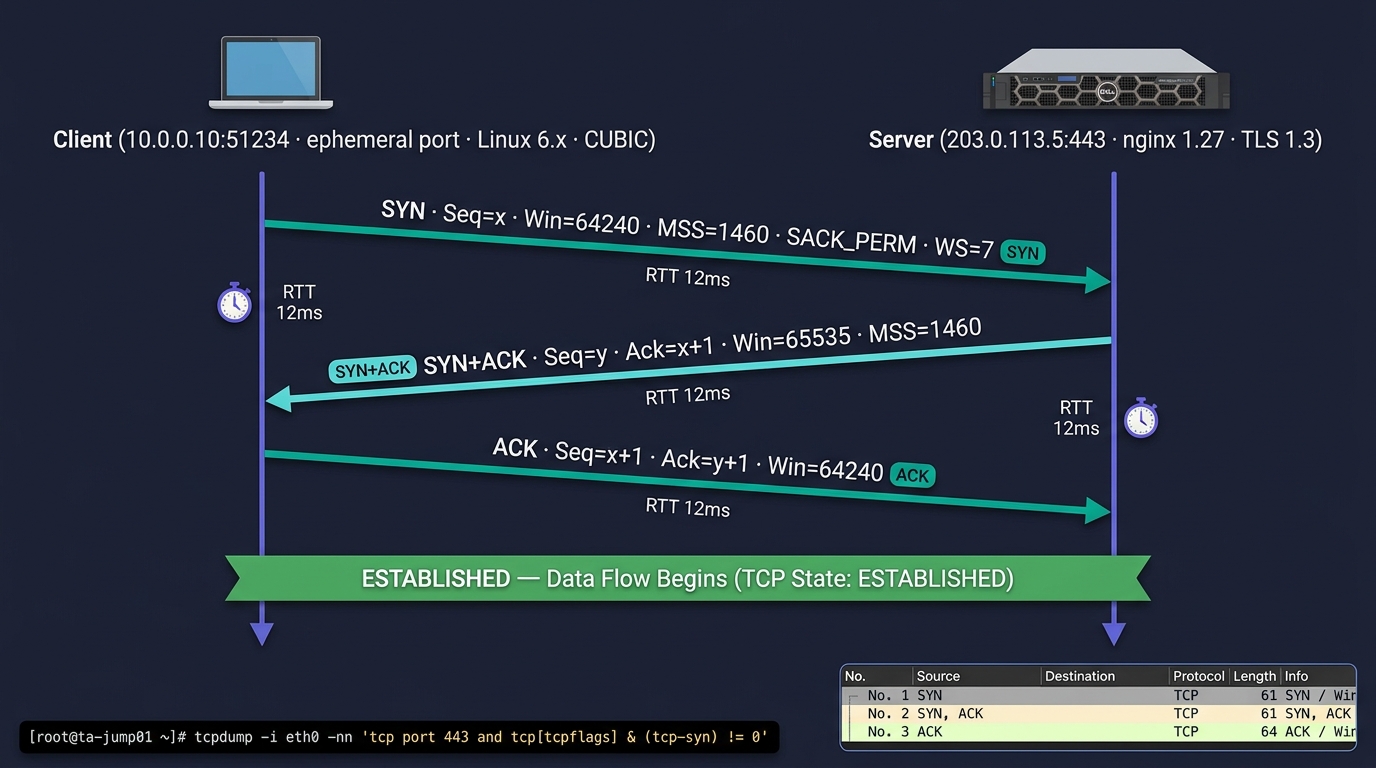
TCP 3-Way Handshake (삽화)
TCP 4-Way Termination — 연결 종료
| 단계 | 동작 |
|---|---|
| 1 | Client → FIN (종료 요청) |
| 2 | Server → ACK (잘 받음, 처리 마저) |
| 3 | Server → FIN (이제 나도 종료) |
| 4 | Client → ACK + TIME_WAIT 대기 |
TIME_WAIT 의 함정 — 짧은 연결을 대량 발생시키면 클라이언트 측 TIME_WAIT가 쌓여 포트 고갈 발생. 대응: Connection Pool·Keep-Alive·tcp_tw_reuse.
Sliding Window · Congestion Control
🪟 Sliding Window
- 송신측이 Ack 없이 보낼 수 있는 최대 바이트 = Window Size
- 수신측이 Ack에 다음 Window 크기 알림 → Flow Control
- BDP (Bandwidth-Delay Product) 기반 튜닝
- 큰 RTT × 큰 BW = 윈도우 키워야 처리량 ↑ (
tcp_window_scaling)
📈 Congestion Window (cwnd)
- 네트워크 혼잡에 따라 동적 조정
- 송신 가능 = min(rwnd, cwnd)
🚦 혼잡 제어 알고리즘
| 알고리즘 | 등장 | 동작 |
|---|---|---|
| Tahoe / Reno | 1988~ | Slow Start + AIMD |
| NewReno | 1996 | Fast Recovery 개선 |
| CUBIC | 2008 | Linux 기본 (3차 함수) |
| BBR | 2016 | Google 개발, 대역폭·RTT 기반 |
| BBRv3 | 2023 | YouTube·QUIC 표준 |
🎙️ TA의 활용
- 장거리·고대역 = BBR 권고
- 단거리 LAN = CUBIC 충분
sysctl net.ipv4.tcp_congestion_control
UDP — 비연결·저지연 표준
🎯 UDP 헤더 (8 bytes)
[ Src Port | Dst Port | Length | Checksum ]
   2 B       2 B        2 B      2 B
📋 UDP 대표 용도
- DNS (53) — 짧은 질의·응답
- DHCP (67/68) — 부팅 시
- NTP (123) — 시간 동기화
- SNMP (161/162) — 모니터링
- Syslog (514) — 로그
- RADIUS (1812/1813)
- VoIP / RTP (실시간 음성·영상)
- 온라인 게임
- VPN (IPSec ESP / WireGuard)
🎙️ TA의 운영 포인트
- DNS UDP 응답 > 512B = TCP fallback (DNSSEC·큰 응답)
- VoIP는 패킷 손실보단 지터(Jitter) 가 더 치명적 → QoS 최우선
- UDP Flood 공격 다수 → 방화벽 Rate Limit
- 일부 LB는 UDP를 잘 처리 못 함 (UDP 5-tuple 세션 분배)
🎮 QUIC = UDP 위의 신뢰성
- HTTP/3의 기반
- TCP의 신뢰성 + UDP의 자유
- 0-RTT 핸드셰이크
- 다음 슬라이드 참고
QUIC — Quick UDP Internet Connections (RFC 9000)
🚀 QUIC 특징
- UDP 위에서 동작 (포트 443)
- 자체적으로 신뢰성·재전송·암호화 (TLS 1.3 내장)
- HTTP/3의 전송 계층
- Google 개발 (2012) → IETF 표준 (2021)
- 0-RTT / 1-RTT 핸드셰이크 (TCP+TLS는 2-3 RTT)
- HoL (Head-of-Line) Blocking 없음 — 스트림 독립
- 연결 마이그레이션 (Wi-Fi↔셀룰러 절체 시 연결 유지)
🎙️ TA의 고려
- 방화벽이 UDP 443 차단하면 HTTP/3 불가 → HTTP/2로 폴백
- L4 LB는 UDP 5-tuple 분배 잘 안 맞을 수 있음
- CDN 표준 트래픽 점유율 30%+ (2026)
- 운영자가 직접 만질 일은 적으나, 알아두면 트러블슈팅에 유리
🔮 차세대
- HTTP/3 (RFC 9114) = QUIC + HTTP 의미론
- MASQUE — QUIC 위의 프록시 (CONNECT-UDP)
포트 분류 — Well-Known · Registered · Dynamic
| 분류 | 범위 | 용도 |
|---|---|---|
| Well-Known | 0~1023 | OS·root 권한 필요, 표준 서비스 |
| Registered | 1024~49151 | IANA 등록 응용 |
| Dynamic / Ephemeral | 49152~65535 | 클라이언트 임시 (Linux는 32768~60999) |
자주 보는 포트 (Well-Known + 운영)
| 포트 | 프로토콜 | 서비스 |
|---|---|---|
| 20/21 | TCP | FTP (Data / Control) |
| 22 | TCP | SSH |
| 23 | TCP | Telnet (사용 금지) |
| 25 | TCP | SMTP |
| 53 | TCP/UDP | DNS |
| 67/68 | UDP | DHCP (Server/Client) |
| 80 | TCP | HTTP |
| 110 | TCP | POP3 |
| 123 | UDP | NTP |
| 143 | TCP | IMAP |
| 161/162 | UDP | SNMP / SNMP Trap |
| 389/636 | TCP | LDAP / LDAPS |
| 포트 | 프로토콜 | 서비스 |
|---|---|---|
| 443 | TCP/UDP | HTTPS / HTTP/3 |
| 445 | TCP | SMB |
| 514 | UDP | Syslog |
| 587 | TCP | SMTP Submission |
| 993 | TCP | IMAPS |
| 1433 | TCP | MS SQL |
| 1521 | TCP | Oracle DB |
| 3306 | TCP | MySQL |
| 3389 | TCP | RDP |
| 5432 | TCP | PostgreSQL |
| 5900 | TCP | VNC |
| 8080 | TCP | HTTP Alt |
PART G
L5~L7 응용 프로토콜 — DNS · HTTP · TLS · 그 외
사용자가 직접 만나는 모든 서비스는 여기서 산다.
DNS — Domain Name System (RFC 1034/1035)
🌳 DNS 계층
- Root (
.) — 13개 글로벌 서버군 - TLD —
.com·.kr·.org·.net·.gov... - 2LD —
naver.com·google.co.kr - Sub —
mail.naver.com
🛡️ DNS 서버 역할
| 역할 | 설명 |
|---|---|
| Authoritative | 특정 도메인의 정답 서버 |
| Recursive Resolver | 사용자 대신 끝까지 질의 (보통 ISP·8.8.8.8·1.1.1.1) |
| Forwarder | 사내 → 외부 DNS로 위임 |
| Caching | 응답 임시 저장 (TTL) |
📜 주요 레코드 타입
| Type | 용도 |
|---|---|
| A | 호스트명 → IPv4 |
| AAAA | 호스트명 → IPv6 |
| CNAME | 별칭 (다른 이름으로 redirect) |
| MX | 메일 서버 (Priority) |
| TXT | 임의 텍스트 (SPF·DKIM·도메인 인증) |
| SRV | 서비스 위치 (예: _ldap._tcp.example.com) |
| NS | 권한 네임서버 |
| PTR | 역방향 (IP → 이름) |
| SOA | Zone 메타 정보 |
| CAA | 발급 가능한 CA 제한 |
🎙️ TA의 운영
- TTL 관리 (전환 직전 짧게 설정)
- 사내 / 외부 DNS 분리 (Split-Horizon)
- DNSSEC·DoH·DoT 도입 검토
DHCP — Relay + Option (DORA 개요)
🔁 DORA 4단계 요약
| # | 단계 | 패킷 |
|---|---|---|
| 1 | Discover | 클라이언트 브로드캐스트 — "IP 줘" |
| 2 | Offer | 서버 → 클라이언트 — "이 IP 어때?" |
| 3 | Request | 클라이언트 → 서버 — "그걸로 줘" |
| 4 | ACK | 서버 확정 + 옵션 전달 |
🔁 DHCP Relay
- 클라이언트는 브로드캐스트로 DHCP 검색
- 라우터는 브로드캐스트를 건너뜀
- → DHCP Relay (IP Helper) 가 다른 서브넷의 DHCP 서버로 유니캐스트 전달
- L3 SW·라우터에
ip helper-address X.X.X.X
📦 DHCP Options
| Option | 용도 |
|---|---|
| 3 | Default Gateway |
| 6 | DNS Server |
| 15 | Domain Name |
| 42 | NTP Server |
| 43 | 벤더 옵션 (AP·IP폰 컨트롤러 IP) |
| 60 | 벤더 클래스 식별 |
| 66/67 | PXE 부팅 서버·파일 |
| 82 | Relay Agent 정보 (위치·포트) |
⚠️ 보안
- DHCP Snooping 으로 악성 DHCP 차단
- IP Source Guard 결합
DHCP DORA — 시간 흐름
그림 읽는 법 — Discover·Request는 브로드캐스트(클라이언트 IP 미보유 단계), Offer·ACK는 유니캐스트. 4번째 ACK 수신 즉시 클라이언트는 받은 IP·게이트웨이·DNS·기타 Option(43·82 등)을 적용한다.
HTTP — 1.1 · 2 · 3 진화
| 항목 | HTTP/1.1 | HTTP/2 | HTTP/3 |
|---|---|---|---|
| 연도 | 1997 | 2015 | 2022 |
| 전송 계층 | TCP | TCP + TLS | UDP (QUIC) |
| 다중화 | X (Pipelining 불완전) | ⭕ (Stream) | ⭕ (Stream) |
| 헤더 압축 | X | HPACK | QPACK |
| HoL Blocking | 있음 | TCP 레벨에 있음 | 없음 |
| 암호화 | 옵션 | 사실상 필수 (HTTPS) | 필수 (TLS 1.3 내장) |
| Server Push | X | ⭕ (사실상 사용 X) | (HTTP/3 X) |
| 포트 | 80 / 443 | 443 | 443 (UDP) |
🚀 HTTP/2 핵심
- 바이너리 프로토콜
- Stream 다중화 (한 TCP 연결에 여러 요청)
- 헤더 압축으로 모바일 성능 ↑
🚀 HTTP/3 핵심
- QUIC 기반 → 0-RTT 재연결
- 모바일 환경 절체에 강함
- 방화벽 UDP 443 차단 주의
HTTPS / TLS — 1.2 vs 1.3 핸드셰이크
TLS 1.2 — 2-RTT 핸드셰이크
| 순서 | 방향 | 메시지 | 내용 |
|---|---|---|---|
| 1 | Client → Server | ClientHello | 지원 암호 스위트·랜덤 |
| 2 | Server → Client | ServerHello + 인증서 + Key Exchange | 선택 암호·서버 공개키 |
| 3 | Client → Server | Key Exchange + ChangeCipherSpec + Finished | 프리마스터 키·암호 전환 |
| 4 | Server → Client | ChangeCipherSpec + Finished | 암호 전환 확인 |
| ✅ | C ↔ S | Encrypted Application Data | 본 통신 시작 |
🔐 TLS 1.3 (RFC 8446)
- 1-RTT 핸드셰이크 (TLS 1.2의 절반)
- 0-RTT 재연결 가능 (PSK)
- 구식 약한 암호 제거 (RC4·SHA1·CBC)
- AEAD 암호 스위트만: AES-GCM, ChaCha20-Poly1305
- Perfect Forward Secrecy 필수
⚠️ TLS 운영 함정
- 인증서 만료 알람 — Let's Encrypt 90일·EV 1년
- 약한 암호 비활성 — TLS 1.0/1.1 폐기 (2020+)
- 와일드카드 vs SAN 인증서
- HSTS·HPKP·CT (Certificate Transparency)
- TLS Offload — LB가 복호화, 내부는 평문 (관제 편의 vs 보안)
이메일 — SMTP · POP3 · IMAP
📨 SMTP (송신)
- 포트 25 — Server↔Server
- 포트 587 — Submission (Client→Server, AUTH 필수)
- 포트 465 — SMTPS (TLS implicit)
- 인증·암호화: STARTTLS
🛡️ 메일 보안 3종
- SPF — 허용 발신 IP 목록 (TXT 레코드)
- DKIM — 발신 도메인의 디지털 서명
- DMARC — SPF/DKIM 실패 시 처리 정책
📥 POP3 (수신 — 다운로드)
- 포트 110 (TLS = 995)
- 서버에서 다운로드 후 보통 삭제
- 단말 1대 기준 (모바일 시대에 부적합)
- 단순·가벼움
📨 IMAP (수신 — 서버 보관)
- 포트 143 (TLS = 993)
- 서버에 그대로 보관 → 다중 단말 동기화
- 폴더·플래그 서버 관리
- 현재 표준 (Gmail·M365·Yahoo)
🎙️ TA의 결정
- 사내 메일 = M365·Google Workspace·HCL Domino·메일플러그
- 수신 = IMAPS·POP3S, 송신 = SMTP Submission
- DMARC 정책 (none → quarantine → reject)
파일 전송 — FTP · SFTP · FTPS · NFS · SMB
| 프로토콜 | 포트 | 보안 | 특징 |
|---|---|---|---|
| FTP | 20/21 | 평문 | 구식, 보안 위협 |
| FTPS | 21·990 | TLS | FTP + TLS (Explicit/Implicit) |
| SFTP | 22 (SSH) | SSH | FTP 대체 표준 |
| TFTP | 69 (UDP) | 없음 | 부팅·이미지 전송 |
| SCP | 22 (SSH) | SSH | 단순 복사 |
| rsync | 873 / SSH | SSH | 증분 동기화 |
| NFS v3/v4/v4.1/pNFS | 2049 | Kerberos 옵션 | Linux 파일 공유 표준 |
| SMB / CIFS | 445 | NTLM/Kerberos | Windows 파일 공유 표준 |
| WebDAV | 80/443 (HTTP) | TLS | 웹 기반 |
| S3 API | 443 (HTTP) | TLS | 오브젝트 스토리지 표준 |
현장 표준: 운영자 작업 = SFTP, Linux 파일 공유 = NFS, Windows 파일 공유 = SMB, 오브젝트 = S3 API.
SSH — Secure Shell (RFC 4251)
🔑 SSH 동작
- 포트 22
- 키 교환 (Diffie-Hellman) + 호스트 인증 + 사용자 인증
- 채널 다중화 (한 연결에 여러 세션)
- 흐름: TCP 연결 → 키 교환 → 인증 → 채널
🔐 인증 방식
- Password — 약함, brute force 위험
- PubKey (Key-Based) — 표준
- Certificate-Based — Bastion / CA 서명 키
- MFA (2FA) — Google Authenticator·FIDO2
🚇 포트 포워딩
- Local Forward (-L) — 클라 포트 → 원격 서비스
- Remote Forward (-R) — 원격 포트 → 클라 서비스
- Dynamic (-D) — SOCKS5 프록시
- 운영자가 Bastion → 내부 자원 접근 시 표준
🎙️ TA의 표준
- root 직접 로그인 금지
- 키 기반만 허용 (
PasswordAuthentication no) - Bastion·점프 호스트 도입
- 세션 기록 (Teleport·Strongdm·자체 PAM)
운영 프로토콜 — SNMP · NTP · Syslog · LDAP
📊 SNMP
| 버전 | 보안 | 비고 |
|---|---|---|
| v1 | Community String (평문) | 폐기 |
| v2c | Community String | 여전히 흔함 |
| v3 | 인증 + 암호화 (USM) | 권고 |
- 포트 161 (Get/Set) · 162 (Trap)
- MIB·OID 트리 구조
- NMS (Zabbix·PRTG·SolarWinds) 의 기본
⏰ NTP (Network Time Protocol)
- 포트 123 (UDP)
- Stratum 0 (원자시계) → 1 → 2 → ...
- 모든 보안·감사 로그의 전제
- chrony / ntpd
📜 Syslog
- 포트 514 (UDP) / 6514 (TLS)
- Facility (kern·auth·mail·local0~7)
- Severity (0 Emergency ~ 7 Debug)
- SIEM 입력의 기본 형식
- rsyslog·syslog-ng
📂 LDAP / AD
- 포트 389 (LDAP) / 636 (LDAPS)
- 디렉터리 서비스 — 사용자·그룹·자산
- Active Directory = LDAP + Kerberos + DNS + GPO
- 사내 인증 통합의 표준
- 응용 SSO·이메일·VPN·SSH 인증의 백엔드
PART H
네트워크 장비 — Hub부터 WAF까지
계층별로 살펴본 장비들을 한 번에 정리.
L1·L2 장비 — Hub · Bridge · L2 Switch
🔌 Hub (L1)
- 단순 전기 신호 증폭·재전송
- 모든 포트로 플러딩 = 공유 매체
- 충돌 도메인 1개
- 현재는 박물관 — 사용 X
🔁 Repeater (L1)
- 신호 재생·증폭
- 동선·광 거리 연장
- Media Converter = 동선↔광 변환
🌉 Bridge (L2)
- 초기 L2 분할 장비
- 충돌 도메인 분리
- 현대엔 Switch에 흡수됨
🎚️ L2 Switch
- 포트마다 충돌 도메인 분리
- MAC 학습/플러딩/포워딩
- VLAN·STP·LACP 지원
- 종류:
- Unmanaged — 가정·소규모, 설정 불가
- Managed — 기업용, VLAN·STP 등 모두 가능
- Smart / Lite-Managed — 중간
📚 Stackable Switch
- 여러 대를 하나의 논리 SW로
- 통합 관리·LACP 가능
- Cisco StackWise, Aruba Stack, HPE IRF
🏗️ Modular / Chassis SW
- 라인카드·SF·전원 모듈러
- 데이터센터 코어급
- Cisco Nexus 9500·Catalyst 9600, Juniper QFX·EX, Arista 7500
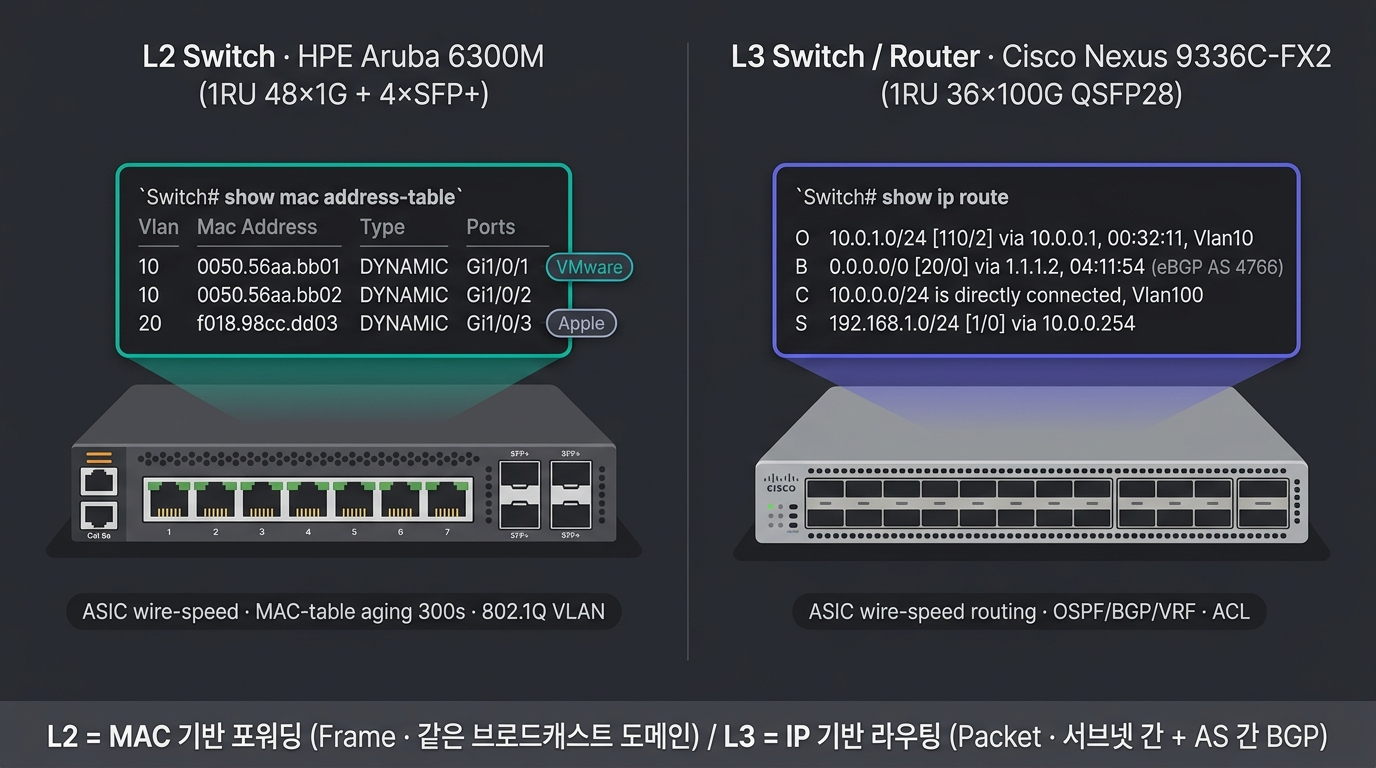
L2 vs L3 스위치 (삽화)
L3 Switch vs Router — 언제 무엇을 쓸 것인가
| 항목 | L3 Switch | Router |
|---|---|---|
| 주 용도 | LAN 내부 VLAN 간 라우팅 | LAN↔WAN, AS↔AS |
| 포트 종류 | 대부분 Ethernet (Cu/Fiber) | Ethernet + Serial + WAN 인터페이스 |
| 포트 밀도 | 24~96+ 포트 | 보통 4~16 포트 |
| 하드웨어 ASIC | 라우팅도 ASIC → 와이어 스피드 | CPU 또는 NPU 처리 (느릴 수 있음) |
| 기능 깊이 | 기본 OSPF/BGP·정책 | 풍부: NAT·VPN·MPLS·QoS·BGP 정책 |
| NAT·VPN·MPLS | 제한적 | 표준 |
| 단가 | 상대적으로 저렴 | 비쌈 |
| 예시 | Cisco Catalyst 9300·9500, Arista 7050 | Cisco ASR·ISR, Juniper MX·SRX |
현장 결정: LAN/DC 내부 라우팅 = L3 Switch, WAN/Edge/복잡한 NAT·VPN = Router. 두 역할이 점차 겹치는 추세 (Universal Routers).
보안 장비 — FW · NGFW · WAF · IPS · VPN · Anti-DDoS
🧱 Firewall · NGFW · UTM
| 종류 | 동작 |
|---|---|
| Stateless FW | 패킷 단위, 세션 인식 X (구식) |
| Stateful FW | 세션 추적, 표준 |
| NGFW | 응용 인식 (App-ID)·IPS·URL 필터링 |
| UTM | FW + AV + IPS + URL + Mail 통합 (중소) |
🛡️ WAF (Web App Firewall)
- HTTP 페이로드 검사
- OWASP Top 10 대응 (SQLi·XSS·CSRF)
- 시그니처 + 행위 분석
- F5 ASM·Imperva·Cloudflare·Akamai·Wapples (국산)
🚨 IPS / IDS
- IPS = 인라인 차단
- IDS = 미러링 탐지만
- 시그니처·이상행위·머신러닝
- McAfee·Trellix·SecureSky (국산: 펜타시큐리티·시큐브)
🔒 VPN Gateway
- IPSec (Site-to-Site·Client)
- SSL VPN (Pulse·Cisco AnyConnect·Fortinet·Penta-VPN)
- WireGuard·OpenVPN (오픈소스)
🛡️ Anti-DDoS
- L3/L4 볼륨 + L7 응용 공격 방어
- Arbor (NETSCOUT)·Radware·Cloudflare·Akamai
LB / ADC — L4 vs L7 한 줄, 본문은 Session 5
LB = L4(5-Tuple로 IP/Port 분배) · L7(URL/Cookie/Header 분배), ADC = LB + SSL 종단 + WAF + Caching. 보안 장비(WAF·NGFW) 바로 옆 — 트래픽의 마지막 분기점이다.
📚 본문은 Session 5 PART F · G 로 이동 — 본 회차는 L1~L7 어휘 정리가 목표라 LB는 위치만 표시. 다음 항목은 모두 Session 5 로드 밸런싱 Part 에서 전개:
- L4 vs L7 결정 트리 · SSL Termination·Bridging·Passthrough —
s5 ## L4 vs L7 - 분배 알고리즘 8종 (RR·WRR·Least Conn·IP/URL Hash …) —
s5 ## L4 LB 알고리즘 - 헬스 체크 Active/Passive ·
/health설계 —s5 ## 헬스 체크 - Session Persistence (Cookie Insert·Source IP …) —
s5 ## Session Persistence - 솔루션 카탈로그 F5·Citrix·A10·HAProxy·NGINX·KEMP·Radware·K8s Ingress —
s5 ## LB 솔루션 비교 - GSLB 사이트 간 분산·DR Failover —
s5 ## GSLB
PART I
토폴로지 — Star · Mesh · 3-Tier · Spine-Leaf
토폴로지는 곧 가용성·확장성·비용을 결정한다.
기본 토폴로지 — Bus · Ring · Star · Mesh · Tree · Hybrid
🚌 Bus
- 단일 케이블에 모든 노드
- 1980s 이더넷 초기
- 현재 사용 X
- 단일 장애 = 전체 마비
💍 Ring
- 노드를 원형으로 연결
- Token Ring·FDDI·SONET
- 레거시·통신사 백본 잔존
- 자동 우회 (Dual Ring)
⭐ Star
- 중앙 허브·스위치
- LAN의 표준
- 단순·관리 용이
- 중앙 SW 장애 = 전체 마비 → 이중화
🕸️ Mesh
- Full Mesh = 모든 노드 직접
- Partial Mesh = 핵심 노드만
- WAN·캐리어·고가용
- N(N-1)/2 회선 = 비싸짐
🌳 Tree
- 계층적 (Star × 다중)
- 3-Tier 의 기반
- 캠퍼스 표준
🎨 Hybrid
- 여러 토폴로지 조합
- 현실의 거의 모든 NW
- 코어 = Mesh, 액세스 = Star
기본 토폴로지 6종 — 형태 비교
🎨 이미지 프롬프트: "Editorial network topology illustration on dark navy #0f1722 background showing six classic LAN topology shapes arranged in a clean 3x2 grid. Each cell contains one topology with a small English title above it: 'BUS' — a single horizontal cable with 4 nodes hanging off it; 'RING' — 5 nodes connected in a circular loop with directional arrows; 'STAR' — one central hub with 5 spoke nodes radiating outward; 'MESH' — 5 nodes all directly interconnected (full mesh); 'TREE' — a hierarchical 3-level tree with one root, 2 mid-tier, 4 leaf nodes; 'HYBRID' — a small mesh core connected to multiple star clusters. Nodes are small white circles or rounded squares, links are thin teal #00b894 or purple #6c5ce7 lines. Each cell separated by faint white grid lines. Clean editorial illustration style, monospaced English labels only, teal and purple accents, 16:9. CRITICAL: All visible text MUST be in English ONLY (no Korean characters). Each label appears EXACTLY ONCE — no duplicates. No mirrored or reversed text."
3-Tier 아키텍처 — Core · Aggregation · Access
🏛️ Core
- 백본 라우팅
- 초고속·이중화
- 단일 도메인 통합
🎚️ Aggregation
- VLAN 종단·L3 경계
- 정책 적용 (ACL·QoS)
- L2/L3 경계
🔌 Access
- 사용자·서버 직결
- PoE·VoIP 지원
- VLAN 할당
🎯 3-Tier 사용 위상
- 현장 표준: 캠퍼스 LAN·엔터프라이즈 빌딩 (사용자 → 액세스 → 어그리게이션 → 코어)
- 트래픽 패턴: North-South 중심 (사용자 ↔ 서버·인터넷)
- 한계: 데이터센터 East-West 트래픽 폭증 → Spine-Leaf로 대체
3-Tier 아키텍처 — Tier 배치 일러스트
🎨 이미지 프롬프트: "Editorial 3-tier enterprise network architecture illustration on dark navy #0f1722 background. Three horizontal tiers stacked top-to-bottom with clean spacing. Top tier labeled 'CORE' contains 2 large rounded square nodes (Core SW 1, Core SW 2) drawn in purple #6c5ce7 with thicker borders. Middle tier labeled 'AGGREGATION' (also 'DISTRIBUTION') contains 4 medium rounded nodes (Agg SW 1~4) in teal #00b894. Bottom tier labeled 'ACCESS' contains 6 smaller nodes (Access SW with small PC and phone icons hanging below). Each Core node connects to all Aggregation nodes (full mesh between tier 1 and 2) with thin teal lines; each Aggregation node connects to 2-3 Access nodes with thinner lines. Subtle horizontal dividers separate the tiers. Small annotations on the right: 'North-South traffic dominant', 'L3 boundary at Aggregation', 'PoE / VoIP at Access'. Clean editorial illustration style, monospaced English labels only, teal #00b894 and purple #6c5ce7 accents, 16:9. CRITICAL: All visible text MUST be in English ONLY (no Korean characters). Each label appears EXACTLY ONCE — no duplicates. No mirrored or reversed text."
3-Tier 토폴로지 — Core · Aggregation · Access 연결 도식
Spine-Leaf (Clos) — 현대 데이터센터 표준
🎯 핵심 특성
- 모든 Leaf가 모든 Spine과 연결 (Full Mesh)
- 동등 비용 경로 (ECMP)
- East-West 트래픽 최적화 (서버 ↔ 서버)
- 스케일 아웃 — Spine·Leaf 추가만으로 확장
- STP 없음 → BGP·EVPN-VXLAN 사용
🎙️ TA의 운영
- Underlay = BGP unnumbered (RFC 7938)
- Overlay = VXLAN-EVPN (테넌트 격리)
- Spine은 라우팅만, Leaf가 액세스
- 50% 트래픽이 East-West인 현대 DC에 최적
Spine-Leaf (Clos) — Full Mesh 패브릭 일러스트
🎨 이미지 프롬프트: "Editorial Spine-Leaf (Clos) data center fabric illustration on dark navy #0f1722 background. Two horizontal tiers: top row labeled 'SPINE' contains 4 large rounded square nodes (Spine 1~4) in purple #6c5ce7; bottom row labeled 'LEAF (ToR)' contains 6 rounded square nodes (Leaf 1~6) in teal #00b894 with small server rack icons hanging below each leaf. EVERY leaf is connected to EVERY spine with thin teal lines (full bipartite mesh — 4 spines × 6 leaves = 24 links visible), demonstrating ECMP. Small server icons (3 per leaf) labeled with tiny 'SRV' text show the workload layer. Annotations on the right side: 'ECMP equal-cost paths', 'East-West optimized', 'BGP unnumbered Underlay', 'VXLAN-EVPN Overlay'. Bottom-right corner: tiny comparison icon 'No STP'. Clean editorial illustration style, monospaced English labels only, teal #00b894 and purple #6c5ce7 accents, 16:9. CRITICAL: All visible text MUST be in English ONLY (no Korean characters). Each label appears EXACTLY ONCE — no duplicates. No mirrored or reversed text."
Spine-Leaf 토폴로지 — Full Mesh 연결 도식
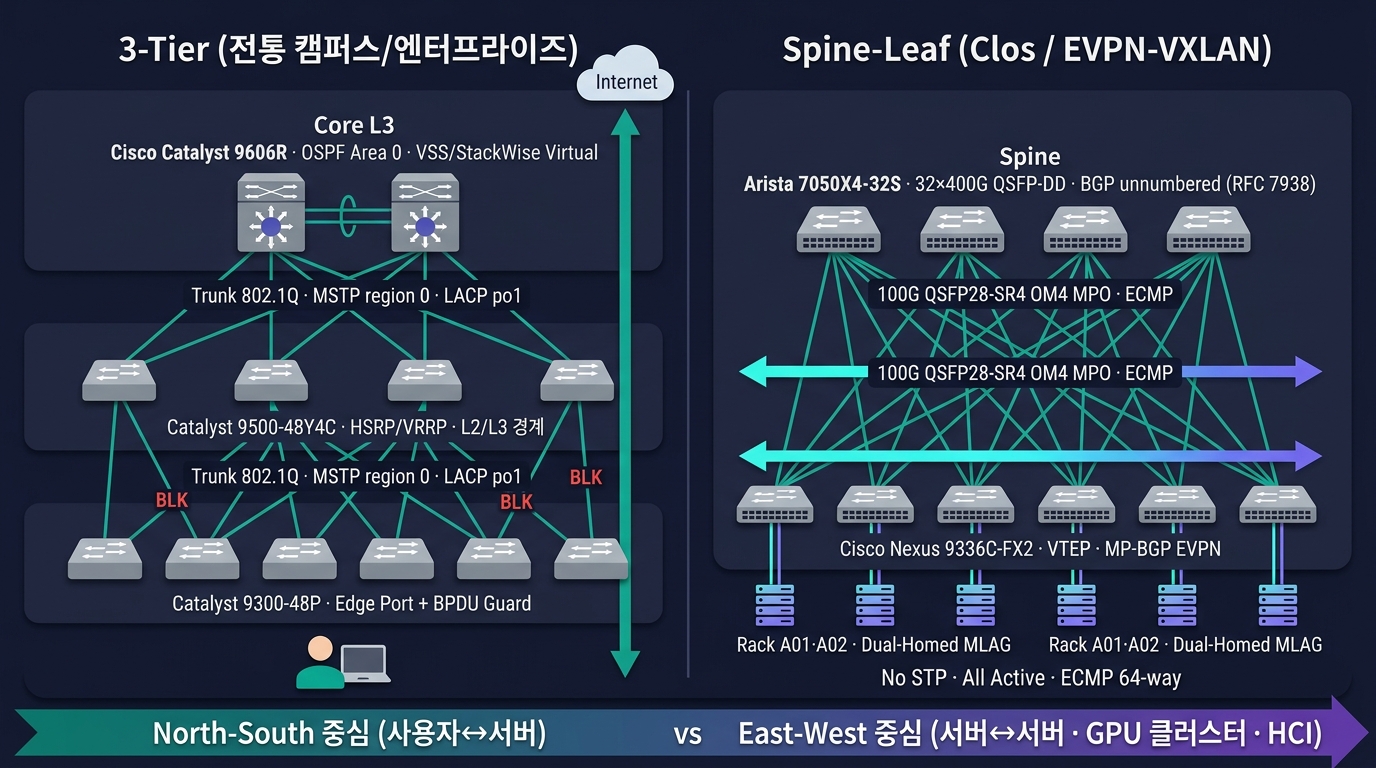
3-Tier vs Spine-Leaf (삽화)
WAN 토폴로지 — Hub-and-Spoke · Full-Mesh · SD-WAN
🛞 Hub-and-Spoke
- 본사 = Hub, 지점 = Spoke
- 모든 지점 → 본사 경유
- 단순·저렴·관리 용이
- 본사 회선 병목·SPOF
🕸️ Full-Mesh
- 모든 지점 간 직접 연결
- 지연 최소·이중화 ↑
- 회선 수 = N(N-1)/2 = 매우 비쌈
- 소수 핵심 지점만 적용
🌐 Partial-Mesh
- 일부만 직결 (트래픽 많은 곳)
- Hub-and-Spoke + 선별적 직결
- 현실 표준
🌍 SD-WAN
- 컨트롤러가 정책 자동 적용
- 다중 통신사 자동 절체·로드밸런싱
- 응용 인지 라우팅
- 클라우드 우회 (Local Internet Breakout)
🏢 DMVPN (Cisco)
- 동적 Mesh — Hub로 시작, Spoke 간 직접 연결 동적 생성
- 회선 절감 + Mesh 효과
📜 MPLS L3VPN
- 통신사가 L3 분리 제공
- KT VPN·SKB VPN·LG U+ VPN
- 안정적이지만 비쌈
- VRF + MP-BGP 기반
🎨 이미지 프롬프트: "Editorial WAN topology comparison illustration on dark navy background — three side-by-side network diagrams in panels labeled 'Hub-and-Spoke', 'Partial Mesh', and 'Full Mesh'. Left 'Hub-and-Spoke': a central building icon 'HQ Seoul (Hub)' connected by solid teal lines to 5 surrounding nodes labeled 'Branch Busan', 'Branch Daegu', 'Branch Gwangju', 'Branch Daejeon', 'DR Site Cheonan' — every spoke routes through the hub; small tag 'MPLS L3VPN · KT/LG U+'. Middle 'Partial Mesh': same HQ + 4 branches + 1 DR site, with HQ-to-all-spokes plus selective direct links between high-traffic branches (HQ↔DR, HQ↔Busan↔Daegu) drawn with dashed purple lines, label 'DMVPN · selective direct'. Right 'Full Mesh': all 6 sites fully interconnected, every node-to-node line drawn in thin teal, with annotation 'Links = N(N-1)/2 = 15' and tag 'SD-WAN overlay · multi-carrier'. Each node rendered as a small clean isometric building icon (HQ taller, DR with a shield icon, branches small) with monospaced English labels and IP-cloud icons in the link space ('MPLS', 'Internet', 'LTE/5G'). Clean technical editorial style, thin connection lines with small bandwidth/latency tags, teal #00b894 and purple #6c5ce7 accents, 16:9"
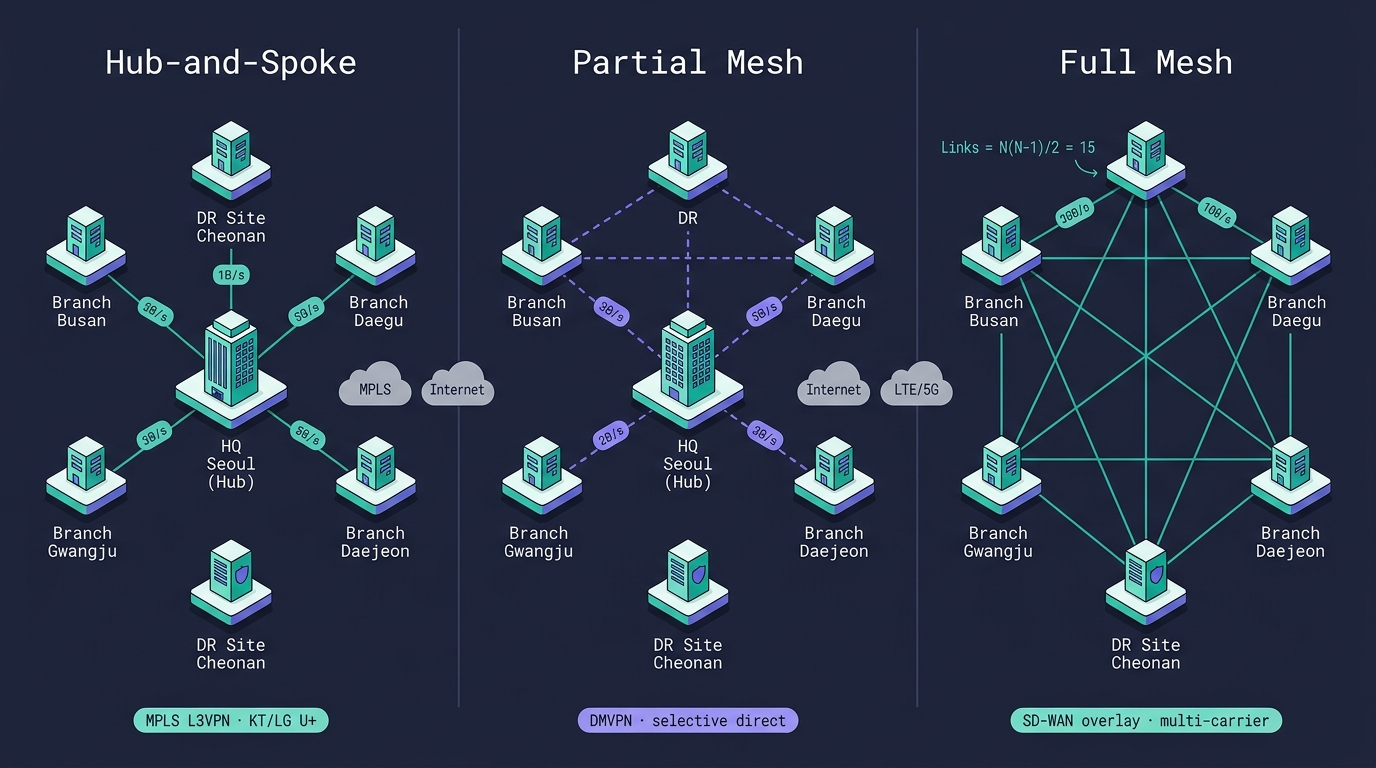
WAN 토폴로지 — Hub-and-Spoke · Full-Mesh · SD-WAN
토폴로지 비교 매트릭스 — 장단점·비용·확장성
| 토폴로지 | 비용 | 가용성 | 확장성 | 관리 | 적합 환경 |
|---|---|---|---|---|---|
| Star | 낮음 | 중간 | 중간 | 쉬움 | LAN 액세스 |
| Mesh (Full) | 매우 높음 | 최고 | 낮음 | 어려움 | 코어·핵심 P2P |
| Mesh (Partial) | 중간 | 높음 | 중간 | 중간 | 캠퍼스 코어 |
| Tree | 중간 | 중간 | 중간 | 중간 | 캠퍼스 |
| 3-Tier | 중간~높음 | 높음 | 중간 | 중간 | 전통 엔터프라이즈 |
| Spine-Leaf | 중간 | 높음 | 최고 | 중간 | 현대 DC·AI 클러스터 |
| Hub-and-Spoke | 저렴 | 낮음 | 낮음 | 쉬움 | WAN 다지점 |
| SD-WAN | 중간 | 높음 | 높음 | 중간 | WAN 글로벌 |
Out-of-Band (OOB) 관리 — 별도 NW로 장비 관리
🎯 OOB 개념
- 운영 트래픽과 물리적으로 분리된 관리망
- 평시·장애 시 모두 항상 접근 가능
- 운영 NW가 죽어도 장비 관리 가능
🔌 OOB 구성요소
- 각 장비의 관리 포트 (MGMT)
- iLO·iDRAC·BMC (서버)
- Console Server (RS-232·Serial-over-IP)
- KVM-over-IP
- 별도 PDU·UPS
🌐 OOB 토폴로지
- 별도 관리 VLAN + 관리 SW
- 별도 라우터 + 별도 회선 (LTE 등) 백업
- 관리망용 작은 SW를 ToR과 별도로 배치
- Bastion / Jump Host 를 통한 접근
🎙️ TA의 표준
- 운영망 / 관리망 / DMZ 3망 분리
- 모든 관리는 OOB 통해서만
- 비밀번호·키·인증서 별도 관리
- 점프호스트 세션 기록 도입
PART J
TA의 네트워크 결정 · 산출물 · 정리
7계층·100+ 프로토콜·수십 가지 장비를 결정의 언어로 옮긴다.
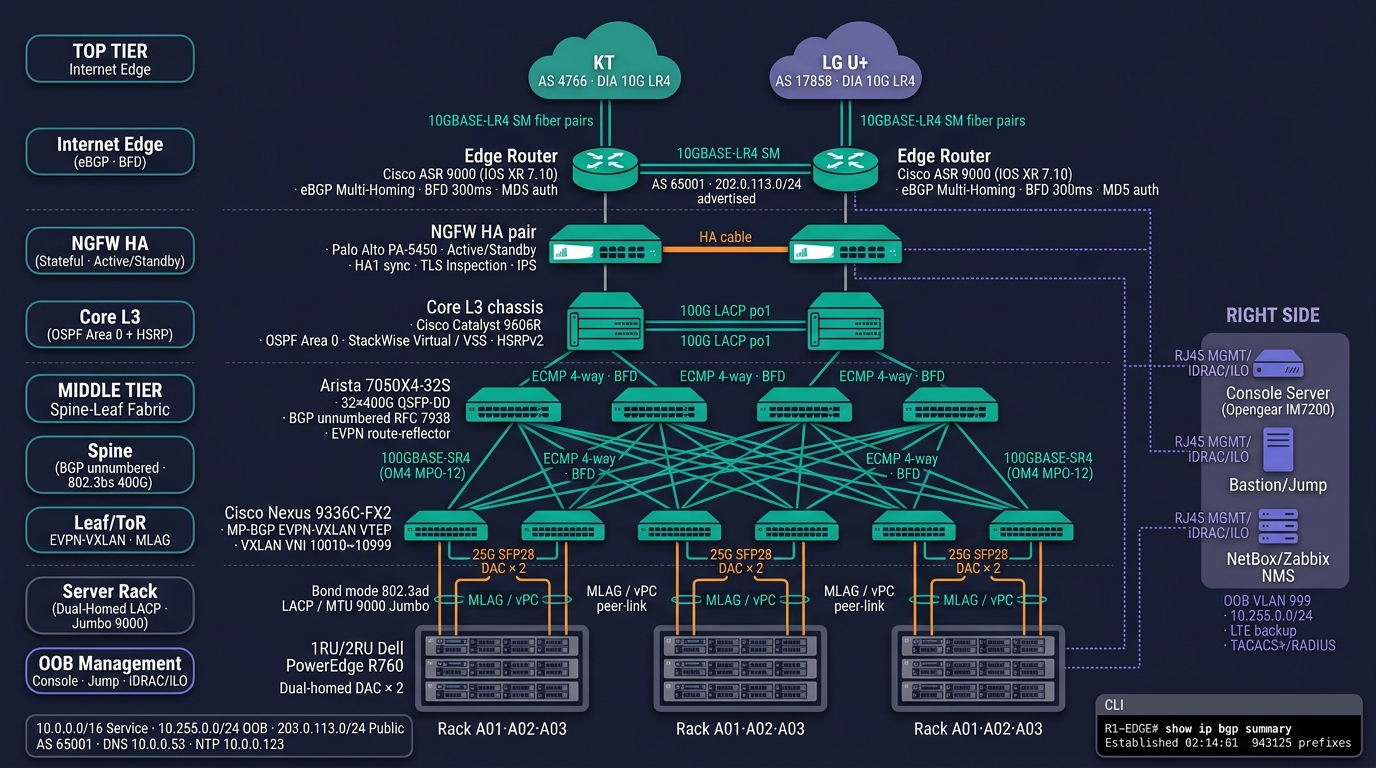
데이터센터 NW 구성도 (삽화)
TA가 네트워크 설계에서 결정해야 할 10가지
1️⃣ ~ 5️⃣
- 물리 매체 — Cat 6a / 광 (SR/LR/ER) / DAC
- 장비 벤더 표준 — Cisco·Juniper·Arista·국산
- 토폴로지 — 3-Tier · Spine-Leaf · Hybrid
- L2 도메인 범위 — VLAN 설계·STP 영역
- L3 라우팅 프로토콜 — Static·OSPF·BGP·IS-IS
6️⃣ ~ 🔟
- 이중화 패턴 — VRRP·MLAG·ECMP
- IP 주소 체계 — CIDR·VLSM·사설 IP 대역 선정
- MTU 정책 — 1500 / Jumbo 9000
- 관리망 분리 — OOB·Bastion·3망 분리
- WAN 연결 방식 — MPLS L3VPN·SD-WAN·인터넷 VPN
모든 결정은 산출물에 정량적으로 기록 — 단가·EOL·라이센스·유지보수 비용까지 BOM에 명시.
TA의 네트워크 산출물 — 6종 표준
| 산출물 | 형식 | 핵심 내용 | 작성 시점 |
|---|---|---|---|
| 논리 구성도 | Visio·draw.io | L2/L3 토폴로지·VLAN·라우팅 영역 | 초기 설계 |
| 물리 구성도 | Visio·CAD | 랙 배치·케이블 경로·포트 매핑 | 시공 직전 |
| VLAN 표 | Excel | VLAN ID·이름·서브넷·게이트웨이·사용처 | 설계 + 운영 갱신 |
| IP 할당표 | Excel·NetBox·IPAM | 호스트·VIP·DHCP 범위·예약 | 설계 + 매 변경 |
| 라우팅 표 | Excel·Markdown | OSPF Area·BGP Peer·MED·LOCAL_PREF | 설계 + 트러블슈팅 시 |
| 포트 매핑표 | Excel·NetBox | 장비 포트 ↔ 단말·서버·VLAN | 시공 + 운영 |
추가 보조 산출물
- 방화벽 정책표 — Src/Dst/Port/Action/Justification
- 케이블 라벨링 표준 — 양 끝 라벨·도면 ID
- 점검 체크리스트 — 일/주/월/분기
- 변경관리 (CR) — 변경 영향·롤백 절차
결정 의사결정 트리 — 케이블·라우팅·토폴로지
🧵 케이블 선택 트리
거리 < 5m, 25G+
  → DAC (저렴·저전력)
거리 < 30m, 25/40G
  → Cat 8 또는 SFP28 DAC
거리 < 100m, 1G/10G
  → Cat 6a
거리 100m~500m, 10/40/100G
  → MM (OM4) + SR
거리 > 500m, 100G+
  → SM + LR
거리 > 10km
  → SM + ER/ZR 또는 통신사 회선
🛤️ 라우팅 선택 트리
지점 1~3개·변경 없음
  → Static
단일 캠퍼스·동일 벤더
  → OSPF Single Area
다중 캠퍼스
  → OSPF Multi-Area
Cisco 단일·중소
  → EIGRP (선택)
인터넷 연결·멀티 ISP
  → BGP (필수)
DC 내부 Spine-Leaf
  → BGP (RFC 7938)
ISP·캐리어 백본
  → IS-IS
Linux 네트워크 CLI — ip · ss · tcpdump · dig
# ────────── ip 명령 (iproute2 — net-tools 대체) ──────────
$ ip -br addr                                # 인터페이스 + IP 요약
$ ip addr add 10.0.0.10/24 dev eth0          # IP 추가
$ ip link set eth0 mtu 9000                  # Jumbo MTU
$ ip link set eth0 up                        # 인터페이스 UP
$ ip route                                   # 라우팅 테이블
$ ip route add 192.168.1.0/24 via 10.0.0.1   # Static Route 추가
$ ip route add default via 10.0.0.254
$ ip neigh                                   # ARP 테이블 (ip neighbour)
$ ip -s link show eth0                       # 인터페이스 통계

# ────────── ss — netstat 대체 ──────────
$ ss -tnp        # TCP LISTEN+ESTABLISHED + 프로세스
$ ss -tan state established
$ ss -s          # 요약 (TCP/UDP/Total)

# ────────── tcpdump — 패킷 캡처 ──────────
$ sudo tcpdump -i eth0 -nn  host 10.0.0.5 and port 443
$ sudo tcpdump -i any -nn   'tcp[tcpflags] & (tcp-syn|tcp-rst) != 0'
$ sudo tcpdump -i eth0 -w /tmp/capture.pcap  port 53
$ sudo tcpdump -r /tmp/capture.pcap -nn -A | less

# ────────── DNS·TLS·HTTP 디버그 ──────────
$ dig +short A   www.example.com  @8.8.8.8
$ dig +trace     www.example.com           # 루트→TLD→권한 추적
$ openssl s_client -connect example.com:443 -servername example.com </dev/null
$ curl -v -o /dev/null  https://example.com
$ mtr -rwbzc 100  8.8.8.8                  # ping + traceroute + 통계
🎨 이미지 프롬프트: "Editorial Linux terminal mockup on dark navy background — a wide tmux-style terminal split into 4 panes on a RHEL 9.4 / Ubuntu 24.04 LTS host; TOP-LEFT pane runs
[root@ta-jump01 ~]# ip -br addrshowing rows 'lo UNKNOWN 127.0.0.1/8 ::1/128 / eth0 UP 10.0.0.10/24 fe80::250:56ff:feaa:bb01/64 / eth1 UP 10.255.0.10/24 (OOB) / bond0 UP 10.0.100.10/24 (mode=802.3ad)' followed by# ip link set eth0 mtu 9000and# ip -s link show eth0with RX/TX byte counters and 0 errors/drops; TOP-RIGHT pane runs[root@ta-jump01 ~]# ip routeshowing 'default via 10.0.0.254 dev eth0 proto static metric 100 / 10.0.0.0/24 dev eth0 proto kernel scope link src 10.0.0.10 / 10.0.1.0/24 via 10.0.0.254 dev eth0 proto ospf metric 110 / 192.168.1.0/24 via 10.0.0.254 dev eth0 proto static' and below# ss -tnlpshowing 'LISTEN 0 128 0.0.0.0:22 sshd / LISTEN 0 511 :443 nginx / ESTAB 0 0 10.0.0.10:51234 203.0.113.5:443'; BOTTOM-LEFT pane runs[root@ta-jump01 ~]# tcpdump -i eth0 -nn -vv 'tcp port 443 and tcp[tcpflags] & (tcp-syn|tcp-ack) != 0'with several live packet capture lines streaming '14:02:11.123456 IP 10.0.0.10.51234 > 203.0.113.5.443: Flags [S], seq 1842..., win 64240, options [mss 1460,sackOK,TS val..., wscale 7], length 0 / 14:02:11.135789 IP 203.0.113.5.443 > 10.0.0.10.51234: Flags [S.], seq 9281..., ack 1843..., win 65535 / 14:02:11.135999 IP 10.0.0.10.51234 > 203.0.113.5.443: Flags [.], ack 1, win 502 / Flags [P.] length 517 (TLS ClientHello)'; BOTTOM-RIGHT pane runs[root@ta-jump01 ~]# dig +short A www.example.com @8.8.8.8returning '93.184.215.14' then# dig +trace www.example.com(truncated root→TLD→authoritative chain), then# curl -v --resolve www.example.com:443:93.184.215.14 https://www.example.comshowing TLS 1.3 handshake details (' SSL connection using TLSv1.3 / ALPN: server accepted h2 / * issuer: C=US; O=DigiCert Inc... / > GET / HTTP/2 / < HTTP/2 200'). Monospaced Source Code Pro font, soft glow on the tmux status bar showing hostname '[ta-jump01] · CPU 0.42 · 4 panes · Bastion · OOB 10.255.0.10', subtle scanlines. Teal #00b894 prompt accents on each#symbol, 16:9"
현장 표준: ifconfig·netstat·route·arp·nslookup 은 모두 deprecated. RHEL 9·Ubuntu 24.04 기본 이미지에는 빠져 있음 → ip·ss·dig·mtr 4종 세트를 외워야 함.
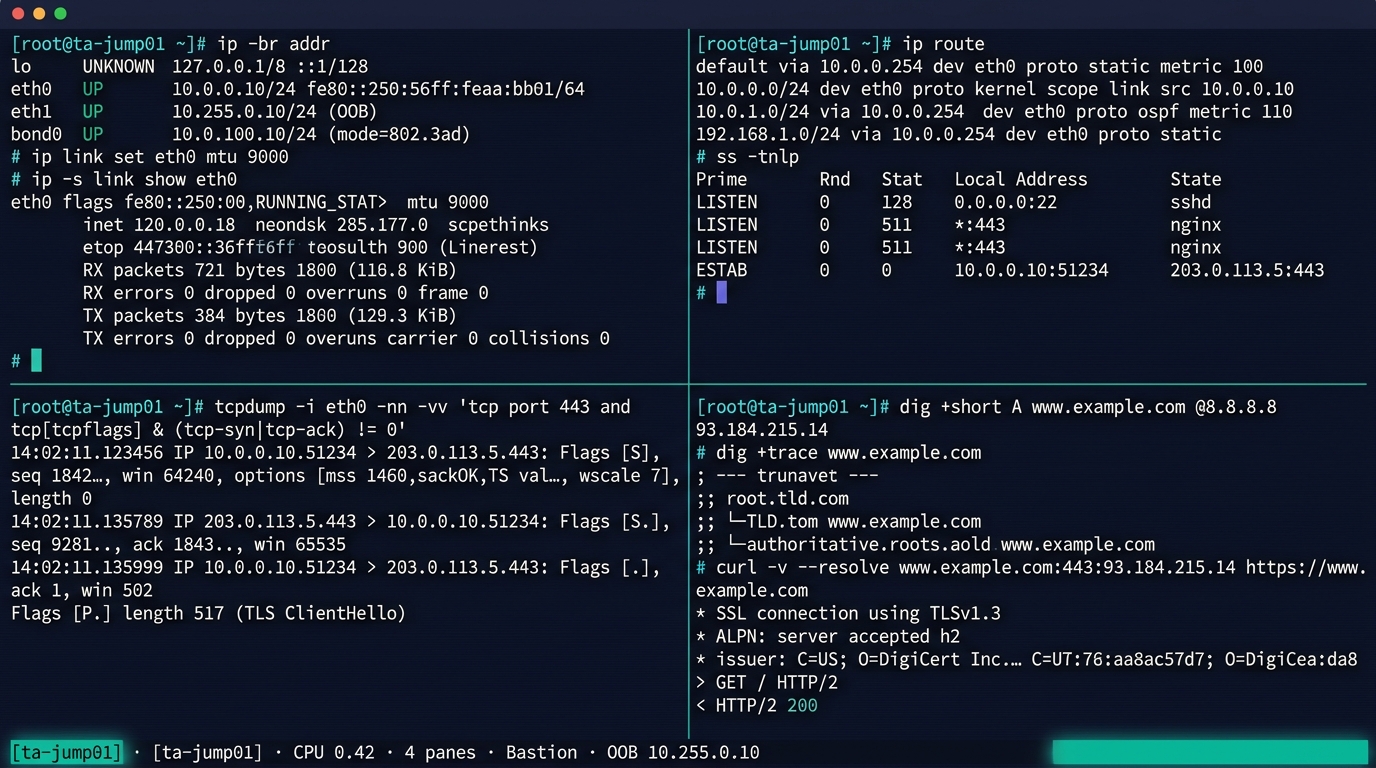
Linux 네트워크 CLI — ip · ss · tcpdump · dig
트러블슈팅 체크리스트 — Bottom-up 7단계
| 단계 | 점검 항목 | 명령·도구 |
|---|---|---|
| L1 | 케이블·SFP·Link LED | 물리 점검·ethtool eth0 |
| L2 | MAC 학습·VLAN·STP 상태 | show mac addres6-table·show spanning-tree |
| L3 | IP·게이트웨이·라우팅 | ip addr·ip route·show ip route |
| L3 | 도달성 | ping·traceroute·mtr |
| L4 | 포트 LISTEN·TCP 상태 | netstat -an·ss -tnp |
| L5~L7 | DNS·TLS·응용 | dig·nslookup·openssl s_client·curl -v |
| 패킷 | 실제 트래픽 | tcpdump·wireshark·tshark |
기본 원칙: Bottom-up 으로 격리 → 각 계층에서 정상 동작 확인 → 한 계층씩 위로. 상위에서 시작하면 시간 낭비.
세션 4 핵심 키워드 — 암기 카탈로그
🟢 OSI / TCP/IP
- 7 Layer / 4 Layer
- 캡슐화·디캡슐화
- Frame·Packet·Segment·Data
- L1=Hub, L2=Switch, L3=Router, L4=FW/L4 LB, L7=WAF
🟢 L1 물리
- Cat 5e·6·6a·7·8
- SM (9/125)·MM (50/125·OM3/4/5)
- LC·SC·MTP/MPO
- SFP·SFP+·SFP28·QSFP+·QSFP28·QSFP-DD·OSFP
- SR (100m)·LR (10km)·ER (40km)·ZR (80km)
🟢 WiFi
- 802.11 a/b/g/n/ac/ax/be
- 2.4·5·6 GHz · 20~320 MHz
- WPA3·EAP-TLS·802.1X
🟢 L2
- Ethernet·MAC OUI·ARP
- STP·BPDU Guard·Root Guard
- LACP·LAG·EtherChannel
- LLDP·CDP·LLDP-MED
- VLAN 802.1Q·Trunk·Native·Voice
- Port Security·DHCP Snooping·DAI
🟢 L3
- IPv4·TTL·Protocol
- RFC 1918 사설 IP
- CIDR·VLSM·Longest Prefix
- ICMP·Ping·Traceroute
- OSPF·BGP
- iBGP·eBGP
- AS_PATH·LOCAL_PREF
- ECMP·PBR
🟢 L4
- TCP·UDP·QUIC
- 3-Way·4-Way·TIME_WAIT
- Sliding Window·cwnd
- CUBIC·BBR
- Well-Known 포트
🟢 L5~L7
- DNS (A·CNAME·MX·TXT·SRV·NS)
- DHCP DORA·Option 43/60/82
- HTTP/1.1·2·3·TLS 1.2/1.3
- SMTP·POP3·IMAP·SPF·DKIM·DMARC
- FTP/SFTP·NFS·SMB·S3
- SSH·Bastion
- SNMP·NTP·Syslog·LDAP/AD
🟢 장비·토폴로지
- Hub·Bridge·L2/L3 SW·Router·LB·WAF·FW
- Fixed·Modular·Stackable·ToR/EoR
- 3-Tier·Spine-Leaf·Hub-Spoke·SD-WAN
- OOB 관리
Q&A — 세션 4 자주 묻는 질문
❓ Q1. Cat 6와 6a 중 어느 것?
신규 = Cat 6a. Cat 6는 10G가 55m까지만 보장. 데이터센터·신축 표준은 Cat 6a.
❓ Q2. OSPF와 BGP 중 어느 것?
AS 내부 = OSPF, AS 간(인터넷) = BGP. DC 내부도 BGP로 통일하는 추세 (RFC 7938).
❓ Q3. TCP CUBIC과 BBR 중 어느 것?
LAN·단거리 = CUBIC 충분. WAN·고대역·장거리 = BBR 권고.
❓ Q4. HTTP/3로 바꿔야 하나?
자동 협상되므로 강제 전환 불필요. CDN 사용 시 자동 적용. 사내는 HTTP/2가 표준.
❓ Q5. VLAN은 몇 개까지?
802.1Q = 4094개. 데이터센터 멀티 테넌트는 VXLAN(24bit·1600만) 같은 Overlay 로 확장.
❓ Q6. WiFi 7 도입 시점?
2026년 단말 보급 시작. AP는 미리, 단말은 자연 교체 권고.
❓ Q7. 관리망 분리는 꼭?
공공·금융 사실상 의무. 일반 기업도 보안 표준상 권고. OOB + Bastion 조합.
마무리 — 7계층, 한 권의 통일
네트워크는 7개 계층의 약속, 100여 개의 프로토콜, 수십 가지 장비의 종합 예술.
TA는 이 약속을 도면 · 표 · 결정 매트릭스 · 산출물로 풀어낸다.
🏆 오늘의 성취
- OSI 7 / TCP/IP 4 계층 — 완전한 어휘 확보
- L1 케이블·광·모듈·WiFi — 매체 결정 가능
- L2 Ethernet·VLAN·STP·LACP — 스위칭 이해
- L3 IP·CIDR·OSPF·BGP — 라우팅 결정 가능
- L4 TCP/UDP/QUIC — 전송 성능 진단 가능
- L5~L7 DNS·HTTP·TLS·SSH·SNMP — 응용 운영 가능
- 장비·토폴로지 — BOM·도면 설계 가능
🧰 가져갈 산출물 카탈로그
- TA의 NW 결정 10가지
- 표준 산출물 6종 (논리·물리 구성도·VLAN·IP·라우팅·포트)
- 케이블·라우팅·토폴로지 결정 트리
- Bottom-up 트러블슈팅 7단계 체크리스트
- 핵심 키워드 카탈로그 (시험·면접·산출물 공용)
💡 자기 학습 과제
- VLAN 표·IP 할당표 양식 한 번씩 작성해보기
- 사내 NW 도면을 OSI 7 계층 기준으로 분해해보기
tcpdump·ip route·show interface trunk명령 익혀 두기