Session 7
보안 6대 도메인
Day 2 · 오후 후반 (약 180~200분)
네트워크 · 엔드포인트 · 데이터 · 최신 트랜드 · 거버넌스/인증 · 클라우드
강사 박수현 · 🚀 젠아이랩스(GenAI Labs)
🎨 이미지 프롬프트: "Editorial wide cover illustration on dark navy background — a giant hexagonal wheel divided into six glowing segments labeled in Korean: '네트워크' (with tiny sub-labels: Fortinet FortiGate 600F · Palo Alto PA-5450 · F5 Advanced WAF i7800), '엔드포인트' (CrowdStrike Falcon Insight XDR · Microsoft Defender for Endpoint · 안랩 V3 EDR Plus), '데이터' (마크애니 DocuMaker DRM · 신시웨이 Petra DBSafer · Forcepoint DLP), '최신 트랜드' (Zero Trust NIST SP 800-207 · SASE · Palo Alto Cortex XSOAR), '거버넌스·인증' (ISO/IEC 27001:2022 · ISMS-P · CC EAL4+ · KCMVP), '클라우드' (Wiz CNAPP · Palo Alto Prisma Cloud · Netskope CASB); each segment has a small representative icon (rackmount firewall with red logo, laptop with shield + Falcon orange chevron, locked database + key, AI brain with shield, certificate badge with wax seal, cloud with padlock + Kubernetes wheel). Behind the wheel a stylized SOC operations room with three analysts at multi-monitor desks tracking world-map threat feeds (red dots over Russia/CN/NK suggesting APT29·APT41·Lazarus·Kimsuky), Splunk Enterprise Security 7.x Glass Tables and IBM QRadar Offense Manager screens reflected on the wall, blue-purple holographic dashboards floating above; teal #00b894 and purple #6c5ce7 accents, cinematic glow, 16:9, technical editorial style"
왜 보안인가 — 국내 개인정보 유출 3선
🚨 ① KB·NH·롯데카드 1억 건
2014.01 (공개)
KCB 내부 협력업체 직원이 카드 3사 고객정보 약 1.04억 건 유출. 역대 최대 규모.
- 주민번호·카드번호·연락처
- 외부 위탁 보안 통제 부재
- 신용카드사 「보안수칙·내부통제」 의무화
💡 교훈 — 외부 위탁 보안 (SAC·DRM·로그 감시) + 개인정보 암호화 의무
참고: 「2014 카드 3사 정보유출」 검색
🚨 ② LG U+ 18만 건
2023.01 (공개)
LG U+ 고객정보 약 29만 건 (이후 추가 18만 건) 유출. 다크웹 판매 정황.
- 인증·DB 접근 통제 미흡
- DB 암호화·접근 로그 부족
- 과징금·CISO 책임 강화
💡 교훈 — DB 보안(접근제어·암호화·감사) + ISMS-P 2.5.5 특수권한
참고: 「2023 LG유플러스 정보유출」 검색
🚨 ③ SK텔레콤 USIM 해킹 (역대 최대)
2025.04.18 (금)
BPFdoor 악성코드로 SKT 핵심 시스템 침투 → USIM 정보 2,695만건 + IMEI 29만건 유출 (9.82GB).
- 국내 통신 사상 최대 개인정보 유출
- 신고 지연 → 기업 책임론
- 집단소송 3만명+ 참여
- 「통신사 보안 인프라 점검」 의무화
💡 교훈 — EDR·XDR·BPFdoor 대응·KISA 신고 SOP·DRM·SIEM
참고: 위키백과 「2025년 SK텔레콤 유심 정보 유출 사고」
📌 이번 세션의 시각 — 위 3건은 모두 「위탁 보안 통제 부재」「DB 접근 감사 누락」「인증 통제 미흡」. 본 세션의 NGFW·SAC·DLP·DRM·FIDO·PKI·SIEM 6대 도메인 다층 방어가 직접 해법.
Session 7 — 회차 메타데이터
📋 세션 정보
- 회차: 8 / 15 — Day 2 오후 후반
- 소속: Day 2 — 네트워크·스토리지·보안·HA
- 카테고리: security (보안·거버넌스)
- 예상 분량: 본문 78 슬라이드 + 이미지 14장
- 강의 시간: 약 120~150분
- 강사: 박수현 — 젠아이랩스(GenAI Labs) CEO / CTO
🎯 핵심 메시지
보안은 단일 솔루션이 아니라 6대 도메인의 다층 방어. TA는 모든 솔루션을 직접 구현하지 않더라도 배치 위치·정책 흐름·인증 요구사항을 설계한다.
🧭 학습 목표 (Learning Objectives)
- 네트워크 보안 — Firewall 4세대, NGFW/UTM, WAF, IPS/IDS, Anti-DDoS, VPN 비교·선택
- 엔드포인트 보안 — AV → EPP → EDR → XDR → MDR 진화, NAC·PMS·SIEM 역할
- 데이터 보안 — DRM·DLP·DB보안·TDE·PKI·FIDO·HSM 배치와 운영 흐름 설계
- 최신 보안 — CDR·SOAR·SASE·SDP·ZTNA·Zero-Trust·MITRE ATT&CK·TI·LLM 보안 조망
- 거버넌스·인증 — ISMS-P·KCMVP·CC인증·ISO 27001·NIST CSF·PCI-DSS 인증 체계 비교
강의 지도 — 6 PART + 운영 보너스
A. 네트워크 보안 (18 슬라이드)
- Firewall 4세대 진화
- NGFW · UTM · WAF
- IPS · IDS · Anti-DDoS
- APT · DPI · NDR
- VPN (IPSec·SSL·WireGuard)
B. 엔드포인트 보안 (11 슬라이드)
- AV → EPP → EDR → XDR → MDR
- 솔루션 비교 (CrowdStrike·V3 등)
- PMS · NAC · SIEM
- SecureOS · 공급망 공격
C. 데이터 보안 (12 슬라이드)
- DRM · DLP
- DB보안 3종 (NW·Plug-in·Kernel)
- TDE · DAM · Tokenization
- FIDO · MFA · 생체 인증
- PKI · KMS · HSM
D. 최신 트랜드 (13 슬라이드)
- CDR · SOAR · SASE · SDP · ZTNA
- Zero-Trust · MITRE ATT&CK
- Threat Intelligence · LLM 보안
E. 거버넌스·인증 (10 슬라이드)
- 정책 4계층 · SOP 4종
- 국내 — ISMS-P · KCMVP · CC
- 국제 — ISO 27001·NIST·PCI
- 국내 법령
F. 보안 운영 + 실전 (12 슬라이드)
- SOC Tier 1·2·3
- VA · PT · BAS
- TA의 12대 결정
보안 6대 도메인 — 한눈에 보는 전체 지도
🎨 이미지 프롬프트: "Editorial circular wheel infographic on dark navy background — a central hub labeled '보안 6대 도메인' glowing in teal, with six radial segments equally divided: '① 네트워크 보안' (rackmount firewall icon with red logo accent), '② 엔드포인트 보안' (laptop+shield icon with orange Falcon-style chevron), '③ 데이터 보안' (locked database barrel icon with key), '④ 최신 트랜드' (AI brain + shield icon), '⑤ 거버넌스·인증' (certificate badge icon with red wax seal), '⑥ 클라우드 보안' (cloud + padlock icon with Kubernetes helm wheel overlay); thin teal lines connect adjacent segments suggesting overlap; each segment has 3~4 sub-keywords in tiny text — ① 'NGFW Fortinet FortiGate 600F · WAF F5 i7800 · IPS 윈스 Sniper V40 · Anti-DDoS Radware DefensePro x4420', ② 'EDR CrowdStrike Falcon · NAC Cisco ISE 3.3 · SIEM Splunk ES 7.x · SOAR Cortex XSOAR', ③ 'DRM 마크애니 DocuMaker · DLP 소만사 Mail-i · DB보안 신시웨이 Petra DBSafer · PKI Thales Luna 7', ④ 'ZTNA NIST SP 800-207 · SASE Cato·Netskope · SOAR Splunk Phantom · XDR Palo Alto Cortex', ⑤ 'ISMS-P · ISO/IEC 27001:2022 · CC EAL4+ · NIST CSF 2.0 · KCMVP 검증필', ⑥ 'CASB Netskope · CSPM Wiz · CNAPP Prisma Cloud · CWPP Lacework'; clean editorial wheel diagram, teal #00b894 and purple #6c5ce7 accents, 16:9"
6대 도메인 + 횡축
- ① 네트워크 — 경계·내부 트래픽 통제
- ② 엔드포인트 — PC·서버·모바일 보호
- ③ 데이터 — 정보 자산 자체 보호
- ④ 최신 트랜드 — Zero-Trust·AI·자동화
- ⑤ 거버넌스·인증 — 정책·법규·인증
- ⑥ 클라우드 — IaaS/PaaS/SaaS 통제
횡으로 관통하는 축
- 사용자/계정 (Identity) — 모든 도메인의 기반
- 로그·관찰성 (SIEM) — 모든 이벤트 집중
- 거버넌스 (Policy) — 모든 통제의 근거
- 자동화 (SOAR·IaC) — 운영의 미래
6대 도메인은 독립이 아니라 다층 방어 — 한 곳이 뚫려도 다음이 막는다.
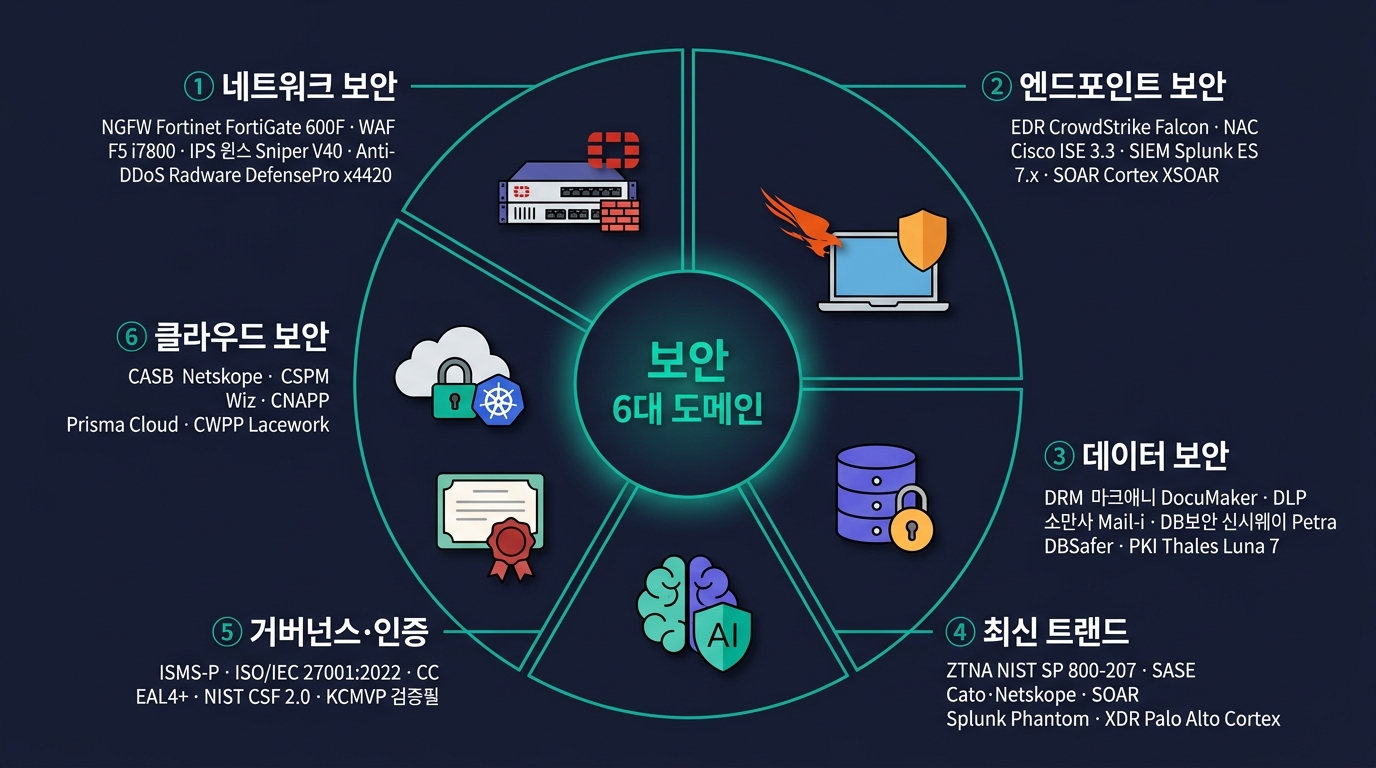
보안 6대 도메인 — 한눈에 보는 전체 지도
정보보안의 3대 원칙(CIA) — 다시 확인
🔒 Confidentiality
기밀성 — 알아야 할 사람에게만 - 권한 없는 자 접근 금지 - 암호화·접근통제·물리 격리 - 망분리·DRM·KMS - 위반 = 유출 사고
✅ Integrity
무결성 — 변조 없이 그대로 - 데이터 변조 차단 - 해시 (SHA-256·SM3)·전자서명 - WORM 백업·감사로그 - 위반 = 조작 사고
🚀 Availability
가용성 — 필요할 때 작동 - 서비스·데이터 사용 가능 - HA·DR·DDoS 대응 - Anti-DDoS·백업·이중화 - 위반 = 서비스 중단
확장 5원칙 (Parkerian Hexad): CIA + Authenticity(진본성) · Non-repudiation(부인방지) · Utility(유용성) — 전자서명·PKI 시대에 추가된 축.
6대 도메인의 모든 솔루션은 CIA 중 어떤 축을 지키는가로 분류할 수 있다.
PART A
네트워크 보안 — 경계와 내부 트래픽의 통제
Firewall 4세대 · NGFW · UTM · WAF · IPS · Anti-DDoS · VPN
Firewall 4세대 진화 — Stateless → NGFW
🎨 이미지 프롬프트: "Editorial horizontal timeline illustration on dark navy background — four evolutionary stages of firewall drawn left to right as connected boxes: '1세대 Packet Filter (Stateless)' with a simple IP/Port filter icon labeled '~1990' and sub-text 'Cisco ACL · ipfw · 5-tuple (src/dst IP·port·proto)', '2세대 Stateful Inspection' with a connection table icon labeled '~1995' and sub-text 'Check Point FireWall-1 · Cisco PIX 515 · TCP state table (ESTABLISHED/SYN_SENT/...)', '3세대 Application Proxy' with a proxy gateway icon labeled '~2000' and sub-text 'TIS Gauntlet · WinGate · Layer-7 HTTP/SMTP/FTP 프록시', '4세대 NGFW' with a multi-feature stacked icon (App-ID, User-ID, IPS, SSL Decrypt, AV, URL Filter) labeled '2010~' and sub-text 'Palo Alto PA-5450 · Fortinet FortiGate 600F · Check Point Quantum 6000 · Cisco Firepower 4145 · 시큐아이 BS5800'; each stage shows its key feature in 2-3 lines of tiny text with throughput examples (e.g. '~1Gbps → ~10Gbps → ~40Gbps → 100Gbps+'); thin teal arrows showing evolution with small CVE/incident notes between them ('Code Red 2001', 'SQL Slammer 2003'); clean editorial timeline diagram, teal #00b894 and purple #6c5ce7 accents, 16:9"
1세대 — Packet Filter (Stateless)
- 헤더만 검사 (SRC/DST IP·Port·Protocol)
- 연결 상태 추적 없음
- ACL 기반 단순 통제
- 빠르지만 무지 — Spoof·반사 공격 취약
2세대 — Stateful Inspection (1995~)
- 연결 상태 테이블 유지
- TCP/UDP 흐름·세션 추적
- 응답 패킷 자동 허용
- Check Point FW-1이 대표
3세대 — Application Proxy
- L7 페이로드 검사
- 응용 계층까지 분해 (HTTP·FTP·SMTP)
- 클라이언트 ↔ Proxy ↔ 서버 (중계)
- 느리지만 강력 — 콘텐츠 통제 가능
4세대 — NGFW (2010~)
- Stateful + DPI + IPS + App-ID + User-ID
- SSL/TLS 인스펙션
- Threat Intelligence 연동
- Palo Alto·Fortinet·Check Point·Cisco
신규 도입은 4세대 NGFW가 표준 — 1·2세대는 백본·내부 분리용으로만 잔존.
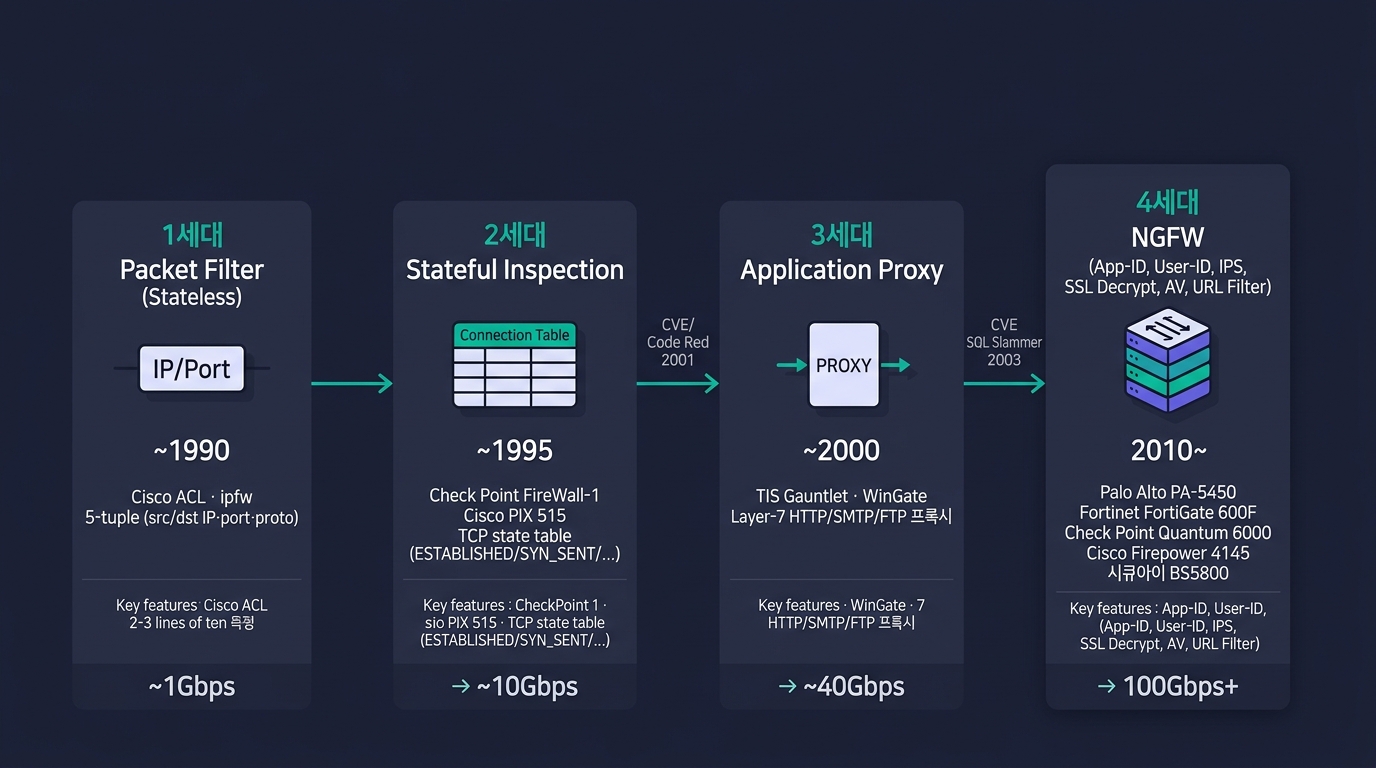
Firewall 4세대 진화 — Stateless → NGFW
Firewall 유형 비교 — 언제 무엇을 쓰나
| 세대 | 검사 깊이 | 성능 | 가시성 | 주 용도 |
|---|---|---|---|---|
| Stateless | L3·L4 헤더만 | 최고 | 낮음 | 백본·라우터 ACL·간단 분리 |
| Stateful | + 세션 추적 | 높음 | 중간 | 내부 망 경계·DMZ |
| App Proxy | L7 페이로드 | 중간 | 높음 | 메일·FTP·웹 게이트웨이 |
| NGFW | L3~L7 + IPS+TI | 중간~높음 | 최고 | 외부 경계·표준 |
| UTM | NGFW + AV/URL/VPN 통합 | 중간 | 높음 | 중소기업·지점 |
NGFW vs UTM의 차이: NGFW는 고성능 단일 기능 통합, UTM은 저비용 다기능 통합. 대기업·금융은 NGFW 다층, 중소기업·지점은 UTM 1대로 처리하는 것이 일반적.
NGFW — 7대 핵심 기능
① Application Awareness
- L7 App-ID — 5,000+ 응용 인식
- 포트가 아닌 앱 단위 정책 (예: Facebook 차단 vs Messenger 허용)
- 모바일 앱·SaaS도 식별
② Identity Awareness
- 사용자·그룹 단위 정책
- AD/LDAP 연동
- "재무팀만 ERP 접근" 식 정책
③ IPS 통합
- 시그니처 + 휴리스틱 침입탐지
- 실시간 차단
④ SSL/TLS Inspection
- HTTPS 트래픽 복호화 → 검사 → 재암호화
- 인증서 체인 관리 필수
- 성능 부하 30~50%
- 개인정보·은행 사이트는 예외 정책
⑤ Threat Intelligence
- 외부 TI 피드 (Palo Alto WildFire·Fortinet FortiGuard)
- IoC·평판 기반 자동 차단
- 분 단위 업데이트
⑥ Sandbox 연동
- 의심 파일 가상 환경에서 실행
- APT 대응의 핵심
- WildFire·FortiSandbox
⑦ URL Filter
- 카테고리 기반 URL 차단 (도박·성인·뉴스)
- 업무 시간 통제
🏢 주요 NGFW 솔루션
- Palo Alto PA-시리즈
- Fortinet FortiGate
- Check Point Quantum
- Cisco Firepower
- Sangfor · 수산INT · 시큐아이
🎨 이미지 프롬프트: "Editorial product-shot illustration on dark navy background — six rackmount firewall appliances arranged in two rows like a product lineup poster: top row 'Fortinet FortiGate 600F' (dark gray 2U with red FortiGate logo + front LCD panel + 16 SFP+ ports + 4 QSFP28 100G ports + dual PSU LEDs, caption '36 Gbps NGFW · ASIC NP7+CP9'), 'Palo Alto Networks PA-5450' (silver 2U with red PA triangle logo + 8 RJ45 + 4 SFP+ + 2 QSFP28 ports + management LCD, caption '72 Gbps App-ID · 5세대 NGFW'), 'Cisco Firepower 4145' (dark blue 2U chassis with Cisco logo + Snort 3 + Talos badge + dual PSU, caption '45 Gbps Threat Inspection'); bottom row 'Check Point Quantum 6000' (black 1U with Check Point chain logo + 10 RJ45 + 2 SFP+ ports, caption 'R81.20 · 28 Gbps'), 'SonicWall NSa 6700' (red 1U with SonicWall shield logo, caption 'RTDMI · 36 Gbps'), '시큐아이 BS5800' (white-gray 2U Korean NGFW with SECUI ribbon logo + CC EAL4+ KCMVP 검증필 시일 sticker on side, caption '국내 NGFW · 시큐아이'); each appliance shown front-face with small caption label below indicating throughput and form-factor; clean editorial product photography style, teal #00b894 and purple #6c5ce7 background accents, 16:9"
🎨 이미지 프롬프트: "Editorial dark-theme console mockup illustration on dark navy background — Fortinet FortiManager 7.4 centralized policy console: top header 'FortiManager 7.4.2 · ADOM: prod-korea · admin@fmg-01', breadcrumb 'Policy & Objects → IPv4 Policy', left navigation tree with 'Device Manager (24 devices)', 'Policy & Objects', 'AP Manager', 'FortiGuard'; main pane shows a tabular policy list with columns Seq/Name/Source/Destination/Service/Action/Profile/Log (sample rows: '1 allow_dmz_web · any · 10.10.0.0/24 · HTTPS · ACCEPT · NGFW_strict (IPS+AV+WebFilter+SSL-Insp) · All', '2 allow_corp_out · 10.20.0.0/16 · all · web-services · ACCEPT · NGFW_balanced · UTM', '3 BLOCK_RU_CN · geoip:RU,CN,KP · any · ALL · DENY · — · All' in red, '4 allow_branch_vpn · IPsec-tunnel-branch · 10.30.0.0/16 · all · ACCEPT · default · Sec'); right side panel shows the matching CLI: 'FGT600F # show full-configuration firewall policy 1'; bottom pane shows policy install status 'fw-edge-01 (FortiGate 600F): Installed · fw-edge-02 (FortiGate 600F): Pending · fw-dc-01 (FortiGate 3500F): Installed'; status bar with green health dots; clean editorial UI mockup style, teal #00b894 accents, 16:9"
📸 NGFW 어플라이언스·관리 콘솔 reference - Fortinet FortiGate 600F / 3000F — fortinet.com/products/next-generation-firewall - Palo Alto PA-1410 / PA-3400 / PA-5400 — paloaltonetworks.com/network-security/next-generation-firewall - Check Point Quantum 6200 / 16200 — checkpoint.com/quantum - Cisco Firepower 9300 / 4100 — cisco.com/c/en/us/products/security/firewalls - F5 BIG-IP iSeries i7800 — f5.com/products/big-ip-services - 관리 콘솔 — FortiManager · Panorama (Palo Alto) · Cisco FMC · Check Point SmartConsole - 시큐아이·안랩 TrusGuard·수산INT — 국내 KCMVP 인증 NGFW - Linux 호스트 — iptables · nftables · firewalld (firewall-cmd) 매뉴얼
WAF — 웹 응용 전용 방화벽
🛡️ WAF가 막는 것 — OWASP Top 10
- Broken Access Control
- Cryptographic Failures
- Injection (SQLi·XSS·Command)
- Insecure Design
- Security Misconfiguration
- Vulnerable Components
- Authentication Failures
- Software/Data Integrity Failures
- Logging Failures
- SSRF (Server-Side Request Forgery)
NGFW가 막지 못하는 응용 계층 공격 전담.
🏢 WAF 솔루션 — 클라우드 vs 온프레미스
클라우드형 WAF - Cloudflare WAF · Akamai Kona - AWS WAF · Azure WAF - NCP WAF · KT Cloud WAF - 즉시 도입, 글로벌 분산 - 대규모 DDoS 흡수
온프레미스형 WAF - F5 Advanced WAF (ASM) - Imperva · Radware AppWall - Penta WafXpert · 이트원 WAF - 내부 응용 보호·법규 대응 (국정원 검증)
TA 결정 포인트: 외부 인터넷 노출 = 클라우드 WAF + 온프레미스 WAF 2단이 표준. 내부망 응용은 온프레미스 WAF만으로 충분.
🎨 이미지 프롬프트: "Editorial split illustration on dark navy background — left half labeled 'On-Prem WAF Appliance' showing a 2U F5 BIG-IP Advanced WAF i7800 rackmount with red F-shaped logo, front LCD, 8 SFP28 + 2 QSFP28 ports, dual PSU LEDs (caption 'OWASP Top 10 · L7 DoS · Bot Defense'), mounted in a server rack with a 1U Penta WAPPLES SE-5000 unit below it (white front bezel + Korean 펜타시큐리티 ribbon, caption 'COCEP™ 엔진 · KCMVP 검증필') and an Imperva SecureSphere X8500 2U at the bottom (dark gray with red Imperva logo); right half labeled 'Cloudflare WAF Dashboard' showing a browser dashboard with rule sets panel ('Cloudflare Managed Ruleset', 'OWASP Core Ruleset 4.0', 'Custom Rules · 18 active', 'Rate Limit · 100 req/min/IP'), a world map with red dots for blocked requests concentrated over RU/CN/BR, top counter '4.2M requests blocked / 24h · Top attack: SQLi 38% / XSS 22% / Bot 19%', a stacked area chart of attack types over 24h, side panel 'Top blocked URI: /wp-login.php · /admin · /.env'; clean editorial style with teal #00b894 and purple #6c5ce7 accents, 16:9"
📸 WAF 어플라이언스·콘솔 reference - F5 BIG-IP Advanced WAF / iSeries i7800 — f5.com/products/big-ip-services/advanced-waf - Imperva SecureSphere WAF Gateway — imperva.com/products/web-application-firewall-waf - Cloudflare WAF Dashboard — cloudflare.com/application-services/products/waf - AWS WAF Console — aws.amazon.com/waf - Akamai Kona Site Defender — akamai.com/products/kona-site-defender - 국내 — 펜타시큐리티 WAPPLES · 이트원 WAF (KCMVP)
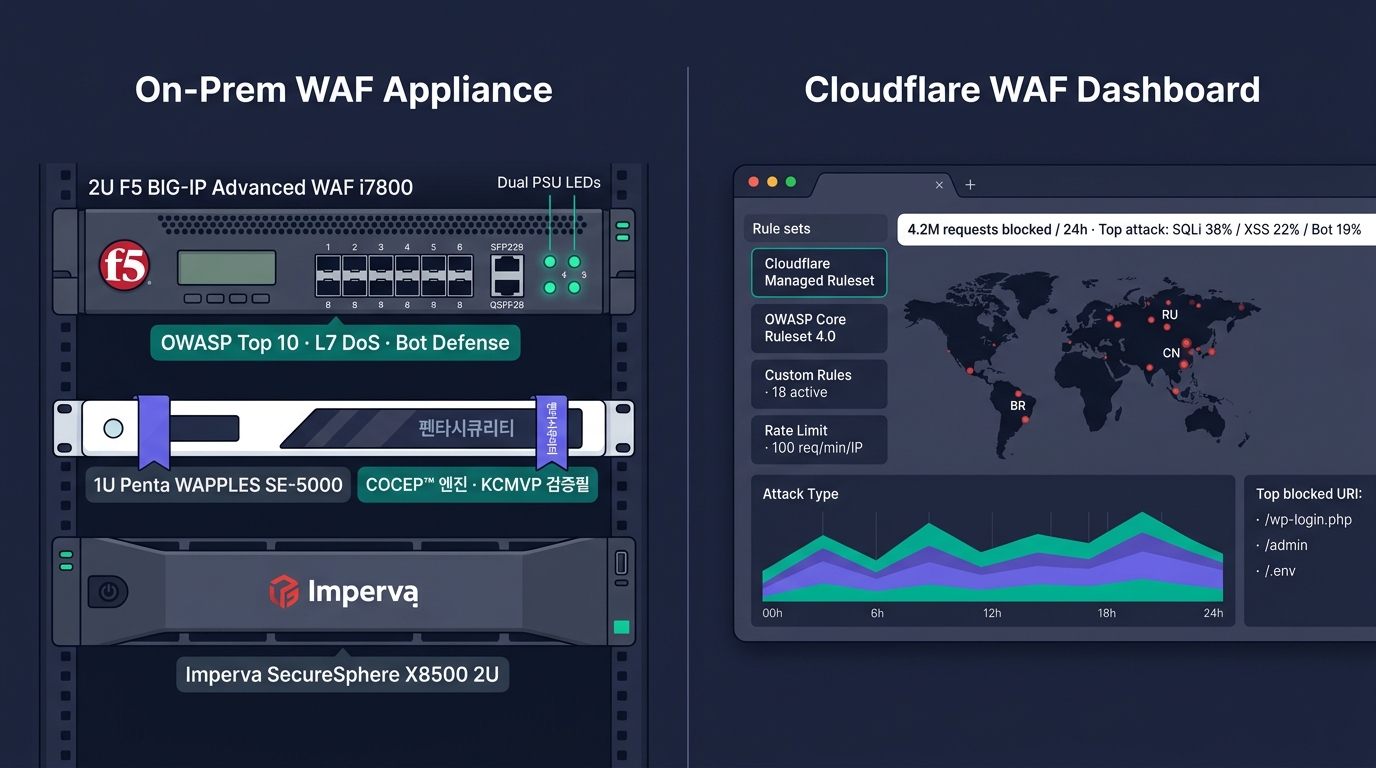
WAF — 웹 응용 전용 방화벽
UTM — Unified Threat Management
🧰 UTM 1대에 들어가는 기능
- Firewall (Stateful·NGFW급)
- IPS/IDS
- VPN (IPSec·SSL VPN)
- Anti-Virus (Gateway AV)
- Anti-Spam (메일 필터)
- URL Filter · Web Filter
- DLP (간단한 키워드·패턴)
- App Control
- SD-WAN (최신형)
🎯 도입 패턴
- 본사 — NGFW 다층 + 별도 IPS·WAF
- 지점·소규모 — UTM 1대로 일괄 처리
- 사용자 수 — 50~500명 규모가 sweet spot
- HA — UTM 2대 Active-Passive
🏢 대표 솔루션
- Fortinet FortiGate (UTM 시장 1위)
- Sophos XG · WatchGuard · SonicWall
- 국내 — 안랩 TrusGuard · 이트론 · 수산INT
- 가격 — 동급 NGFW의 60~70%
UTM은 AIO(All-In-One)의 편리함과 단일 장애점의 트레이드오프 — 지점·소규모에 적합.
IPS vs IDS — 탐지냐 차단이냐
🎨 이미지 프롬프트: "Editorial split-screen comparison illustration on dark navy background — left half labeled 'IDS (Tap/SPAN Mode)' showing a core switch with a SPAN port mirror line to a Gigamon network tap, an IDS sensor box drawn off-path labeled 'Snort 3.1 · Suricata 7.0' with a watching eye icon, an alarm bell ringing 'Alert only · syslog → SIEM (Splunk ES 7.x)', side note 'No packet drop · no blocking · 우회 불가 zero risk'; right half labeled 'IPS (Inline Mode)' showing the same network but with the IPS device placed in-line between edge router and core switch, drawn as a gate with a stop sign labeled 'Cisco Firepower NGIPS · 윈스 Sniper IPS V40 · SECUI MFI', blocking malicious red packets (with tags 'CVE-2024-XXXX exploit · SQL injection · Mirai bot') while green ones pass through, side note 'Latency ~수십 μs · fail-open bypass switch · 정책 오탐 시 서비스 영향'; thin teal connector lines, clean isometric perspective, teal #00b894 and purple #6c5ce7 accents, 16:9, technical illustration"
👁️ IDS (Intrusion Detection System)
- Tap 모드 — 트래픽 복사본만 감시
- 탐지만 (차단 불가)
- 오탐 영향 적음
- 분석·포렌식 중심
- 신호 + 알람
- 대표: Snort·Suricata·국정원 인증 IDS
🚧 IPS (Intrusion Prevention System)
- Inline 모드 — 트래픽 경로상 위치
- 탐지 + 차단
- 오탐 = 정상 트래픽 차단 사고
- 실시간 대응
- 신호 + 차단
- 대표: Palo Alto·Fortinet·시큐아이 IPS
현실의 운영: 신규 도입은 99% IPS(NGFW 내장 또는 별도 어플라이언스). IDS는 로그 수집·SIEM 연동 분석용으로 잔존. 국내 보안기능 확인서 IPS 6종이 공공 표준.
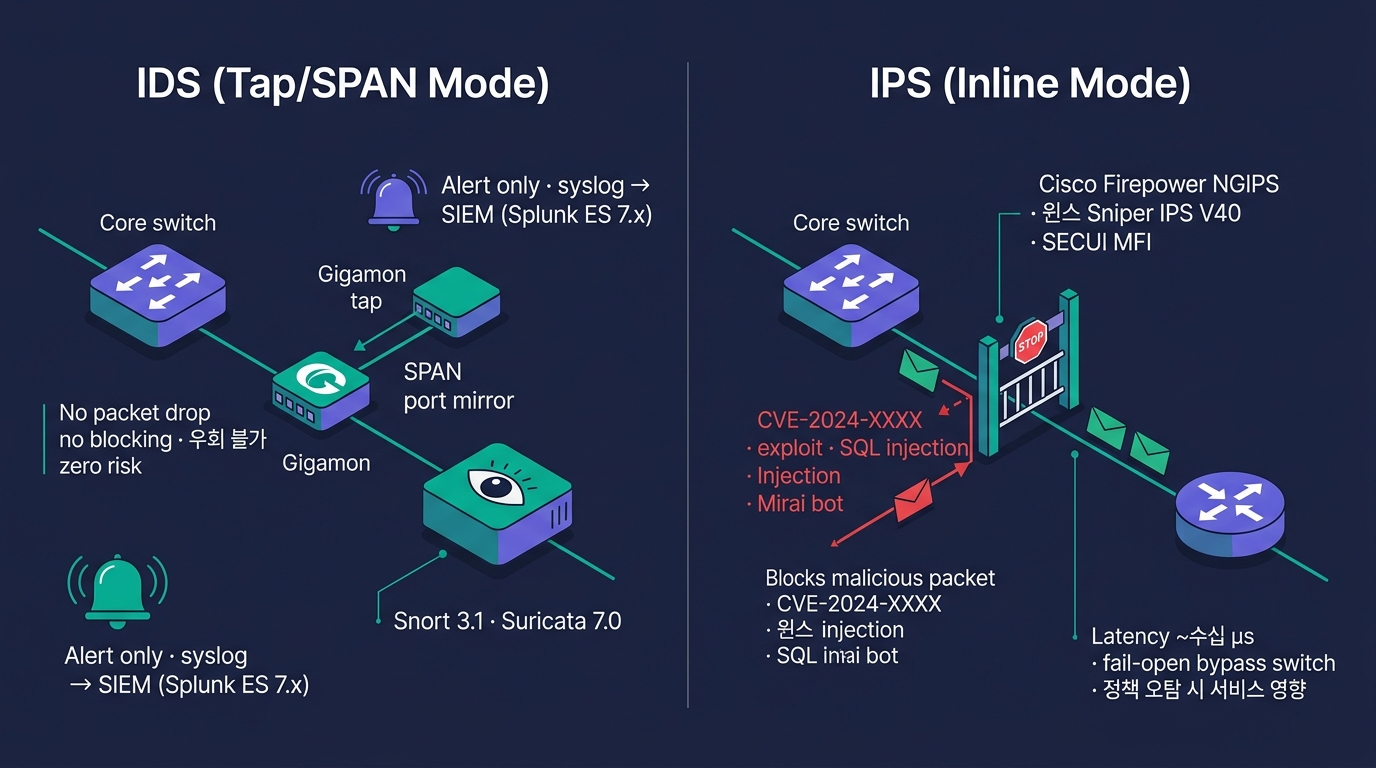
IPS vs IDS — 탐지냐 차단이냐
Anti-DDoS — 대량 트래픽 차단
🌊 DDoS 7대 유형
- Volumetric — UDP Flood·ICMP Flood
- Reflection/Amplification — DNS·NTP·Memcached
- TCP State Exhaustion — SYN Flood
- Application Layer — HTTP GET/POST Flood
- Slowloris·R-U-Dead-Yet — 저속 고갈
- DNS Query Flood
- Encrypted (SSL) Flood
🛡️ 대응 방식 3단계
- Scrubbing Center — 트래픽 우회·정화 (Akamai Prolexic·Cloudflare Magic Transit)
- BGP FlowSpec — ISP에 차단 규칙 전파
- RTBH (Remotely Triggered Black Hole) — 공격 대상 IP 트래픽 폐기
🏢 솔루션·서비스
- 클라우드 흡수형 — Cloudflare·AWS Shield Advanced·Akamai·Cloudbric
- 온프레미스 어플라이언스 — Radware DefensePro·Arbor (NETSCOUT)·A10 Thunder·Genie Networks
- 국내 — KT·LG U+·SK 통신사 Anti-DDoS 서비스
- 국정원 보안기능 확인서 DDoS 6종 인증 제품
🎙️ TA 결정 포인트
- 회선 대역 > 공격 규모 → 자체 방어 가능
- 회선 < 공격 → 상위 ISP·클라우드 흡수 필수
- 하이브리드 — 평시 온프레, 임계 초과 시 클라우드 자동 우회
APT — Advanced Persistent Threat
🎭 APT의 특징
- 지속·은밀·표적
- 평균 잠복 기간 200일+
- 국가·산업 스파이·해커그룹
- 사례 — 농협·KBS·청와대·SK텔레콤
- 일반 시그니처로 탐지 불가
🔗 APT Kill Chain (Lockheed Martin)
- Reconnaissance (정찰)
- Weaponization (무기화)
- Delivery (전달)
- Exploitation (취약점 악용)
- Installation (설치)
- C2 (Command & Control)
- Actions on Objectives (목적 달성)
🛡️ APT 대응 핵심
- Sandbox 기반 탐지 — 알려지지 않은 악성코드 실행 검사
- C&C 채널 차단 — 평판 기반 IP·도메인 차단
- 이메일 첨부 무해화 (CDR)
- EDR + NDR 연동 — 호스트·네트워크 통합
- 위협 인텔리전스 (TI) 연동
🏢 APT 솔루션
- FireEye (Trellix·NX/EX/HX)
- Palo Alto WildFire
- Trend Micro Deep Discovery
- 국내 — 안랩 MDS · 윈스 Sniper APT · 시큐레터
DPI · NDR — 심층 패킷 검사와 네트워크 탐지
🔬 DPI (Deep Packet Inspection)
- 패킷 페이로드까지 분석
- 응용 식별·콘텐츠 검사
- NGFW·IPS·QoS의 기반 기술
- ISP 트래픽 분석에도 활용
- 암호화 트래픽은 SSL Inspection 결합 필요
🚦 활용 영역
- 응용 인식 (App-ID)
- DLP (콘텐츠 검사)
- QoS (응용별 우선순위)
- 합법 감청 (CALEA·국내 통신비밀보호법)
🕵️ NDR (Network Detection & Response)
- 네트워크 트래픽 메타데이터 + AI/ML
- 시그니처가 없어도 이상 행위 탐지
- East-West (내부 횡 이동) 가시성
- C&C 통신·데이터 유출 탐지
- EDR의 네트워크판
🏢 NDR 솔루션
- Darktrace · ExtraHop Reveal(x)
- Vectra AI · Corelight · Cisco Secure Network Analytics (Stealthwatch)
- 국내 — 시큐레터·시큐아이 NDR
🎨 이미지 프롬프트: "Editorial terminal screenshot illustration on dark navy background — three stacked dark terminal windows with title bars: top window titled '$ tcpdump -i eth0 -nn -s0 -w /tmp/cap.pcap \"tcp port 443\" &' showing tcpdump capture summary 'listening on eth0, link-type EN10MB (Ethernet), capture size 262144 bytes ... 18472 packets captured · 18512 received · 0 dropped'; middle wide window titled '$ tshark -r /tmp/cap.pcap -Y \"http.request.method == POST\"' showing color-coded packet output with columns No./Time/Source/Destination/Protocol/Info: rows like '1247 12.4231 10.20.1.55 → 10.10.0.80 HTTP POST /api/login HTTP/1.1', '1248 12.4289 10.10.0.80 → 10.20.1.55 HTTP HTTP/1.1 200 OK 1.2k', '1493 14.8821 192.0.2.66 → 10.10.0.80 HTTP POST /admin/exec' with red background labeled 'suspicious · MITRE ATT&CK T1059 Command and Scripting Interpreter'; bottom terminal titled '$ openssl s_client -connect example.com:443 -showcerts -tls1_3' showing TLS 1.3 handshake output with Certificate chain (0: CN=.example.com, 1: CN=DigiCert TLS RSA SHA256 2020 CA1, 2: CN=DigiCert Global Root G2), SAN: DNS:example.com DNS:.example.com, NotBefore 2025-01-15 NotAfter 2027-01-14, 'SSL handshake has read 5328 bytes, written 423 bytes · cipher TLS_AES_256_GCM_SHA384 · Server Temp Key X25519, 253 bits · Verify return code: 0 (ok)'; clean editorial terminal style, teal #00b894 accents, 16:9"
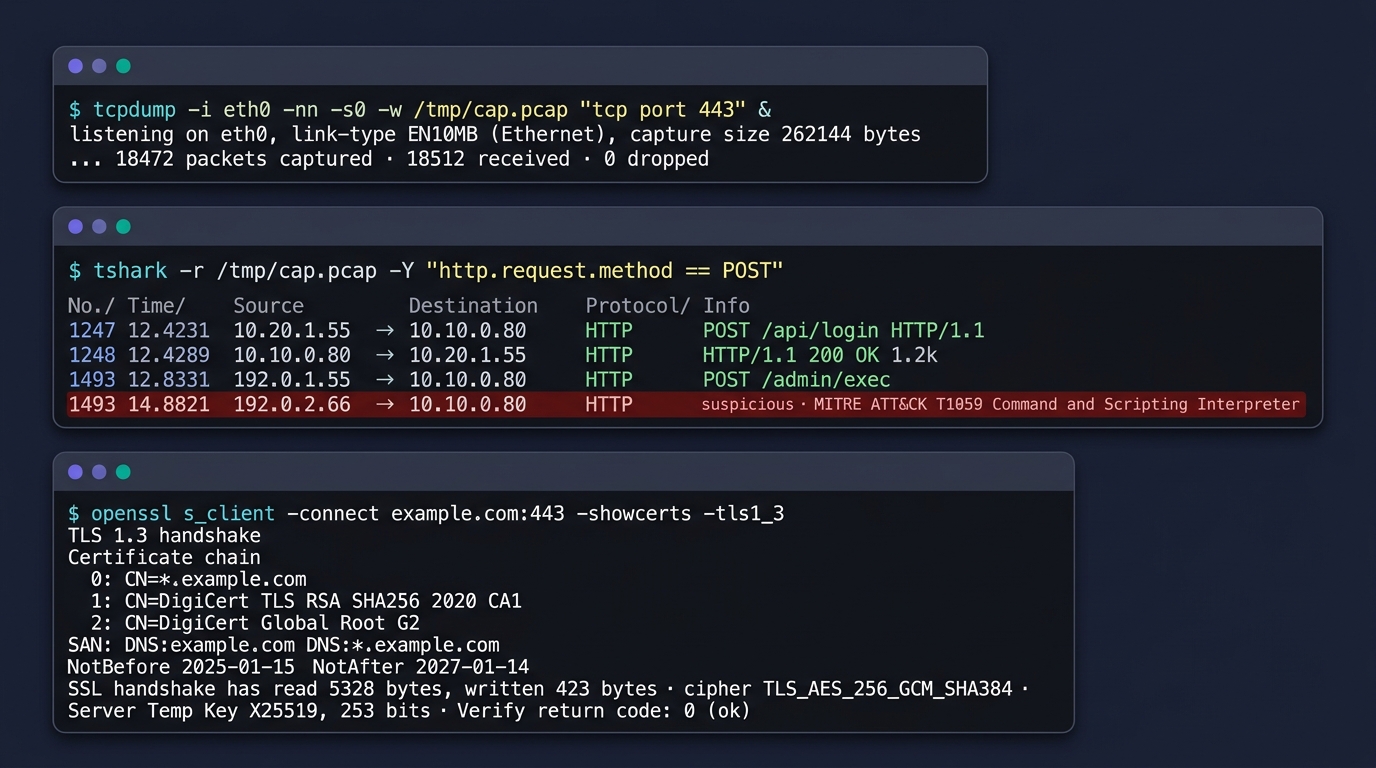
DPI · NDR — 심층 패킷 검사와 네트워크 탐지
VPN — 네 가지 표준 + 신흥 두 가지
🎨 이미지 프롬프트: "Editorial side-by-side comparison illustration on dark navy background — left half labeled 'IPSec VPN (Site-to-Site)' showing two corporate buildings (본사 HQ Seoul · 지사 Branch Busan) connected by a thick encrypted tunnel labeled with 'IKEv2 (UDP 500/4500) · ESP (Encapsulating Security Payload) · AH (Authentication Header) · Tunnel Mode AES-256-GCM · PSK or X.509 인증서', endpoints drawn as 'Cisco ASA 5555-X' and 'Fortinet FortiGate IPsec' rackmount appliances with red logos, side note 'L3 전구간 암호화 · 항상 연결 · 분기·DC 전용'; right half labeled 'SSL VPN (Remote Access)' showing a laptop user (재택근무자) connecting via browser HTTPS (TLS 1.3) to a 'Palo Alto GlobalProtect Portal · Fortinet FortiClient EMS · Cisco AnyConnect Secure Mobility' VPN gateway in front of the corporate network, with sub-text 'TCP 443 · 브라우저만으로 접속 · split-tunnel 옵션 · MFA YubiKey/SMS OTP'; both halves use clean isometric perspective with teal #00b894 and purple #6c5ce7 accents, padlock icons on the tunnels, 16:9, technical illustration"
🔐 IPSec VPN
- 표준 RFC 4301 · 게이트웨이↔게이트웨이
- Site-to-Site (지사↔본사)·Client-to-Site
- IKE (키 교환)·ESP (암호+무결성)·AH (무결성만)
- Tunnel 모드 (전체 IP 캡슐화) vs Transport 모드 (페이로드만)
- DMVPN (Cisco) — IPSec + GRE + NHRP, Hub-Spoke 동적
🌐 SSL VPN
- 브라우저 HTTPS 또는 클라이언트 SW
- 사용자 단위 원격 접속에 최적
- Pulse·Cisco AnyConnect·F5·Fortinet·NCP
🆓 OpenVPN
- 오픈소스·TLS 기반
- 포트 1194 (UDP/TCP)
- 중소기업·SMB 표준
- 라이센스 비용 0
⚡ WireGuard
- 차세대 표준 (2020~)
- Linux 커널 내장
- 코드 4,000줄 (vs OpenVPN 600,000줄)
- 빠르고 단순·NAT 우회 강력
- Tailscale·Twingate가 활용
🛡️ 망분리 환경
- 망연계 솔루션 (한 방향) — 시큐웍스 SecuwayLink·소만사
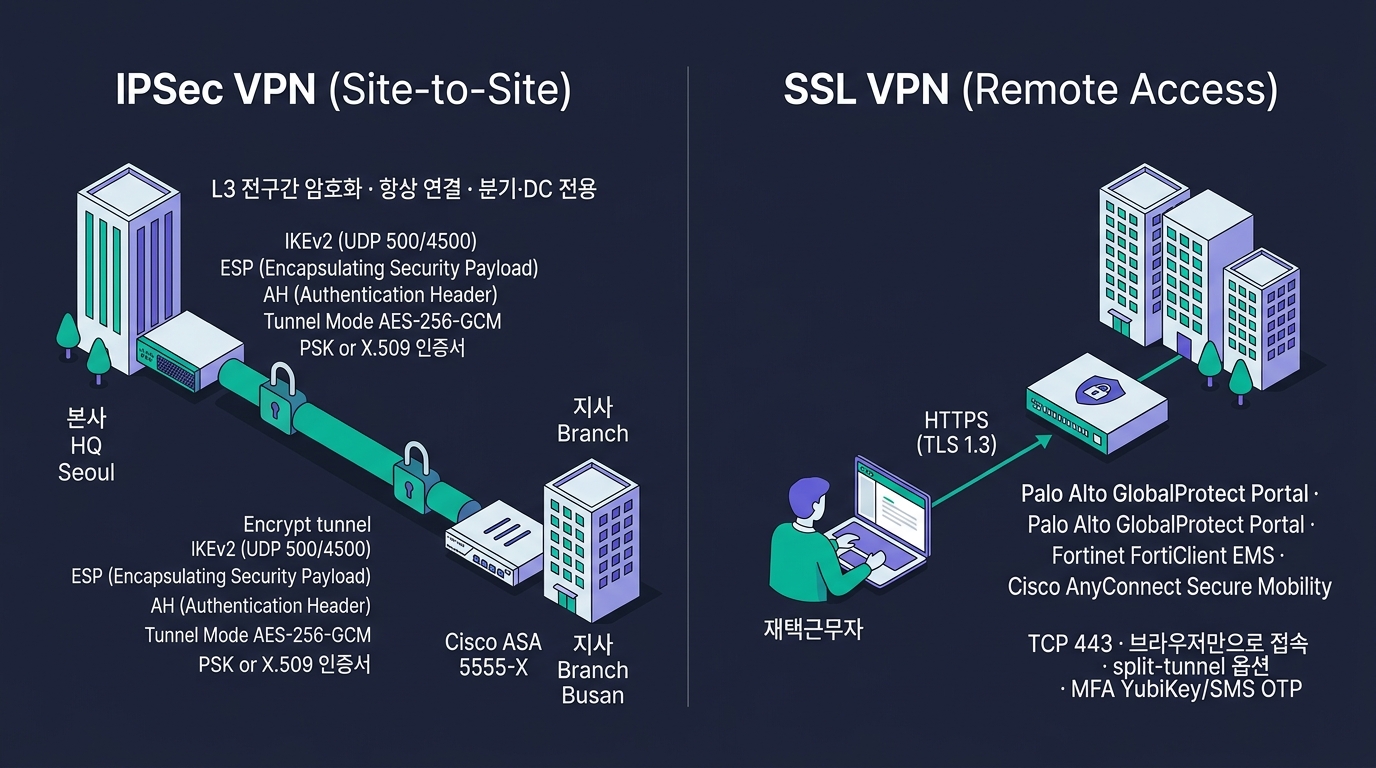
VPN — 네 가지 표준 + 신흥 두 가지
VPN 결정 매트릭스 — 언제 어느 것?
| 시나리오 | 권장 VPN | 이유 |
|---|---|---|
| 본사 ↔ 지사 상시 | IPSec Site-to-Site | 안정·표준·대역 활용 |
| 재택근무 사용자 | SSL VPN 또는 WireGuard | 클라이언트 단순·HTTPS 통과 |
| 외부 협력사 한시적 | SSL VPN + MFA | 사용자 단위·세분화 |
| 다수 지점 (Hub-Spoke) | DMVPN | 동적 터널·관리 단순 |
| 오픈소스·저예산 | OpenVPN | 무료·검증·널리 호환 |
| 차세대·고성능 | WireGuard | 단순·빠름 |
| 공공·금융 망연계 | 단방향 게이트웨이 | 망분리 의무 |
| 클라우드 VPC 연결 | Cloud VPN (IPSec) | AWS/Azure 표준 |
TA 결정 4축: ① 사용자 vs 사이트 단위, ② 클라이언트 SW 설치 가능 여부, ③ 인증·암호화 강도 요구, ④ 운영 인력 역량.
Part A 정리 — 네트워크 보안 9가지
경계 보안
- NGFW — 4세대 통합 방화벽
- WAF — OWASP Top 10 차단
- UTM — 중소·지점 통합형
트래픽 통제
- IPS/IDS — Inline vs Tap
- Anti-DDoS — Scrubbing·RTBH
위협 탐지
- APT 대응 — Sandbox + Kill Chain
- NDR — 네트워크 이상행위 AI 탐지
- DPI — L7 페이로드 분석
원격 접속
- IPSec/SSL/OpenVPN/WireGuard
- DMVPN — Hub-Spoke
- 단방향 GW — 망분리 필수
TA 결정 7가지
- 외부 경계 방화벽 세대
- WAF 위치 (클라우드 vs 온프레)
- IPS 도입 (NGFW 내장 vs 별도)
- Anti-DDoS 자체 vs 통신사
- APT 솔루션 도입 여부
- VPN 종류·이중화
- 망분리 수준 (논리 vs 물리)
PART B
엔드포인트 보안 — PC·서버·모바일의 마지막 방어선
AV → EPP → EDR → XDR → MDR · NAC · PMS · SIEM · SecureOS
엔드포인트 보안 5세대 진화
1세대 — Anti-Virus (1990~)
- 시그니처 기반 — 알려진 악성코드만
- 매일 패턴 업데이트
- 한계: 신종·변종·Zero-day 대응 불가
- 대표: 안랩 V3·이스트시큐리티 알약·Symantec Endpoint Protection·McAfee
2세대 — EPP (Endpoint Protection Platform)
- AV + 방화벽 + 디바이스 통제
- 휴리스틱·행위 기반 추가
- 통합 콘솔
- 대표: Trend Micro Apex One (구 OfficeScan)·Symantec Endpoint Protection·McAfee EPS
3세대 — EDR (Endpoint Detection & Response)
- IoC·이상 행위·시계열 기반
- 모든 프로세스·파일·네트워크 행위 기록
- 사고 발생 후 포렌식·롤백 가능
4세대 — XDR (Extended Detection & Response)
- Endpoint + Network + Cloud + Identity 통합
- 다층 텔레메트리 상관 분석
- AI/ML 자동 분류·우선순위
- 대표: Palo Alto Cortex XDR·CrowdStrike Falcon·SentinelOne Singularity·Microsoft Defender XDR
5세대 — MDR (Managed Detection & Response)
- 외부 SOC 24/7 위탁 운영
- 자체 보안 인력 부족 기업용
- 솔루션 + 인력 패키지
- 대표: CrowdStrike Falcon Complete·SentinelOne Vigilance·Arctic Wolf·Expel
1세대 AV는 더 이상 충분하지 않다 — EDR/XDR + MDR이 2026 신규 도입 표준.
EDR — 동작 원리와 분석 흐름
🎨 이미지 프롬프트: "Editorial timeline illustration on dark navy background — horizontal time axis (T-30min → T-0 → T+5min) showing EDR endpoint event streams over time, four swim-lanes labeled 'Process (procmon)', 'File (NTFS USN journal)', 'Network (Sysmon EID 3)', 'Registry (HKLM/HKCU)'; small icons (gear, document, network arrow, key) appear along each lane as events with timestamps (sample: '10:14:22 winword.exe spawned', '10:14:23 ~$invoice.docm written to %TEMP%', '10:14:25 powershell.exe -enc base64...', '10:14:26 outbound 443 → 185.220.x.x (Tor exit)', '10:14:27 HKCU\...\Run added persistence key'); one red exclamation cluster in the middle highlighted with a circular zoom indicator labeled '이상행위 패턴 · CrowdStrike Falcon Insight XDR detection · Severity: High', a thin teal connecting line to a side panel showing 'IoC Match: SHA256 a3f5... · IP 185.220.101.42 (Tor) · ML Score 0.94 · MITRE ATT&CK TTPs: T1566.001 Spearphishing Attachment → T1059.001 PowerShell → T1547.001 Registry Run Keys → T1041 Exfiltration over C2 · Suspected actor: LockBit affiliate / APT29 Cozy Bear pattern' analysis bullets; clean editorial timeline visualization, teal #00b894 and purple #6c5ce7 accents, 16:9"
🎯 수집 데이터
- 프로세스 생성·종료
- 파일 읽기·쓰기·삭제
- 네트워크 연결 (IP·포트·도메인)
- 레지스트리 변경 (Windows)
- PowerShell·CMD 명령
- DLL 로드·인젝션
- 사용자 로그인·권한 상승
🧠 분석 방법
- IoC 매칭 (해시·도메인·IP)
- 행위 기반 (MITRE ATT&CK TTP)
- ML 이상 탐지·시계열 상관
🛡️ 대응 (Response)
- 격리 (Network Containment)
- 프로세스 강제 종료
- 파일 격리·삭제·롤백
- 레지스트리 복원
- 원격 셸·라이브 응답
- 자동 차단 Playbook
📊 운영 관점
- 튜닝 기간 3~6개월 · 오탐 최소화 핵심
- SOC Tier 1·2 인력 필수
- MDR 위탁 시 인력 부담↓
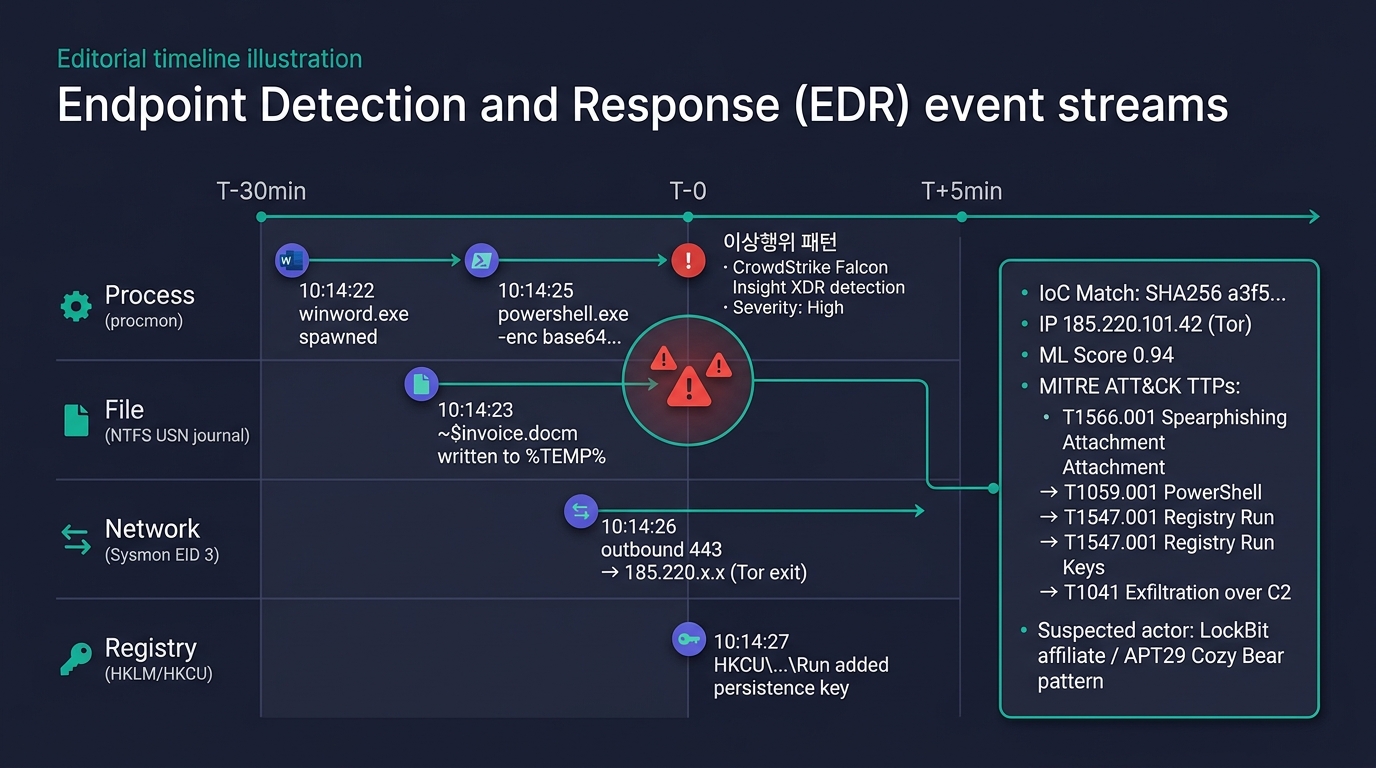
EDR — 동작 원리와 분석 흐름
XDR — Extended Detection & Response
🌐 XDR의 통합 범위
- Endpoint (EDR)
- Network (NDR·NGFW 로그)
- Cloud (CSPM·CASB·CloudTrail)
- Identity (AD·Okta·IAM)
- Email (Email Security)
🧠 핵심 차별점
- 다층 텔레메트리 상관 분석
- 단일 사건 → 공격 캠페인 재구성
- AI/ML로 우선순위 자동화
- MTTD/MTTR 단축
🆚 SIEM vs XDR
- SIEM — 로그 수집·검색·룰 기반 (범용)
- XDR — 보안 도메인 특화 통합 분석
둘은 대체가 아니라 보완 — XDR이 1차 자동 분석, SIEM이 통합 보존·감사.
🏢 대표 XDR 솔루션
- Palo Alto Cortex XDR
- CrowdStrike Falcon XDR
- Microsoft Defender XDR
- Trend Vision One
- Cisco XDR (구 SecureX)
PMS — Patch Management System
🩹 왜 PMS인가
- 취약점 = Zero-day의 99%는 패치 미적용
- 수동 패치 = 누락·지연·검증 불가
- 공공·금융은 30일 이내 보안 패치 의무
- 자산 대수 100대 넘으면 자동화 필수
🛠️ 주요 기능
- 취약점 스캐닝 (CVE 매칭)
- 패치 배포 스케줄
- 사전 검증 (Pilot Group)
- 롤백·강제 리부트
- 준수 보고서 (감사 대응)
🏢 솔루션
- Microsoft WSUS / SCCM (MECM) — Windows 표준
- Red Hat Satellite — RHEL
- Ivanti · ManageEngine Patch Manager
- 국내 — 안랩 APC·소만사 PMS·지란지교 PMS
⚠️ 한국 특수성
- 공공 보안 가이드 — 패치 30일 이내
- 분기별 모의 점검 — 미패치 0건 목표
- 1년 누적 미패치 발견 시 감사 지적
📍 보안기능 확인서
- 국정원 인증 PMS 제품이 공공 표준
공급망 공격 — Supply Chain Attack
🎯 사례
- log4j (2021) — Apache 로깅 라이브러리 RCE, 전 세계 영향
- SolarWinds (2020) — Orion 패치에 백도어 삽입
- Kaseya VSA (2021) — RMM 솔루션 통한 랜섬웨어
- MOVEit (2023) — 파일 전송 SW RCE
- 3CX (2023) — VoIP 클라이언트 변조
- 국내 — 공공 SW 업데이트 채널 공격 시도
🪤 공격 경로
- 오픈소스 라이브러리 (npm·PyPI·Maven)
- 유료 SW 업데이트 채널
- DevOps 파이프라인 (Git·CI/CD)
- 하드웨어 펌웨어
- 외주·MSP
🛡️ 대응 7가지
- SBOM (Software Bill of Materials) — 구성요소 목록화
- 의존성 스캐닝 (Snyk·Dependabot·OWASP Dep-Check)
- 이미지 서명 검증 (Sigstore·Cosign·Notary)
- SLSA Framework (Supply-chain Levels for Software Artifacts)
- CI/CD 파이프라인 보안 (인증·시크릿 관리)
- 벤더 보안 점검 (SOC 2·ISO 27001 요구)
- EDR/XDR이 변조 패치 탐지 (행위 기반)
🎙️ TA 인식
- 자체 보안만으로는 부족 — 공급사슬 전체 가시성이 필요
- 미국 EO 14028, 유럽 CRA, 한국도 가이드 강화 중
NAC — Network Access Control
🎯 NAC의 역할
- "누가 들어왔나" — 사용자·단말 인증
- "상태는?" — Posture Assessment (AV·패치·OS)
- "어디로?" — VLAN 자동 할당
- "격리" — 비인가·미준수 단말 격리망
🔐 인증 방식
- 802.1X — 표준·포트 단위 인증 (EAP-TLS·EAP-PEAP)
- MAC 인증 — MAC 화이트리스트
- Captive Portal — 웹 로그인 (Wi-Fi·게스트)
- Agentless — Fingerprinting 기반
🩺 Posture Assessment
- AV 설치·최신화 확인
- OS 패치 수준
- 방화벽 활성
- 인가 SW 외 차단
- 부적합 → 격리 VLAN → 자동 교정 → 재인증
🏢 솔루션
- Cisco ISE — 글로벌 1위
- Aruba ClearPass
- Forescout (CounterACT) — Agentless 강자
- 국내 — Genians NAC·시큐브 SecuwayNAC·윈스 NAC
- 공공 KCMVP·보안기능 확인서 NAC 6종
ESM vs SIEM — 통합 보안 관제의 두 세대
📊 ESM (Enterprise Security Management)
- 2000년대 통합 보안 관제 1세대
- 보안 장비 이벤트 통합·정규화
- 실시간 알람·대시보드
- 상관 분석 약함
- 국내 — 이글루시큐리티 SPiDER·안랩 TMS·LG CNS ESM
🧠 SIEM (Security Information & Event Management)
- ESM + 빅데이터·상관 분석·룰 엔진
- 전 IT 로그 통합 (보안 + 시스템 + 응용)
- 컴플라이언스 보고서 자동화
- 장기 보존 6개월~1년+
- 머신러닝 이상 탐지 (UEBA)
🏢 SIEM 솔루션
- Splunk Enterprise Security — 시장 1위·고가
- IBM QRadar — 금융권 강자
- Micro Focus ArcSight — 정부·통신
- Elastic SIEM — 오픈소스·비용 절감
- LogRhythm · Securonix · Exabeam
- 국내 — 이글루 SPiDER TM·안랩 TMS·LG U+ SecureNet
🎙️ TA 결정
- 로그량 (EPS) 기반 라이센스
- 보존 기간 (1년 vs 3년)
- 상관 룰 작성 인력 보유 여부
- MDR 위탁 가능성
🎨 이미지 프롬프트: "Editorial side-by-side console mockup illustration on dark navy background — left half labeled 'Splunk Enterprise Security 7.x · Glass Tables / Threat Topology' showing a dark-theme SOC dashboard with top notable-events count '47 OPEN / 12 HIGH · Risk Score 893', a horizontal 24h time slider, four correlated widgets: 'Notable Events by Domain (donut: Endpoint 18 / Network 14 / Identity 9 / Access 6)', 'Failed Logins spike (line: 14:22 spike to 1,847 attempts)', 'DNS Exfiltration pattern (table with src/dest/bytes: 10.20.1.55 → dns.malicious.ru 4.2MB)', 'MITRE ATT&CK Heatmap (Tactic x Technique grid with red cells highlighting T1059·T1486·T1041·T1566)', sample SPL query bar 'index=security sourcetype=stream:dns | stats sum(bytes) by query', Splunk green chevron logo top-left; right half labeled 'IBM QRadar SIEM 7.5 · Offense Manager' showing the classic blue QRadar console with 'Offenses' list (ID 18472 Magnitude 8 'Botnet C2 communication · src 10.20.1.55 · dst 185.220.101.42 · 142 events', ID 18415 Magnitude 6 'Brute force - SSH · 1,247 failed logons · src 203.0.113.x', ID 18398 Magnitude 9 'Data Exfiltration suspected · T1041 · 4.2 GB out · 야간'), magnitude bar gauges 1-10, a QFlow network widget at bottom with src/dest/bytes columns, AQL query bar 'SELECT sourceip, SUM(sourcebytes) FROM flows ...', IBM 8-bar logo top-left; thin vertical divider; clean editorial UI mockup style, teal #00b894 and purple #6c5ce7 accents, 16:9"
📸 SIEM 콘솔 reference - Splunk Enterprise Security — splunk.com/en_us/products/enterprise-security.html - IBM QRadar SIEM — ibm.com/products/qradar-siem - Microsoft Sentinel — azure.microsoft.com/products/microsoft-sentinel - Elastic SIEM — elastic.co/security/siem - 이글루코퍼레이션 SPiDER TM · 안랩 TMS — 국내 SIEM
🎨 이미지 프롬프트: "Editorial terminal screenshot illustration on dark navy background — three side-by-side terminal windows each with a dark gray title bar, monospace text and faint teal command prompts: left window titled '[root@rhel9 ~]# iptables -L -n -v --line-numbers' showing output 'Chain INPUT (policy DROP 0 packets, 0 bytes)' with columns num/pkts/bytes/target/prot/opt/in/out/source/destination, sample rules '1 1842 142K ACCEPT all -- lo * 0.0.0.0/0 0.0.0.0/0', '2 8421 1.2M ACCEPT tcp -- * * 0.0.0.0/0 0.0.0.0/0 tcp dpt:22', '3 142 18K REJECT all -- * * 192.0.2.0/24 0.0.0.0/0 reject-with icmp-port-unreachable', then 'Chain FORWARD' and 'Chain OUTPUT'; middle window titled '[root@ubuntu24 ~]# nft list ruleset' nftables output with 'table inet filter { chain input { type filter hook input priority filter; policy drop; ct state established,related accept; iifname \"lo\" accept; tcp dport 22 accept; icmp type echo-request limit rate 5/second accept; } chain forward { ... } chain output { ... } }'; right window titled '[admin@centos9 ~]$ sudo firewall-cmd --list-all --zone=public' showing 'public (active) target: default · icmp-block-inversion: no · interfaces: eth0 · sources: · services: ssh dhcpv6-client cockpit · ports: 8080/tcp 443/tcp · protocols: · forward: yes · masquerade: no · forward-ports: · source-ports: · icmp-blocks: · rich rules: rule family=\"ipv4\" source address=\"10.20.0.0/16\" accept'; below the three windows a small caption '리눅스 호스트 방화벽 CLI · iptables → nftables → firewalld'; clean editorial terminal style, teal #00b894 accents, 16:9"
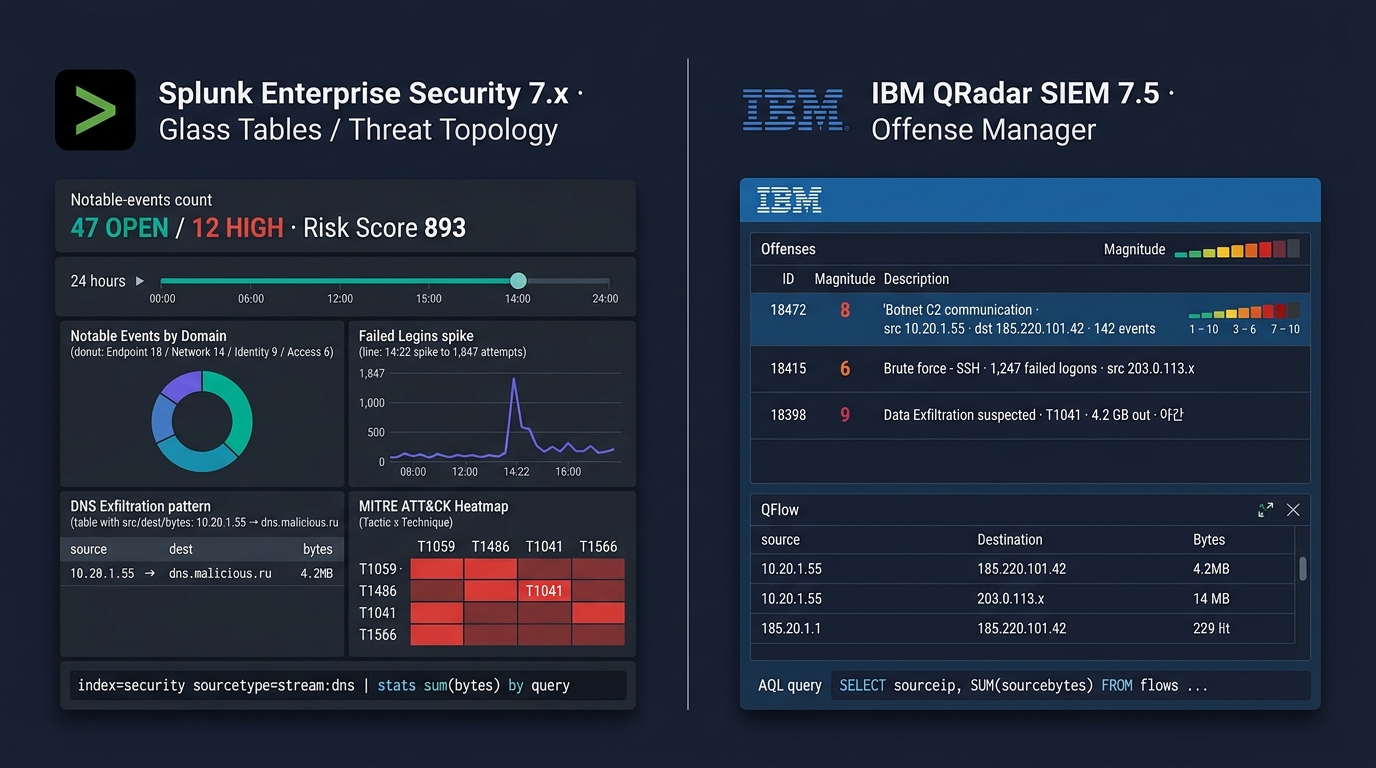
ESM vs SIEM — 통합 보안 관제의 두 세대
Part B 정리 — 엔드포인트 보안 8가지
5세대 진화
- AV → EPP → EDR → XDR → MDR
- 한국 표준 = EDR + MDR 위탁
운영 솔루션
- PMS — 30일 패치 의무
- NAC — 단말 인증·격리
- SecureOS — 커널 강화
통합 관제
- ESM → SIEM → XDR
- EPS·보존기간 기준 라이센스
- MDR 위탁 옵션
TA 결정 6가지
- EDR 솔루션 선택 (KCMVP 여부)
- MDR 자체 vs 위탁
- PMS 도입 시점
- NAC 802.1X vs MAC
- SIEM EPS·보존기간
- SecureOS 적용 범위
공급망 보안
- SBOM·의존성 스캔
- 이미지 서명·SLSA
- 벤더 SOC 2 요구
한국 공공 표준
- KCMVP 인증 EDR
- 패치 30일 의무
- NAC·SecureOS 점진 의무화
PART C
데이터 보안 — 정보 자산 자체를 지키는 기술
DRM · DLP · DB보안 · TDE · PKI · FIDO · KMS/HSM
DRM — Digital Rights Management
🔐 DRM의 본질
- 문서·파일 자체에 암호화 + 권한 정책 결합
- 외부로 유출되어도 권한 없으면 열람 불가
- 한국 기업 보안의 트레이드마크 — 글로벌엔 거의 없음
🎯 통제 항목 — CRWDNO
- Copy — 복사
- Read — 읽기
- Write — 편집
- Delete — 삭제
- Net — 전송
- Output — 출력·캡처
🪡 핵심 기술
- AES-256 파일 암호화
- Watermarking — 인쇄·캡처 시 사용자 식별 워터마크
- 권한 서버 — 열람할 때마다 정책 확인
- 오프라인 정책 — 일정 시간 후 만료
🏢 솔루션 (한국 시장)
- Fasoo (파수) — 시장 1위·금융·공공
- 마크애니 (MarkAny) — 미디어·문서 워터마크
- 소프트캠프 (Softcamp) — 한컴 그룹
- 이니텍·세이프넷
⚠️ 운영 이슈
- 응용 호환성 항상 검증 필요 (Office·CAD 등)
- 권한 서버 장애 시 전사 업무 중단
DLP — Data Loss Prevention
🚪 DLP 3대 배치
- Endpoint DLP — PC·노트북 에이전트
- USB·프린트·캡처·메신저 통제
- Network DLP — 게이트웨이
- 이메일·웹·FTP 트래픽 검사
- Storage DLP (Data-at-Rest)
- 파일서버·DB 스캔·분류·암호화
🔍 검출 기법
- 키워드·정규식 (주민번호·카드번호)
- 데이터 식별자 (Document Fingerprint)
- 머신러닝 분류
- OCR — 이미지 내 문자
📋 DLP 정책 예
- 주민번호 10건+ 이메일 → 차단 + 알림
- 카드번호 외부 송신 → 암호화 강제
- 기밀 등급 문서 → 외부 전송 차단
- USB 복사 → 승인 후 허용
🏢 솔루션
- Symantec DLP (Broadcom) · Trellix DLP (구 McAfee)
- Forcepoint DLP · Digital Guardian
- Microsoft Purview DLP (M365 통합)
- 국내 — 소만사 i-DLP·지란지교 OfficeKeeper DLP·시큐브 DLP
- 공공 보안기능 확인서 DLP 인증 제품
DB 보안 3종 — 접근·감사·암호화
🚪 DB 접근제어 (DAC)
- 사용자 ↔ DB 사이에 Proxy
- 쿼리 단위 인증·인가
- 세션 녹화
- 마스킹 (응답 데이터 가리기)
- 대표 — 펜타시큐리티 D'Amo·신시웨이 Petra·이글루 SAS
📜 DB 감사 (DAM)
- 모든 쿼리 로그 수집
- 외부 분석·이상 행위 탐지
- 컴플라이언스 보고서
- 4가지 수집 방식:
- Network Sniff — 무영향
- Plug-in / Agent — DB 내 후크
- API / Trigger — 응용 변경
- Kernel Hook — OS 수준
🔐 DB 암호화
- TDE (Transparent Data Encryption)
- DB 엔진 차원 자동 암호화
- Oracle Advanced Security·MSSQL TDE·MySQL Enterprise
- Column-level
- 특정 컬럼만 (주민번호·카드)
- Tokenization
- 원본 → 무의미한 토큰 치환
- PCI-DSS 표준 대응
⚙️ 결합 운영
- DAC + DAM + TDE = 3종 풀세트
- 공공·금융 표준
🏢 한국 솔루션
- 펜타시큐리티 D'Amo — 시장 1위
- 신시웨이 Petra
- 이글루코퍼레이션 SAS
- 이니텍·웨어밸리
- 글로벌 — Imperva SecureSphere·IBM Guardium
🎙️ TA 결정
- 운영 DB 부하 영향
- 응용 코드 수정 필요 여부
- KCMVP·보안기능 확인서 요구
FIDO · MFA — 비밀번호 없는 인증
🔑 FIDO 표준 진화
- FIDO U2F (2014) — USB 보안키 + 비밀번호
- FIDO UAF (2014) — 모바일 생체 인증
- FIDO2 / WebAuthn (2019) — 브라우저 표준·비밀번호 완전 대체
🧬 인증 요소 3가지
- 소유 (Possession) — 휴대폰·OTP·보안키
- 지식 (Knowledge) — 비밀번호·PIN
- 고유 (Inherence) — 지문·홍채·얼굴·정맥
MFA = 2개 이상 요소 결합
🛡️ MFA 종류
- OTP — HOTP·TOTP (Google Authenticator)
- SMS OTP — 보안 약함 (SIM Swap)
- Push 알림 — Duo·MS Authenticator
- 하드웨어 토큰 — YubiKey·Feitian
- 생체 — TouchID·FaceID·Windows Hello
- 카드 인증서 — 공동인증서·금융인증서
🏢 한국 인증 시장
- 공동인증서 (구 공인인증서)
- 금융인증서
- 간편인증 — 카카오·네이버·PASS·토스
- FIDO 협회 (Korea FIDO Alliance)
🎨 이미지 프롬프트: "Editorial product flat-lay illustration on dark navy background — six physical authentication devices arranged in a row like a museum display: 'YubiKey 5C NFC' (small black USB-C key with golden touch ring, slim card form factor, label 'FIDO2 · WebAuthn · PIV · OTP'), 'YubiKey 5 NFC (USB-A)' (USB-A version with the touch sensor on the gold disc, label 'NFC tap to phone'), 'YubiKey 5 Bio (Fingerprint)' (black key with on-device fingerprint sensor, label 'biometric match-on-key'), 'Google Titan Security Key (USB-C)' (white rounded USB-C with Google G logo, label 'BLE + NFC · made by Feitian'), 'Feitian ePass FIDO2 NFC' (blue compact key with white side button, label 'CTAP2 · L1 Certified'), 'SafeNet eToken 5300' (black slim USB token with Thales logo, label 'PKI 인증서 저장 · 공인인증서 호환'); to the right of the row a biometric reader terminal 'Suprema BioStation 3' (white wall-mounted unit with green LED + fingerprint sensor + camera, label 'Face + Fingerprint · 출입통제'); below each device a tiny label with model name and FIDO2 / FIDO2.1 / Passkey badge plus 'FIDO Alliance L1 Certified' or 'L2 Certified' shield; each device with subtle soft shadow; clean editorial product photography style, teal #00b894 and purple #6c5ce7 background glow, 16:9"
📸 FIDO 보안키·생체인증 reference - YubiKey 5 Series — yubico.com/products/yubikey-5-overview - Google Titan Security Key — store.google.com/product/titan_security_key - Feitian FIDO2 키 — ftsafe.com - 지문/얼굴 단말 — Suprema BioStation · IDEMIA MorphoWave - Apple Passkey / Windows Hello — FIDO2 OS 내장 인증
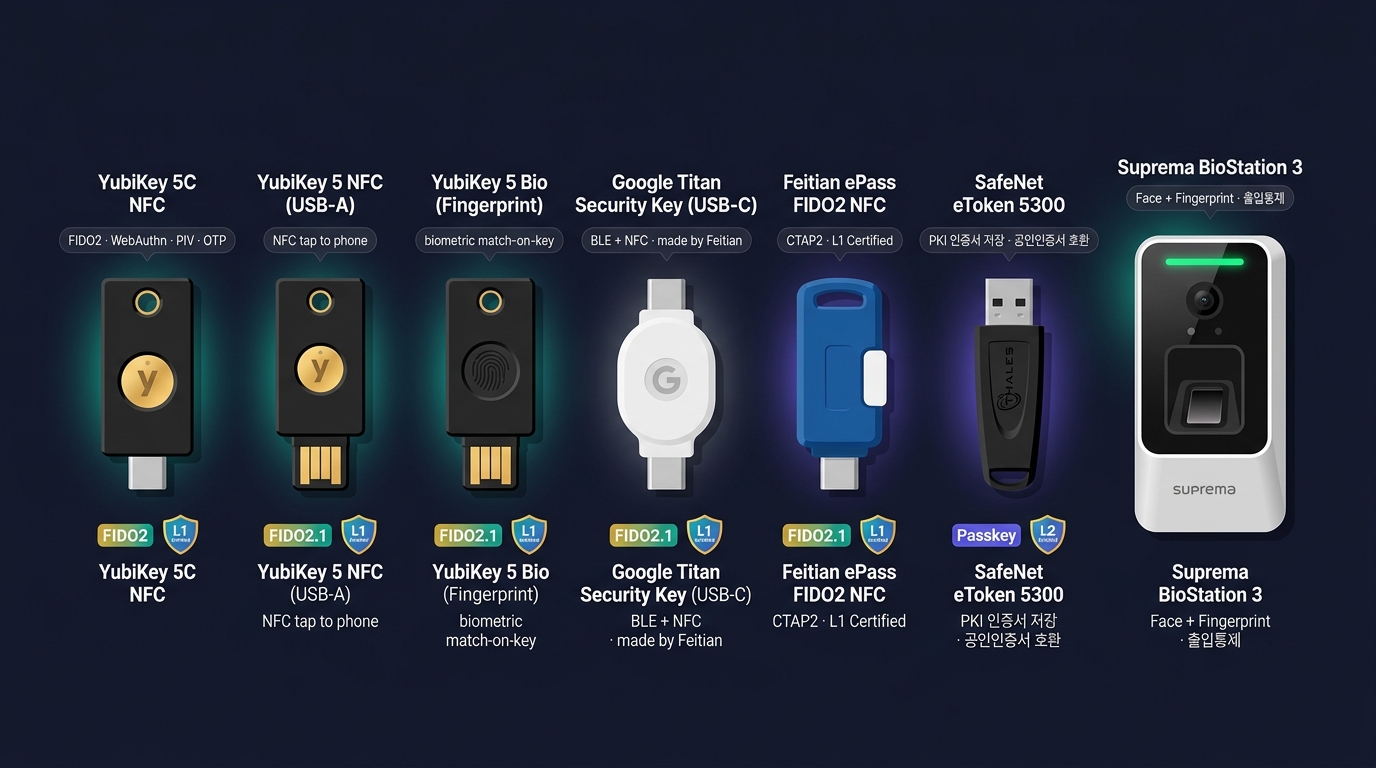
FIDO · MFA — 비밀번호 없는 인증
PKI — Public Key Infrastructure
🎨 이미지 프롬프트: "Editorial flow diagram on dark navy background — vertical PKI certificate lifecycle showing four entities labeled in Korean: 'CA (Certificate Authority) · Microsoft AD CS / HashiCorp Vault PKI Engine 1.16 / DigiCert ICA' at top with a wax-seal stamp icon, 'RA (Registration Authority) · KISA · 한국정보인증' below with a form-and-clipboard icon, 'Subscriber 사용자 (서버/사람)' on the left with a person+laptop icon, 'Relying Party 검증자 (브라우저/서버)' on the right with a magnifying-glass icon; arrows show the flow with protocol labels: Subscriber→RA 'CSR 신청 (PKCS#10 · openssl req -new -key key.pem -out csr.pem)', RA→CA '신원 검증 (도메인 소유권 / 기업 등기부)', CA→Subscriber '인증서 발급 (X.509 v3 · SAN · Key Usage · 365일)', Subscriber→Relying Party 'TLS Handshake 시 Certificate 제시', Relying Party→CA 'CRL 다운로드 / OCSP Stapling 검증 (RFC 6066)'; a side panel shows '인증서 수명주기: ① 신청 CSR → ② 발급 (NotBefore/NotAfter) → ③ 배포 (PEM/DER/PFX) → ④ 사용 (TLS·코드서명·S/MIME) → ⑤ 갱신 (ACME automation) → ⑥ 폐기 (Revoke → CRL/OCSP)'; bottom note 'X.509 v3 필드: Version / Serial / Issuer DN / Validity / Subject DN / SubjectPublicKeyInfo / Extensions (SAN·Key Usage·EKU·Basic Constraints·CRL DP·AIA)'; clean editorial flow diagram, teal #00b894 and purple #6c5ce7 accents, 16:9 — CRITICAL: All visible text in this image MUST be in English only; replace all Korean labels with English equivalents (transliterate Korean proper nouns). Do NOT include any Korean characters as they will be garbled by the renderer."
🏛️ PKI 구성 요소
- CA (Certificate Authority) — 인증서 발급·서명
- RA (Registration Authority) — 신청자 신원 확인
- Subscriber — 인증서 발급자
- Relying Party — 인증서 검증자
- CRL (Certificate Revocation List) — 폐기 목록
- OCSP — 실시간 폐기 조회
📜 X.509 인증서 항목
- 발급자(Issuer)·주체(Subject)
- 공개키·서명 알고리즘
- 유효기간·확장 필드
- CN·SAN
🔄 인증서 수명주기
- CSR 생성 (개인키·공개키)
- 신원 확인 (RA)
- 발급 (CA 서명)
- 배포·사용
- 갱신 (만료 전 30일)
- 폐기 (탈취·이직 시)
🏢 한국 CA
- 공인인증기관 (구) — 금융결제원·한국정보인증·코스콤·한국전자인증·한국무역정보통신
- 사설 CA — 사내용 (AD CS·OpenSSL)
- 글로벌 — Let's Encrypt·DigiCert·Sectigo·GlobalSign
🎨 이미지 프롬프트: "Editorial terminal-and-window illustration on dark navy background — left side shows a dark terminal running '$ openssl x509 -in cert.pem -noout -text' with monospace output displaying X.509 v3 Certificate fields: 'Certificate: Data: Version: 3 (0x2) · Serial Number: 04:3c:8b:1f:7a:e2:9d:55:a4:... · Signature Algorithm: sha256WithRSAEncryption · Issuer: C=US, O=DigiCert Inc, CN=DigiCert Global Root G2 · Validity: Not Before: Jan 15 00:00:00 2025 GMT, Not After: Jan 14 23:59:59 2027 GMT · Subject: C=KR, ST=Seoul, O=Example Corp, CN=.example.kr · Subject Public Key Info: RSA 2048 bit · X509v3 extensions: Basic Constraints: critical CA:FALSE · Key Usage: critical Digital Signature, Key Encipherment · Extended Key Usage: TLS Web Server Authentication, TLS Web Client Authentication · Subject Alternative Name: DNS:example.kr, DNS:.example.kr · CRL Distribution Points: URI:http://crl3.digicert.com/... · Authority Information Access: OCSP URI:http://ocsp.digicert.com'; below it a second prompt '$ openssl s_client -connect example.kr:443 -servername example.kr' showing TLS handshake summary; right side shows the Microsoft 'Active Directory Certificate Services (AD CS) — Certification Authority' MMC console (Windows Server 2022) titled 'certsrv - [Certification Authority (Local)\corp-CA-01]', left tree (Revoked Certificates, Issued Certificates, Pending Requests, Failed Requests, Certificate Templates), right pane lists issued certs with columns Request ID/Requester Name/Binary Certificate/Serial Number/Certificate Effective Date/Certificate Expiration Date/Certificate Template (rows like '1247 · CORP\web01$ · — · 1a2b... · 2025-03-12 · 2027-03-12 · WebServer'); a teal arrow between them labeled 'CLI ↔ AD CS GUI · 동일 X.509 인증서를 두 시각에서'; clean editorial style, teal #00b894 and purple #6c5ce7 accents, 16:9 — CRITICAL: All visible text in this image MUST be in English only; replace all Korean labels with English equivalents (transliterate Korean proper nouns like company/place names). Do NOT include any Korean characters as they will be garbled by the renderer."
📸 PKI·인증서 reference
- X.509 인증서 구조 — RFC 5280 / DigiCert blog
- OpenSSL CLI 매뉴얼 — openssl.org/docs/man3.0 (openssl x509, openssl s_client, openssl req)
- Microsoft Active Directory Certificate Services (AD CS) Console — learn.microsoft.com/windows-server/identity/ad-cs
- 한국 공동인증서·금융인증서 — yessign.or.kr · 금융결제원
- Let's Encrypt / Certbot — letsencrypt.org · certbot.eff.org
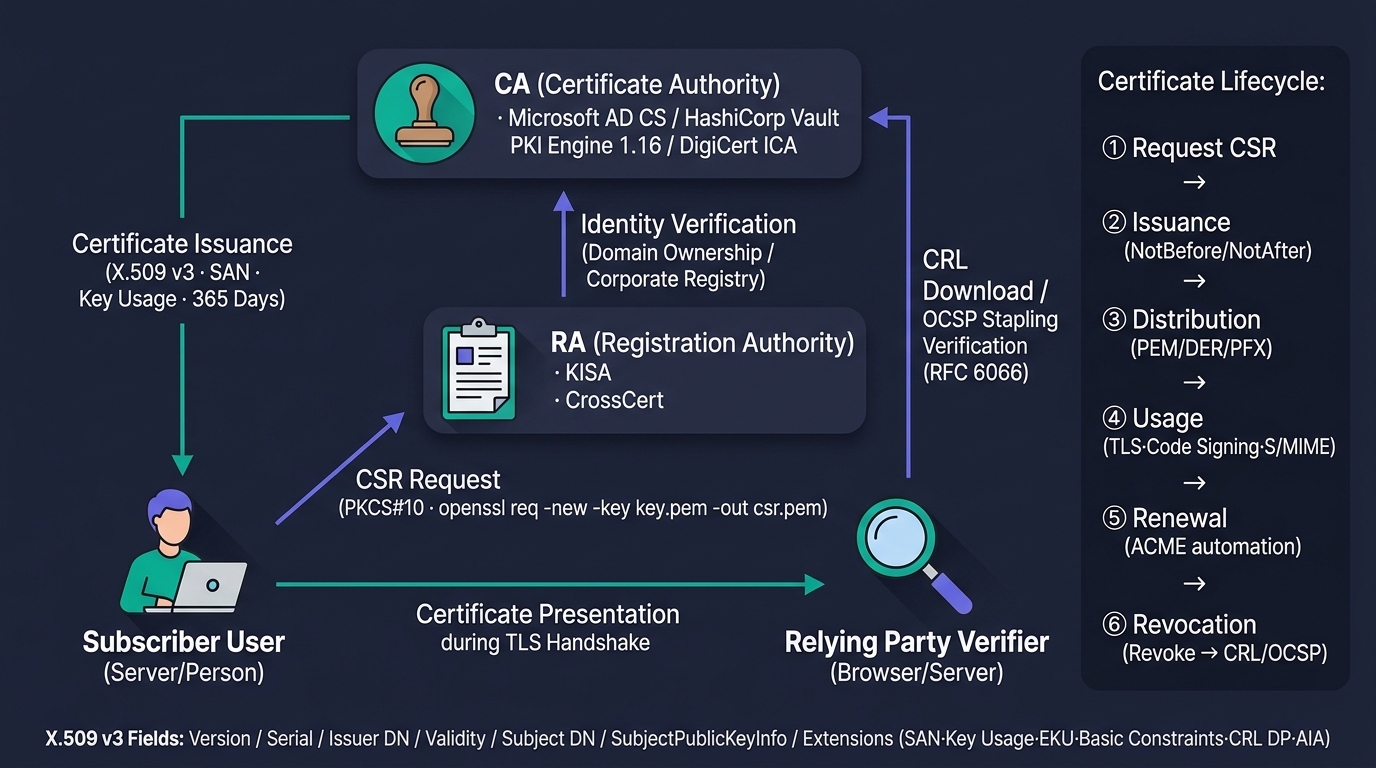
PKI — Public Key Infrastructure
전자서명 vs 전자봉투 — PKI 두 가지 활용
✍️ 전자서명 (Digital Signature)
- 목적: 무결성 + 부인방지
- 송신자의 개인키로 서명
- 수신자가 송신자 공개키로 검증
- 평문 + 서명 함께 전달
- 누구나 평문 열람 가능
- 예: PDF 서명·계약·API 서명
📩 전자봉투 (Digital Envelope)
- 목적: 기밀성 + 무결성
- 평문을 세션키(대칭키)로 암호화
- 세션키를 수신자 공개키로 암호화
- 수신자만 개인키로 세션키 복호 → 평문 복호
- 외부에 노출되지 않는 비밀 전달
- 예: 암호화 메일·DRM
왜 세션키를 쓰나: 공개키 암호는 느리고 큰 데이터 부적합. 빠른 대칭키로 본문 암호화 + 작은 세션키만 공개키로 → 속도+보안 동시 달성.
KMS · HSM — 키 관리의 인프라
🔑 KMS (Key Management System)
- 암호 키 생성·저장·회전·폐기
- 응용은 키를 직접 보지 않고 사용 API만 호출
- 정책 기반 키 사용 제어
- 감사 로그 자동
🏢 솔루션
- AWS KMS · Azure Key Vault · GCP KMS
- HashiCorp Vault — 오픈소스
- Thales CipherTrust Manager
- 국내 — 펜타시큐리티 D'Amo KMS·시큐브·이니텍
🛡️ HSM (Hardware Security Module)
- 물리 보안 칩 안에 개인키 보관
- 반출 불가 — 외부에서 키 추출 불가
- FIPS 140-2 / FIPS 140-3 인증
- Level 2 — 변조 흔적 탐지
- Level 3 — 변조 시 자동 삭제
- Level 4 — 모든 변조 대응
📜 KCMVP
- 한국 국정원 암호모듈 검증
- 공공·금융은 KCMVP 필수
- 검증필 암호 모듈 사용 의무
🏢 HSM 솔루션
- Thales Luna · Entrust nShield · Utimaco
- 국내 — 펜타시큐리티·시큐브·이니텍 HSM
🎨 이미지 프롬프트: "Editorial product-shot illustration on dark navy background — three Hardware Security Modules displayed as a museum lineup: left 'Thales Luna Network HSM 7 (Model A790)' (silver-blue 1U rackmount with front LCD, PED PIN pad port, smart-card reader slot for cloning domain key, slim form factor, caption 'FIPS 140-3 Level 3 · CC EAL4+ · 20,000 RSA-2048 signs/sec'), center 'Entrust nShield Connect XC (High)' (dark gray 1U with the nShield trefoil logo, smart-card slot for Operator Card Set quorum (k-of-n), dual hot-swap PSU LEDs, caption 'FIPS 140-2 Level 3 · CodeSafe · 8,500 ECC P-256 ops/sec'), right 'Utimaco SecurityServer Se Gen2' (black 2U with red Utimaco accent strip, front PIN pad and SmartCard reader, caption 'FIPS 140-2 Level 3 · BSI eIDAS QSCD · German engineering'); each appliance shown front-face with FIPS 140-3 Level 3 tamper-evident holographic seal sticker visible, KCMVP 검증필 sticker on the Korean-deployed unit, and a CC EAL4+ badge; behind them a faint AD CS / HashiCorp Vault PKI Engine integration diagram showing KMIP/PKCS#11 protocols; tiny caption labels below each unit indicating FIPS level and throughput; clean editorial product photography style, teal #00b894 and purple #6c5ce7 background glow, 16:9"
📸 HSM 어플라이언스 reference - Thales Luna Network HSM 7 — cpl.thalesgroup.com/encryption/hardware-security-modules - Entrust nShield Connect XC (구 nCipher) — entrust.com/products/hsm - Utimaco SecurityServer CSe — utimaco.com/products/general-purpose-hsm - AWS CloudHSM — aws.amazon.com/cloudhsm - 국내 — 펜타시큐리티 ISIGN+ HSM · 시큐브 SecuKMS (KCMVP 검증필 암호 모듈)
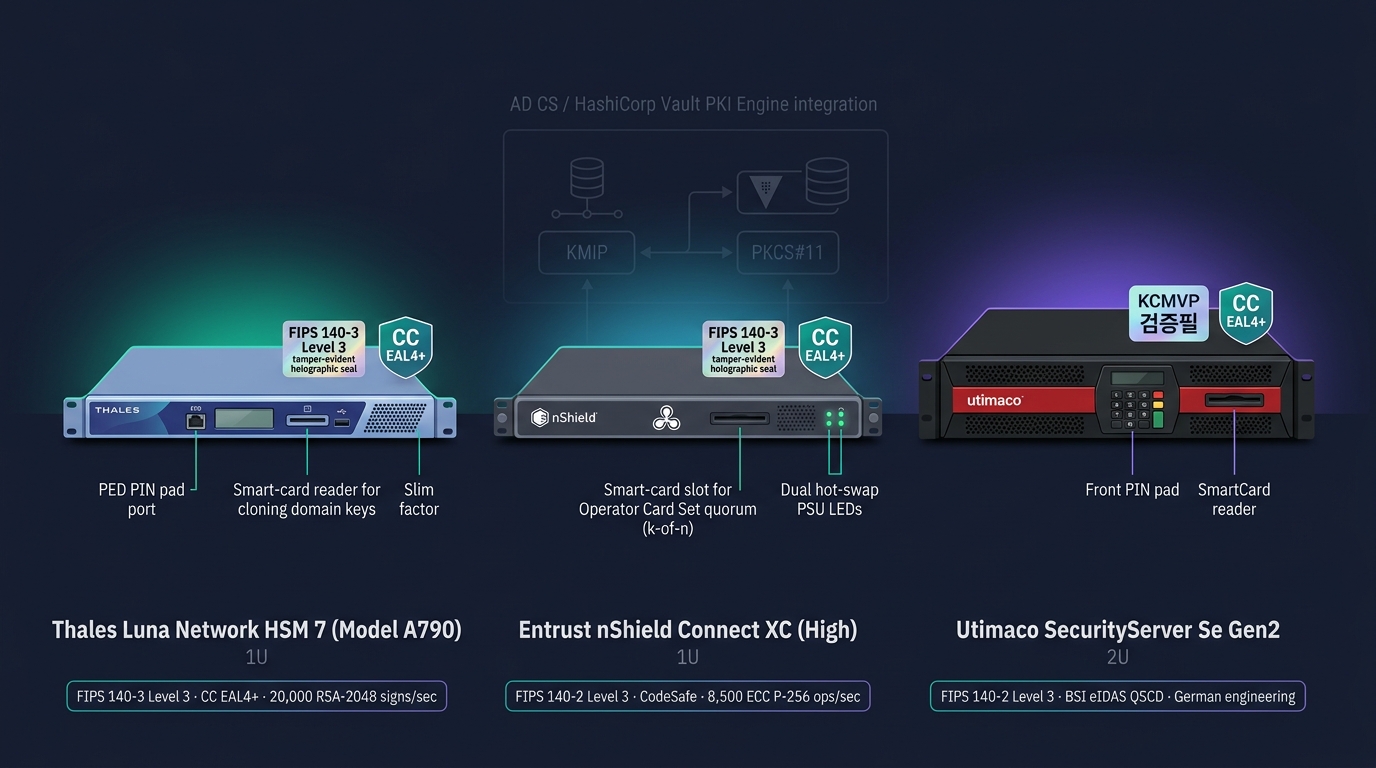
KMS · HSM — 키 관리의 인프라
Part C 정리 — 데이터 보안 8가지
콘텐츠 보호
- DRM — CRWDNO 통제
- DLP — Endpoint·NW·Storage 3종
DB 보안
- DAC — 접근제어 Proxy
- DAM — 감사 로그
- TDE — 컬럼·Tokenization
인증·신원
- FIDO U2F/UAF/FIDO2
- MFA — 3대 요소 조합
- 한국 — 공동/금융인증서·간편인증
키·서명
- PKI — CA·RA·CRL·OCSP
- 전자서명·전자봉투
- KMS / HSM — FIPS·KCMVP
TA 결정 7가지
- DRM 적용 범위 (전사·기밀만)
- DLP 3종 중 우선 도입
- DB 보안 3종 모두 vs 부분
- FIDO2 도입 시점
- PKI 자체 운영 vs 공인 CA
- KMS SaaS vs 온프레
- KCMVP HSM 필수성
한국 특수성
- DRM·DB보안 3종 강세
- KCMVP·보안기능 확인서
PART D
최신 보안 트랜드 — Zero-Trust 시대
CDR · SOAR · SASE · SDP · ZTNA · Zero-Trust · MITRE ATT&CK · TI · LLM 보안
CDR — Content Disarm & Reconstruction
📄 CDR이 하는 일
- 문서·파일에서 위험 요소 제거 후 재구성
- 매크로·스크립트·임베디드 OLE·JavaScript 제거
- 알려지지 않은 악성코드도 무력화 (Sandbox와 보완)
- 사용자에게는 정상 콘텐츠만 전달
🎯 대상 파일
- Office (DOC·XLS·PPT)
- PDF (JavaScript·Form)
- HWP (한컴) — 한국 특수
- ZIP·이미지·CAD
🚪 배치 위치
- 메일 게이트웨이 — 첨부 무해화
- 웹 다운로드 — 파일 다운로드 무해화
- 망 연계 솔루션 — 망 간 자료 이동 시 무해화
- USB 키오스크 — 외부 매체 무해화
🏢 솔루션
- OPSWAT MetaDefender — 글로벌 1위
- Sasa Software Gate Scanner
- 국내 — 지란지교 OfficeKeeper / 한국 CDR, 소프트캠프 SHIELDEX, 시큐레터
SOAR — Security Orchestration, Automation & Response
🤖 SOAR가 하는 일
- 보안 이벤트 → Playbook 자동 실행
- SIEM·EDR·NGFW·TI 등 다수 도구 오케스트레이션
- 반복 작업 자동화
- SOC Tier 1 부담 70%+ 감소
📋 Playbook 예시
- 피싱 이메일 신고 → 자동 분석 → 격리 → 차단·통지
- 의심 IP 탐지 → TI 조회 → NGFW 차단 → 티켓 발행
- 사용자 계정 이상 → 잠금 → 알림 → 조사
🏢 SOAR 솔루션
- Splunk SOAR (구 Phantom)
- Palo Alto Cortex XSOAR (구 Demisto)
- IBM Resilient (QRadar SOAR)
- Microsoft Sentinel Playbook
- Swimlane · Tines · Torq
🎙️ TA 결정
- SIEM과의 통합 호환성
- Playbook 작성 인력
- TI 피드 비용
- 자동 차단 vs 승인 후 실행
SOAR 도입 = SOC 자동화의 출발점.
SASE — Secure Access Service Edge
🎨 이미지 프롬프트: "Editorial conceptual diagram on dark navy background — center labeled 'SASE Cloud Edge · Gartner SASE Framework (2019~) · Cato Networks · Zscaler ZIA/ZPA · Netskope Intelligent SSE · Cisco Umbrella · Palo Alto Prisma Access' as a glowing teal cloud icon with global PoP map markers (Seoul·Tokyo·Singapore·Frankfurt·Virginia); two inputs from the left: 'SD-WAN (Cisco Viptela · VMware VeloCloud · Fortinet Secure SD-WAN)' (network branches with optimized routing arrows showing dynamic path selection) and from below: 'Security Stack (FWaaS Fortinet · SWG Zscaler · CASB Netskope · ZTNA NIST SP 800-207 · DLP Forcepoint · RBI Remote Browser Isolation)' as stacked icons; outputs to the right go to multiple destinations: 'Users (Remote 재택·모바일)', 'Branches (지사·매장)', 'SaaS Apps (Microsoft 365 · Salesforce · ServiceNow · Google Workspace)', 'Data Center (On-prem)', 'Public Cloud (AWS·Azure·GCP)'; thin teal connecting lines show all paths flow through the SASE cloud edge with inline inspection labels 'TLS Decrypt · Identity-aware · Continuous Verification'; clean editorial conceptual diagram, teal #00b894 and purple #6c5ce7 accents, 16:9, technical illustration"
🌐 SASE의 정의 (Gartner, 2019)
- SD-WAN + 보안 스택의 클라우드 통합
- 사용자·디바이스가 어디 있든 동일 정책
- 본사 백홀 불필요 — SaaS 직접 통신
🧰 보안 스택 구성
- FWaaS — Firewall as a Service
- SWG — Secure Web Gateway
- CASB — Cloud Access Security Broker
- ZTNA — Zero Trust Network Access
- DLP·RBI (Remote Browser Isolation)
🏢 SASE 솔루션
- Zscaler — SSE 시장 1위
- Netskope · Cloudflare One
- Palo Alto Prisma Access
- Cisco Umbrella + Meraki
- Cato Networks — 통합형 강자
🎙️ TA 관점
- 재택·다지점 시대의 VPN 대체
- 글로벌 사용자 latency 최소화
- 운영 부담 ↓ (클라우드 매니지드)
- 데이터 주권 검토 필요 (Edge 위치)
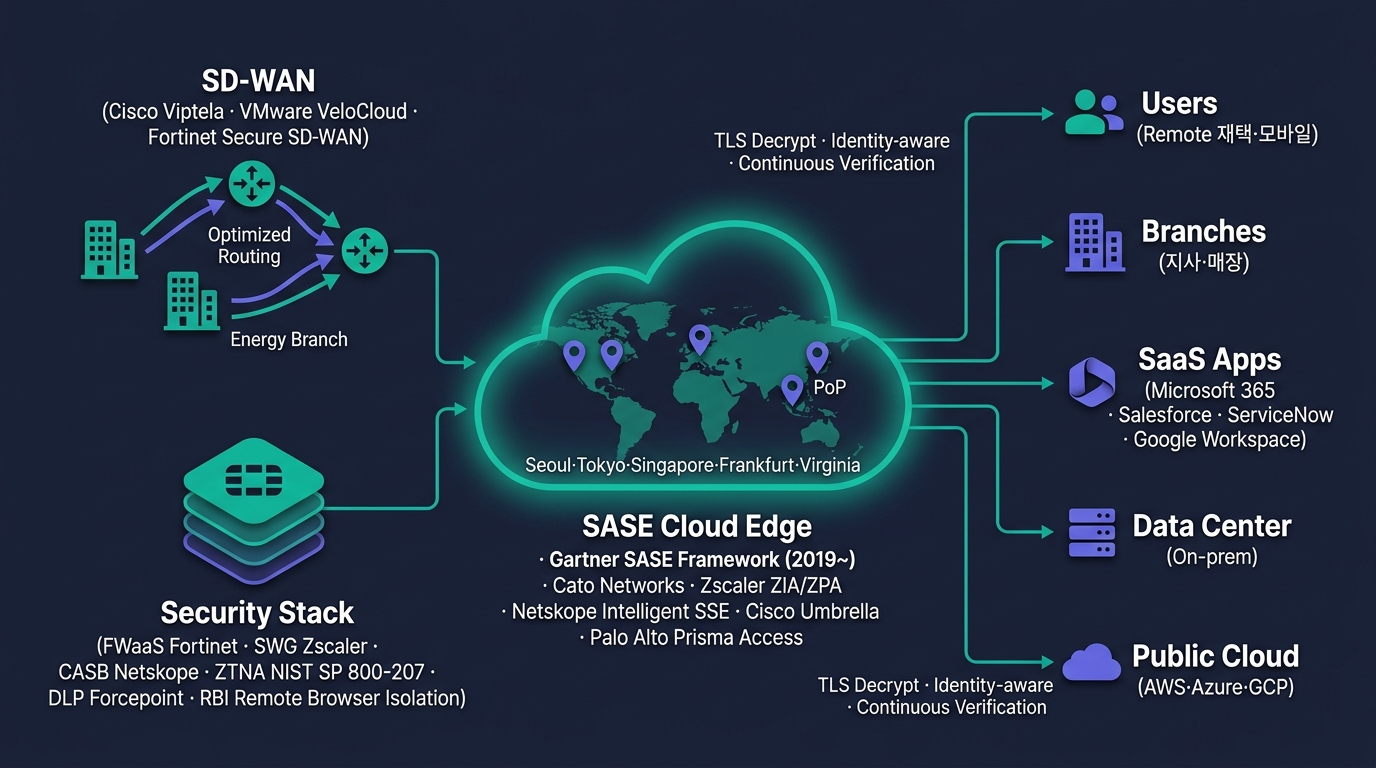
SASE — Secure Access Service Edge
SDP · ZTNA — VPN의 대체
🌑 SDP (Software-Defined Perimeter)
- 일명 Black Cloud — 외부에서 자원이 "보이지 않음"
- 인증 전에는 포트 응답 없음 (Single Packet Authorization)
- Mutual TLS 인증 후 1:1 마이크로 터널
- CSA (Cloud Security Alliance) 표준
🚪 ZTNA (Zero Trust Network Access)
- "Never Trust, Always Verify" 구현체
- 사용자·디바이스·컨텍스트 매번 검증
- 응용 단위 권한 (네트워크 단위 X)
- VPN의 사실상 후계자
🆚 VPN vs ZTNA
| 항목 | VPN | ZTNA |
|---|---|---|
| 접근 단위 | 네트워크 | 응용 |
| 신뢰 모델 | 1회 인증 후 신뢰 | 매번 검증 |
| 가시성 | 외부에 IP 노출 | 숨겨짐 |
| 횡 이동 | 가능 | 차단 |
🏢 솔루션
- Zscaler Private Access
- Cloudflare Access · Netskope ZTNA
- Palo Alto Prisma Access
- Tailscale · Twingate
- Cisco Secure Access (구 Duo Network Gateway)
Zero-Trust — NIST SP 800-207 5대 축
🎨 이미지 프롬프트: "Editorial pentagonal diagram on dark navy background — based on CISA Zero Trust Maturity Model 2.0 / NIST SP 800-207, five glowing nodes arranged in a pentagon, each labeled in Korean with sub-text: 'Identity 정체성 (Okta · Azure AD · FIDO2 YubiKey · MFA)', 'Device 디바이스 (CrowdStrike Falcon Insight · Intune compliance · TPM 2.0 attestation)', 'Network 네트워크 (Microsegmentation · ZTNA Zscaler ZPA · SDP)', 'Application/Workload 응용 (CWPP Prisma Cloud · Service Mesh Istio mTLS · WAF)', 'Data 데이터 (DLP Forcepoint · DRM 마크애니 · 분류 라벨링 · 암호화 at-rest/in-transit)'; in the center the slogan 'Never Trust, Always Verify · NIST SP 800-207' in teal glow with a small circular 'Policy Engine (PE) + Policy Administrator (PA) + Policy Enforcement Point (PEP)' core; thin teal lines connect each node to the center and to adjacent nodes forming a star pattern; each node has a small icon (user with passkey, laptop with chip, network mesh, app cube, data lock); around the pentagon a faint outer ring labeled 'Visibility & Analytics · Automation & Orchestration · Governance'; clean editorial pentagon visualization, teal #00b894 and purple #6c5ce7 accents, 16:9, technical illustration"
🧭 Zero-Trust 원칙
- Never Trust, Always Verify
- 경계 신뢰(perimeter trust) 폐기
- 모든 트래픽·요청을 본질적으로 적대적으로 가정
- 최소 권한·세밀한 통제·지속 검증
- NIST SP 800-207 (2020 발간)
🛠️ 핵심 통제
- Microsegmentation — 응용·워크로드 단위 분리
- Continuous Authorization — 매 요청 검증
- Risk-based Authentication — 컨텍스트 기반
- Encryption Everywhere
🏛️ 5대 축 (NIST)
- Identity — 사용자·서비스 정체성
- Device — 단말 상태·신뢰도
- Network — Micro-Segmentation
- Application / Workload — 응용 단위 정책
- Data — 분류·암호화·DLP
📈 미국 정부 의무화
- EO 14028 (2021) — 연방 기관 ZT 의무
- OMB M-22-09 — 2024년까지 ZT 적용
🇰🇷 한국
- 국가정보원·KISA ZT 가이드라인 작성 중
- 공공 부문 점진 도입
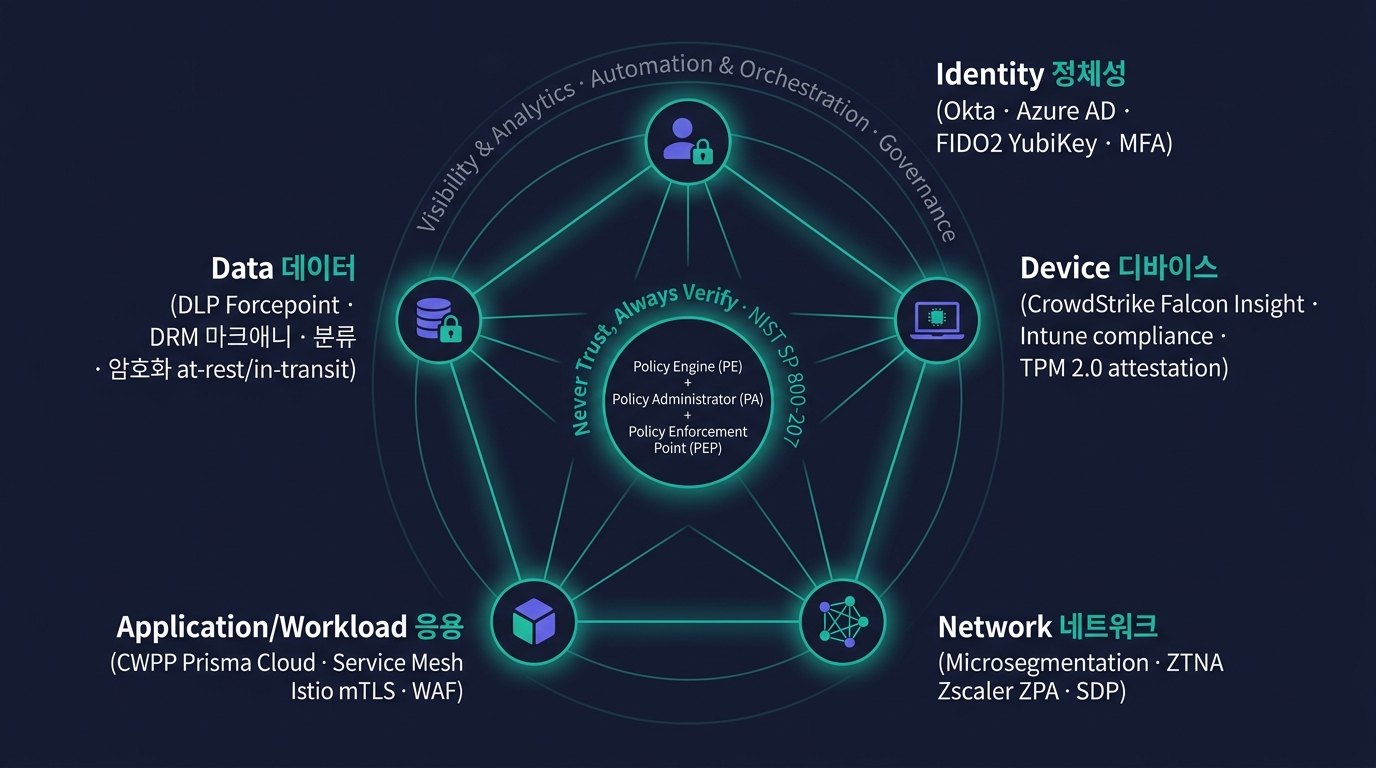
Zero-Trust — NIST SP 800-207 5대 축
MITRE ATT&CK — 공격자의 TTPs 카탈로그
📚 ATT&CK이란
- MITRE가 운영하는 무료 프레임워크
- 실제 관측된 공격자 TTP(Tactic·Technique·Procedure) 정리
- 14개 Tactic (목적) → 200+ Technique (방법) → 수천 Procedure (구체적 사례)
- 공통 언어로 위협을 표현
🎯 14개 Tactic
- Reconnaissance·Resource Development
- Initial Access·Execution·Persistence
- Privilege Escalation·Defense Evasion
- Credential Access·Discovery·Lateral Movement
- Collection·C2·Exfiltration·Impact
🔗 Kill Chain vs ATT&CK
- Lockheed Kill Chain (2011) — 7단계 선형
- ATT&CK (2013~) — 비선형·세밀·실증
- 현재 보안 업계 표준은 ATT&CK
🛠️ 활용처
- EDR/XDR 룰 — Technique 단위 룰 작성
- SIEM 상관 분석 — 다단계 공격 탐지
- 레드팀·블루팀 공통 언어
- CTI — 위협 그룹 매핑 (APT28·Lazarus)
- Atomic Red Team — 검증 도구
Threat Intelligence — 위협 정보의 활용
🧠 TI 4계층
- Strategic — 경영진용 위협 동향
- Operational — 캠페인·공격자 그룹
- Tactical — TTP·도구
- Technical — IoC (IP·도메인·해시)
🎯 IoC vs IoA
- IoC (Indicator of Compromise) — 침해 흔적 (사후)
- IoA (Indicator of Attack) — 공격 행위 패턴 (실시간)
📡 TI 표준 포맷
- STIX 2.x — 위협 정보 구조화 표준
- TAXII — STIX 교환 프로토콜
- MISP — 오픈소스 TI 플랫폼
🏢 TI 피드·플랫폼
- VirusTotal · AlienVault OTX
- Recorded Future · Mandiant TI
- Microsoft Defender TI · CrowdStrike Intelligence
- Group-IB · 국가 사이버안보센터 (NCSC)
- KISA C-TAS — 한국 정부 운영
🎙️ TA 결정
- 무료 피드 (OTX·MISP) vs 유료 (Mandiant)
- SIEM·SOAR 자동 연동
- TI 평판 기준 자동 차단 임계
- CTI (Cyber Threat Intel) 분석가 보유 여부
AI·LLM 보안 — 2026년 신흥 도메인
🤖 AI 시스템 위협
- Prompt Injection — 시스템 프롬프트 우회
- Data Poisoning — 학습 데이터 오염
- Model Inversion — 학습 데이터 추출
- Model Extraction — 모델 자체 탈취
- Adversarial Examples — 오분류 유도
- Jailbreak — 안전 가드 우회
📋 OWASP Top 10 for LLM
- Prompt Injection
- Insecure Output Handling
- Training Data Poisoning
- Model DoS
- Supply Chain (모델·플러그인)
- Sensitive Information Disclosure
- Insecure Plugin Design
- Excessive Agency
- Overreliance
- Model Theft
🛡️ 대응 방향
- Input/Output Guardrails — NeMo Guardrails·LangChain Filters
- PII 마스킹 — 입출력 식별자 가림
- 출력 제한 토큰·도메인 통제
- 모델 모니터링 — drift·hallucination
- RAG 보안 — 벡터 DB 권한·민감 문서 격리
- 에이전트 도구 권한 최소화
🏢 신흥 솔루션
- HiddenLayer · Robust Intelligence · Lakera
- Cisco AI Defense · Palo Alto AI Security
- 국내 — 스캐터랩·셀바스·시큐레터 AI 보안
🎙️ TA 시사점
- LLM 도입 시 모델 + 데이터 + 도구 3축 보안
- RAG에는 벡터 DB 권한 모델 필수
Part D 정리 — 최신 보안 9가지
운영 자동화
- CDR — 콘텐츠 무해화
- SOAR — Playbook 자동화
- TI — STIX/TAXII
네트워크 신모델
- SASE — SD-WAN + Security
- SDP — Black Cloud
- ZTNA — VPN 대체
거버넌스 모델
- Zero-Trust — NIST 5대 축
- MITRE ATT&CK — TTPs 공통 언어
- 미국 EO 14028 의무화
AI 시대
- LLM 보안 — OWASP Top 10 for LLM
- 모델·데이터·도구 3축
- Guardrails·RAG 권한
TA 결정 6가지
- SOAR Playbook 자동화 범위
- SASE 도입 시 VPN 교체
- ZTNA 응용 단위 정책
- Zero-Trust 로드맵
- TI 무료 vs 유료
- LLM 도입 시 보안 가이드라인
핵심 메시지
- 경계 신뢰 모델 종말
- 정체성 + 데이터 중심
- 자동화 + AI 결합
PART E
보안 거버넌스·인증 — 정책·법규·인증 체계
정책 4계층 · SOP 4종 · 국내·국제 인증 · 한국 법령
보안 정책 4계층 — Policy → Guideline
📜 4계층 구조
- Policy (정책) — 최상위 방침 - "회사는 ISMS-P 준수한다" - 이사회 승인·연 1회 갱신
- Standard (표준) - "비밀번호는 12자·복잡도·90일" - CISO 승인·반기 갱신
- Procedure (절차) - "신규 사용자 등록 단계" - 운영팀 작성·분기 갱신
- Guideline (지침) — 권고·참조 - "안전한 비밀번호 작성 팁"
🎯 운영 원칙
- 상위가 하위를 강제
- 충돌 시 상위 우선
- 변경 이력 관리 의무
- 모든 단계가 문서화돼야 인증·감사 통과
- 연 1회 검토가 ISMS-P 통제 항목
📌 누가 작성하나
- CISO·보안팀이 Policy·Standard
- 운영팀이 Procedure
- TA는 Procedure 작성의 핵심 주체
- 기술 표준의 합리적 근거 제공
SOP 4종 — 운영 표준 절차
💾 ① 백업·복구 SOP
- 백업 정책·매체·보관
- 복구 시험 주기 (분기 1회 권고)
- 랜섬웨어 대응 시 Immutable 검증
- RPO·RTO 명시
🔧 ② 변경 관리 SOP
- CR (Change Request) 양식
- CAB (Change Advisory Board) 회의
- 영향도 분석·롤백 계획
- 표준 변경·정기 변경·긴급 변경
- 변경 후 검증·종료 보고
🚨 ③ 장애 대응 SOP
- 등급 분류 (Critical·Major·Minor)
- 에스컬레이션 (On-Call 명단)
- Detection → Containment → Investigation → Recovery → Postmortem
- 사후 Blameless Postmortem
🛡️ ④ 침해사고 대응 SOP
- 탐지 → 격리 → 조사 → 복구 → 보고
- KISA 신고 (72시간 내)
- 증거 보존·포렌식 체인
- 법무·홍보·고객 통지
이 4종 SOP는 ISMS-P·SOC 2·ISO 27001 핵심 통제 항목.
ISMS-P — 정보보호 및 개인정보보호 관리체계
🏛️ 개요
- 운영: KISA (한국인터넷진흥원)
- 근거 법령: 정보통신망법·개인정보보호법
- 명칭: ISMS-P = ISMS + 개인정보(P)
- 기존: ISMS·PIMS 통합 (2018)
- 유효기간: 3년 + 매년 사후심사
📋 통제 항목
- 관리체계 (16개) — 정책·조직·자산·위험
- 보호대책 (64개) — 인적·물리·기술·운영
- 개인정보 처리 (21개) — 수집·이용·제공·파기
🎯 대상
- 의무: 매출 1,500억+ ISP·일평균 100만+ 사용자
- 권장: 모든 대규모 기업·공공
- 공공기관: 점차 의무화 확대
💰 비용·기간
- 인증 비용: 5천만 ~ 2억원 (규모 따라)
- 준비 기간: 12~18개월
- 컨설팅 비용 별도: 3천만 ~ 5천만원
📊 효과
- 정보보호 수준 객관 평가
- 대고객·B2B 신뢰 확보
- 사고 시 책임 경감 (선관주의)
KCMVP · CC인증 · 보안기능 확인서
🔐 KCMVP (암호모듈 검증)
- 국정원 운영
- 암호 알고리즘·모듈의 안전성 검증
- 등급: 검증필 암호 모듈 = KCMVP 인증
- 공공·금융 의무
🏛️ CC인증 (Common Criteria)
- 국정원 IT보안인증사무국
- 보안 기능 평가·국제 상호인정 (CCRA)
- EAL1~EAL7 (한국은 EAL1~EAL4+)
- 대상 — 운영체제·DB·방화벽·VPN 등 60+ 분야
📜 보안기능 확인서 (구 보안적합성 검증)
- 공공기관 보안 솔루션 도입 시 의무
- 6종 카테고리:
- FW (방화벽)
- IPS (침입방지)
- UTM (통합위협관리)
- SAC (시스템 접근 통제)
- NAC (네트워크 접근 통제)
- DDoS (DDoS 차단)
- 기타 카테고리 — DLP·PMS·NAC·EDR도 점차 추가
🎙️ TA 시사점
- 공공 RFP = KCMVP + 보안기능 확인서가 사실상 필수
- 글로벌 제품 도입 시 가장 큰 장벽
- 국내 솔루션이 우선 검토 대상
국제 보안 인증 — 7대 표준
| 인증 | 영역 | 운영 | 주요 적용 |
|---|---|---|---|
| ISO 27001 | 정보보호 관리체계 (ISMS) | ISO/IEC | 전 산업 표준 |
| ISO 27017 | 클라우드 보안 통제 | ISO/IEC | CSP·SaaS |
| ISO 27018 | 클라우드 개인정보 | ISO/IEC | 글로벌 CSP |
| ISO 22301 | 사업 연속성 (BCMS) | ISO/IEC | DR·BCP 대응 |
| NIST CSF | 사이버보안 프레임워크 | NIST (미국) | 정부·기간시설 |
| PCI-DSS | 결제카드 데이터 보호 | PCI Council | 결제·카드사 |
| HIPAA | 의료정보 보호 | 미국 HHS | 의료 (미국법) |
| SOC 2 | SaaS·서비스 통제 보고 | AICPA | SaaS·아웃소싱 |
| GDPR | EU 개인정보 보호 규정 | EU | EU 시민 대상 |
한국 글로벌 진출: SaaS·B2B는 SOC 2 + ISO 27001, 결제는 PCI-DSS, EU 대상은 GDPR 추가. ISMS-P만으로는 글로벌 부족.
한국 보안·개인정보 법령 — 5대 축
📜 5대 법령
- 개인정보보호법 (PIPA) - 모든 개인정보 처리자 적용 - 2024 개정 — 과징금 매출 3%·국외이전
- 정보통신망법 (정통망법) - ICT 사업자 정보보호 의무 - ISMS-P 근거
- 신용정보법 - 금융권 신용정보 보호
- 정보통신기반보호법 - 주요정보통신기반시설 (CII) 보호
- 전자정부법·전자정부 SW 개발보안 가이드 - 공공 시스템 개발 단계 보안
🏛️ 주관 기관
- 개인정보보호위원회 (PIPC) — 개인정보 감독
- 방송통신위원회 (KCC) — 정통망법 감독
- 금융위원회·금감원 — 금융 보안
- 국가정보원 — 국가·공공 보안
- KISA — 인증·정책 지원
- 과기부 — ICT 정책
📌 TA 관점
- 법령 → 정책 → SOP의 흐름
- RFP 보안 요구는 법령 인용 매칭
- 사고 시 선관주의 입증의 출발점
인증 절차·비용·기간 — 현실 가이드
| 인증 | 준비 기간 | 컨설팅비 | 인증 심사비 | 갱신 주기 |
|---|---|---|---|---|
| ISMS-P | 12~18개월 | 3~5천만원 | 5천만~2억원 | 3년 (사후 매년) |
| ISO 27001 | 6~12개월 | 2~4천만원 | 2~5천만원 | 3년 (사후 매년) |
| CC인증 EAL2~4 | 12~24개월 | 1~3억원 | 3~5천만원 | 5년 |
| KCMVP | 6~12개월 | 5천만원~ | 별도 | 5년 |
| SOC 2 Type 2 | 12~18개월 | 1~3억원 | 5천만~1억원 | 매년 |
| PCI-DSS Level 1 | 6~12개월 | 5천만~1억원 | 5천만원 | 매년 |
🎯 인증 실패 흔한 사유
- 정책·SOP는 있는데 실행 증거 부재
- 위험평가 갱신 누락
- 백업 복구 시험 미실시
- 권한 검토·로그 검토 누락
💡 TA 인증 준비 팁
- CMDB·자산 인벤토리 먼저
- 변경관리 티켓 흔적
- 로그 보존·검색 가능성
- 분기 모의 점검 정착
Part E 정리 — 거버넌스·인증 8가지
정책 체계
- Policy → Standard → Procedure → Guideline
- SOP 4종 — 백업·변경·장애·침해
국내 인증
- ISMS-P — KISA
- KCMVP — 국정원
- CC인증·보안기능 확인서 6종
국제 인증
- ISO 27001/17/18·22301
- NIST CSF
- PCI-DSS·HIPAA·SOC 2·GDPR
한국 법령
- 개인정보보호법·정보통신망법
- 신용정보법·정보통신기반보호법
- 전자정부 SW 개발보안 가이드
TA 결정 7가지
- ISMS-P 대상 여부
- CC·KCMVP 필요 솔루션
- 글로벌 진출 시 SOC 2 / ISO 27001
- PCI 도입 결제 영역
- 정책 4계층 작성·갱신
- SOP 4종 정착
- 인증 비용·기간 예산화
핵심 메시지
- 기술 + 운영 + 문서가 인증
- TA는 Procedure 작성 주체
PART G
보안 운영 + 실전 — SOC · 점검 · TA의 결정
SOC Tier 1·2·3 · VA · PT · BAS · TA의 12대 결정
SOC — Security Operations Center 운영
🎨 이미지 프롬프트: "Editorial illustration of a modern 24/7 Security Operations Center on dark navy background — three concentric workstation tiers labeled in Korean: 'Tier 1 모니터링 (Alert Triage · MTTA < 15min)' (front row with 6 analysts at standard dashboards showing Splunk Enterprise Security 7.x Notable Events queue and IBM QRadar Offense list), 'Tier 2 분석 (Incident Response · MTTR < 4h)' (middle row with deeper investigation screens showing CrowdStrike Falcon Console process trees and Palo Alto Cortex XDR Causality Chains), 'Tier 3 헌팅·포렌식 (Threat Hunting · Malware RE)' (back row with advanced threat hunting screens showing MITRE ATT&CK Navigator heatmap, Volatility memory forensics output, YARA rule editor, Cortex XSOAR SOAR playbook canvas); large central video wall showing world map with glowing attack indicators (red dots over RU/CN/NK/IR), threat feed scrolls 'LockBit affiliate · BlackCat ransomware · Cl0p MOVEit · APT29 Cozy Bear · Lazarus · Kimsuky', SIEM dashboards with Risk Score gauges, and a Kill Chain 7-stage banner (Recon → Weaponize → Deliver → Exploit → Install → C2 → Actions on Objectives); side wall plaques showing ISO/IEC 27001:2022 certificate and ISMS-P 인증서; ambient blue-purple lighting, cinematic depth, teal #00b894 and purple #6c5ce7 accents, 16:9, technical editorial style"
🪖 Tier 1 — Monitoring
- 24/7 모니터링·1차 트리아지
- 알람 분류·기본 대응
- Playbook 실행
- 에스컬레이션 판단
- 인력: 신입~주니어
🔬 Tier 2 — Investigation
- 심층 분석·포렌식 초기
- IoC 확인·범위 산정
- Containment 수행
- Tier 1 멘토링
- 인력: 중급
🎯 Tier 3 — Threat Hunting
- 능동 위협 헌팅
- 신규 룰 작성
- 포렌식·RCA
- TI 연구·APT 추적
- 인력: 시니어
🤝 SOC Manager·CISO
- KPI·보고·예산
- 사고 외부 공조 (KISA·국정원)
🏢 SOC 운영 모델
- 자체 SOC — 24/7 인력 풀
- MSSP 위탁 — 운영 위탁
- MDR — EDR/XDR 통합 위탁
- 하이브리드 — 평시 자체·야간 MSSP
🎙️ TA 결정
- 인력 규모·시간대 분담
- 운영 시간 (8x5 vs 24x7)
- 위탁 시 SLA·KPI 정의
- 한국 — KT·LG U+·이글루·안랩 MSSP
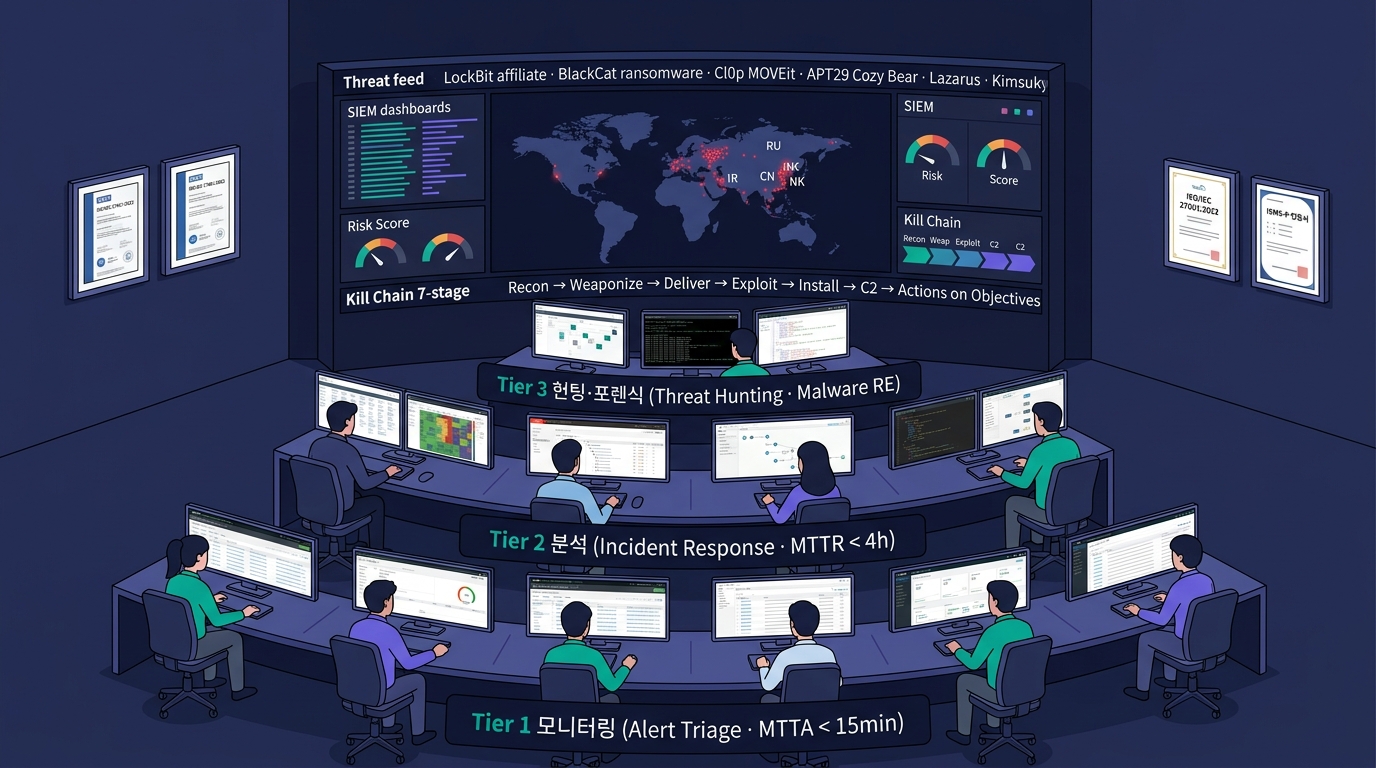
SOC — Security Operations Center 운영
침해사고 대응 — KISA·NIST 표준 절차
🚨 ① Preparation (사전 준비)
SOP·연락망·도구 사전 점검 / 정기 모의 훈련
🔎 ② Detection (탐지)
SIEM·EDR·신고 채널 통합 / 초기 분류
🚧 ③ Containment (격리)
영향 범위 격리 / 단기 vs 장기 격리 결정
🧹 ④ Eradication (근절)
악성코드 제거·취약점 패치 / 백도어 제거
♻️ ⑤ Recovery (복구)
정상 운영 복귀 / 점진적·검증 후 단계 확대
📚 ⑥ Lessons Learned (사후 분석)
Blameless Postmortem / RCA · 재발 방지 · 정책 갱신
KISA 신고 의무: 정보통신서비스 제공자 — 침해사고 인지 후 72시간 이내 KISA 신고. 개인정보 유출 — 5일 이내 정보주체·PIPC 통지.
TA의 보안 설계 — 12대 결정 카탈로그
네트워크 (4)
- NGFW 다층 vs UTM 단일 — 규모·인력
- WAF 클라우드 vs 온프레 — 외부 노출·법규
- IPS Inline vs IDS Tap — 오탐 감내도
- VPN 종류 — IPSec/SSL/ZTNA 조합
엔드포인트 (3)
- EDR 솔루션 — KCMVP 여부·MDR 묶음
- NAC 인증 방식 — 802.1X / MAC
- SIEM EPS·보존 — Splunk vs Elastic vs 국내
데이터 (3)
- DRM 적용 범위 — 전사 vs 부서·기밀
- DB 보안 3종 풀세트 vs 부분
- KMS/HSM — 클라우드 vs HSM 박스 (KCMVP 요구 시)
거버넌스 (1)
- 인증 로드맵 — ISMS-P → ISO 27001 → SOC 2 시퀀스
클라우드·운영 (1)
- SASE·ZTNA 도입 시점 — VPN 교체·SaaS 통제·재택 인구
📋 결정의 출발점 5가지
- 법규·인증 요구사항 — RFP 명문화
- 자산 가치·민감도 — DPIA 수행
- 인력 역량 — 자체 vs 위탁
- 예산 — CapEx vs OpEx
- 운영 부담 — 솔루션 수·통합도
시나리오 ① — 중견 제조 기업, 신규 보안 체계 구축
🏭 상황
- 직원 800명·서버 80대·사용자 PC 700대
- 매출 3,000억·해외 매출 30%
- 사내 ERP·MES·CRM 운영
- 개인정보 보유 (직원·고객사)
- 침해사고 1회 전력 (랜섬웨어)
- 보안 전담 2명 (CISO 겸직)
🎯 요구사항
- ISMS-P 인증
- 24/7 보안 모니터링
- 재택근무 보안 강화
✅ TA 설계안 (8축)
- 경계 — NGFW 2대 HA + 클라우드 WAF + Anti-DDoS 통신사
- 내부 — IPS · NAC (MAC 인증)
- 엔드포인트 — EDR + MDR 위탁 (24/7)
- 데이터 — DLP Endpoint + DB 보안 3종 (D'Amo)
- 인증 — MFA + FIDO2 단계 도입
- 백업 — Immutable + Air-Gap (랜섬웨어 대응)
- 거버넌스 — ISMS-P 12개월 컨설팅 + SOP 4종
- 운영 — MDR + 분기 VA · 연 1회 PT · BAS 도입
예상 투자: 초기 12억 + 연 운영 5억
시나리오 ② — 공공기관 클라우드 전환
🏛️ 상황
- 공공기관·대국민 서비스
- 기존 온프레미스 → CSAP 클라우드 이전
- 개인정보 다수 (수십만 건)
- 망분리 의무 (전자정부)
- 정기 보안 점검 의무
🎯 요구사항
- CSAP 인증 사업자 사용
- 국정원 보안기능 확인서 솔루션
- KCMVP 암호 모듈
- ISMS-P + CC인증
✅ TA 설계안
- CSP 선택 — NCP·KT Cloud·NHN Cloud (CSAP 인증)
- 경계 — 국정원 보안기능 확인서 NGFW·IPS·DDoS
- 망분리 — VPC + 단방향 게이트웨이 (CDR)
- 데이터 — TDE + KCMVP HSM + DLP
- 계정 — SSO + MFA + PAM
- 클라우드 — CSPM + CWPP (멀티 계정 통합)
- 운영 — 자체 SOC + MSSP 야간 위탁
- 인증 — ISMS-P + CC인증 + KCMVP
시나리오 ③ — AI 스타트업, 글로벌 진출
🚀 상황
- LLM 기반 AI 서비스 운영
- 직원 50명·AWS 멀티 리전
- 한국 + 미국 + EU 사용자
- 글로벌 진출 + 엔터프라이즈 B2B 영업
- 보안 전담 1명
🎯 요구사항
- SOC 2 Type 2 (B2B 영업 필수)
- ISO 27001
- GDPR 대응
- AI 모델 보안
✅ TA 설계안
- 인프라 — AWS Well-Architected + GuardDuty + Security Hub
- CSPM·CNAPP — Wiz 또는 Prisma Cloud
- IAM — Okta SSO + MFA + JIT
- 데이터 — KMS + S3 암호화 + DynamoDB TDE + 백업 Immutable
- AI — Guardrails + RAG 권한 모델 + PII 마스킹
- WAF·DDoS — Cloudflare
- 로그 — Datadog 또는 Elastic SIEM + AWS CloudTrail
- 인증 — ISO 27001 (1년) → SOC 2 Type 2 (1년) → GDPR DPA
TA 인사이트: B2B는 SOC 2 없으면 영업 자체 불가능한 경우 다수.
Session 7 학습 정리 — 5대 도메인 + 운영
🎯 5대 도메인 한 줄 요약
- A. 네트워크 — NGFW 4세대 + WAF·IPS·DDoS·VPN
- B. 엔드포인트 — EDR/XDR + MDR + NAC·SIEM
- C. 데이터 — DRM·DLP·DB 3종·PKI·FIDO·HSM
- D. 최신 — Zero-Trust·SASE·ZTNA·ATT&CK·LLM
- E. 거버넌스 — ISMS-P·KCMVP·CC + ISO·SOC 2
🧭 본 회차에서 확보한 시야
- 보안 5대 도메인 + 운영을 한 번에 조망
- 솔루션 카테고리의 배치·역할
- 한국 인증 체계와 RFP 요구 매핑
- TA의 12대 보안 의사결정 카탈로그
- 시나리오 3종을 통한 결정 패턴 체험
📦 본 회차의 카탈로그
- 5 PART의 솔루션 카탈로그
- 솔루션 × 한국·글로벌 매핑
- 3종 시나리오의 8축 설계안 템플릿