프롬프트 vs 컨텍스트 · 3계층 구조 · memory·@file · subagent 자작
강사 박수현 · 🚀 젠아이랩스(GenAI Labs)
🎨 이미지 프롬프트: "Editorial illustration on dark navy #0f1722 background split into two mirrored halves. On the left, a tired developer types into a chat prompt — the chat bubble contains NO letters or words, only 3 thin horizontal lines suggesting text, with faded ghost copies of the same blank bubble stacked behind. On the right, a calm developer sits next to a single document labeled 'CLAUDE.md' that emits soft glowing lines connecting to a laptop — that laptop chat bubble also has NO letters, only 3 thin horizontal lines. A vertical accent divider separates the two scenes. Clean editorial style, teal #00b894 and purple #6c5ce7 accents with warm orange highlights, 16:9. CRITICAL: chat bubbles contain no text or letters at all, only thin abstract lines. English only, no Korean, each label EXACTLY ONCE."
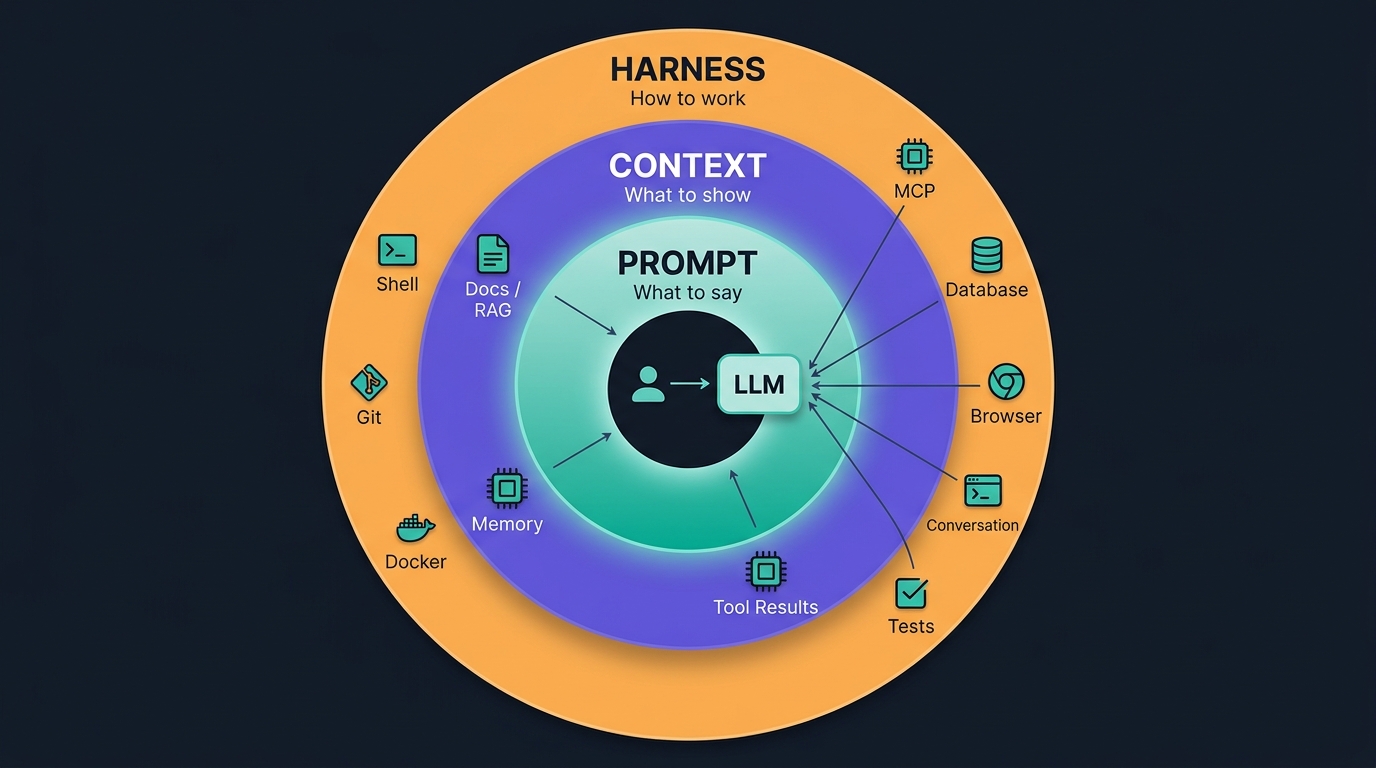
AI 코딩을 다루는 기술은 세 축으로 정리된다. 축마다 초점이 다르고, 뒤의 축이 앞의 축을 감싼다.
무엇을 말할 것인가
무엇을 알려줄 것인가
🟢 오늘 다루는 축
어떻게 일하게 할 것인가
📌 대체가 아니라 포함이다. 프롬프트 ⊂ 컨텍스트 ⊂ 하네스 — 하네스가 실행 환경을 세우고, 그 안에서 컨텍스트가 공급되고, 그 위에서 프롬프트가 실행된다. 새 축이 나왔다고 앞 축이 낡는 게 아니라 다루는 범위가 커진 것이다. 등장 순서는 대략 2022~ 프롬프트 → 2023~2024 컨텍스트 → 2025~ 하네스 로 흘렀다 (경계는 흐릿하다).

오늘 서 있는 자리는 가운데 고리 — 컨텍스트가 프롬프트를 감싸고, LLM 에 판단 재료를 공급한다
프롬프트 vs 컨텍스트 · 판정 기준 · 컨텍스트가 없으면 벌어지는 일 · 3층 구조 뼈대.
프롬프트와 컨텍스트는 성격이 다르다. 이 둘을 섞으면 매 요청이 장황해지고 팀원끼리 결과가 다르게 나온다.
| 축 | 언제 | 무엇을 | 예시 |
|---|---|---|---|
| 프롬프트 | 매 요청 | 지금 이 순간의 지시 | "이 함수의 O(n²) 를 O(n log n) 으로" |
| 컨텍스트 | 한 번 · 지속 | 팀 규약 · 도메인 · 스타일 | "커밋은 feat: prefix" |
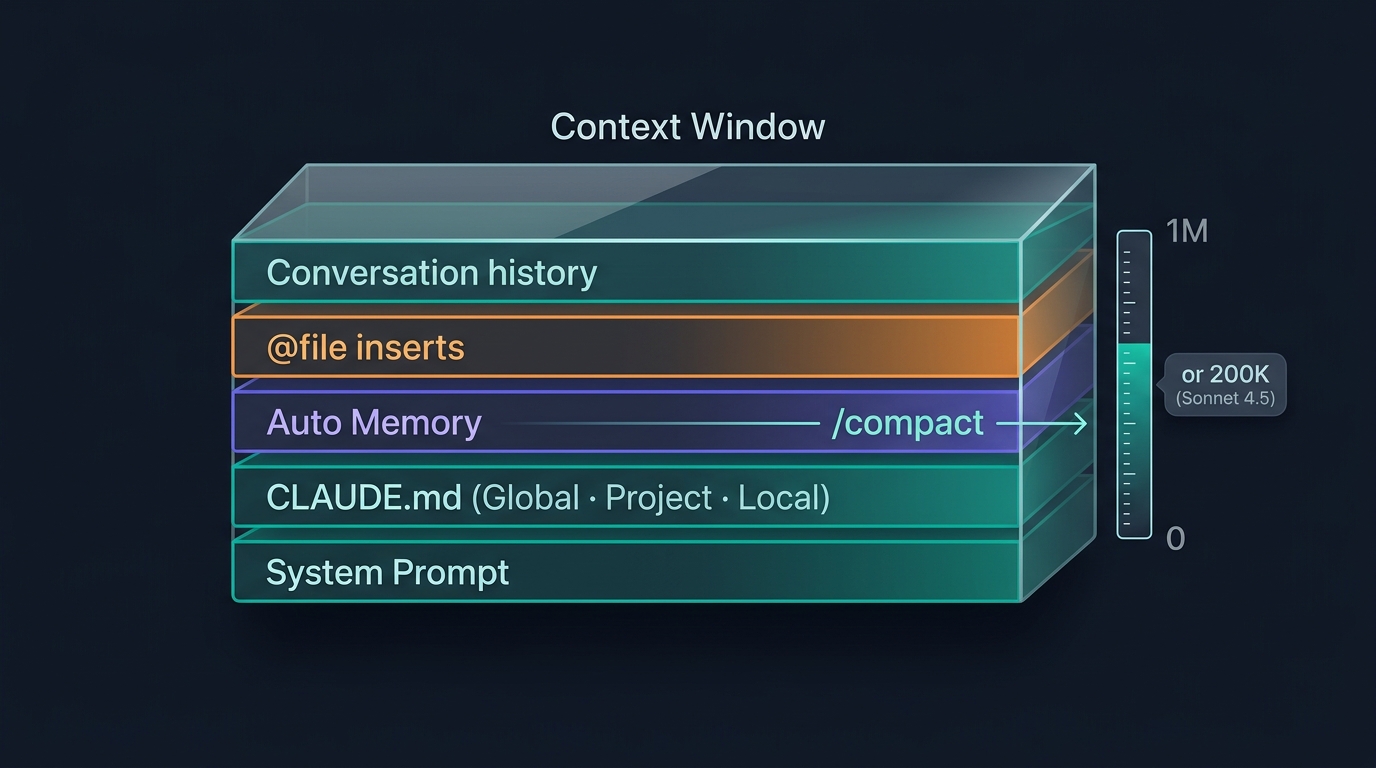
🎨 이미지 프롬프트: "Editorial illustration on dark navy #0f1722 background of a horizontal layered stack rendered as a translucent glass prism labeled 'Context Window' at the top. Inside the prism from bottom to top, five thin horizontal layer bands are stacked with English labels: 'System Prompt', 'CLAUDE.md (Global · Project · Local)', 'Auto Memory', '@file inserts', 'Conversation history'. On the right side of the prism, a vertical gauge with tick marks reads '1M' at the top and '0' at the bottom, showing a fill level roughly two-thirds up. A small secondary badge next to the gauge reads 'or 200K (Sonnet 4.5)' in smaller text. A thin luminous line labels '/compact' with a small arrow suggesting compression toward a smaller shape. Clean editorial illustration style — teal #00b894 for lower stable layers, purple #6c5ce7 accents on Memory, warm orange highlights on inserts, 16:9. CRITICAL: All visible text MUST be in English ONLY. Each label appears EXACTLY ONCE — no duplicates. No mirrored or reversed text."

컨텍스트 윈도우 — 무엇이 담기나 (모델별 컨텍스트 크기는 이미지 게이지 참조)
📌 이 세션의 축. "같은 규약을 반복 지시하지 않는다." 팀 컨벤션·코드 스타일·도메인 용어·개인 취향을 매 프롬프트마다 다시 쓰는 순간, 바이브코딩은 무너진다.
Claude Code 는 세션 시작 시점에 CLAUDE.md 를 세 위치에서 읽는다. 각 위치는 성격이 다르다.
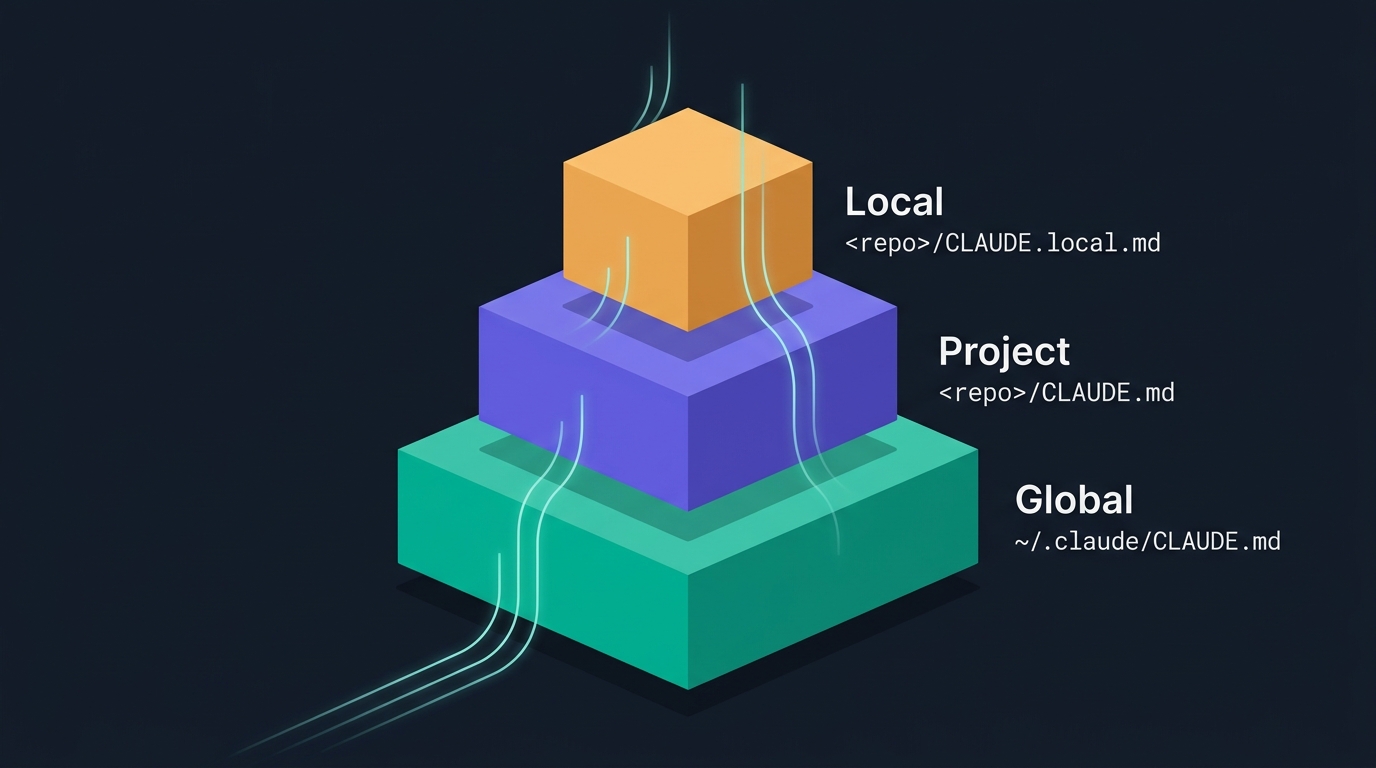
~/.claude/CLAUDE.md개인 · 전 프로젝트 공통. 30 줄 이하.
<repo>/CLAUDE.md팀 전체가 공유하는 리포 규약. git 커밋 대상.
<repo>/CLAUDE.local.md이 리포에서 나만 쓰는 규약. gitignore 필수.
※ 실행 플로우. CLAUDE.md 는 세션 시작 시 1회 로드되어 시스템 프롬프트에 주입된다 — 매 턴 재주입되지 않는다. 세션이 길어져 컨텍스트가 압박받으면 초반 지시의 효력이 떨어질 수 있다. hook 이 필요한 이유 — 매 턴 주요 규약을 다시 주입하는 축.
🎨 이미지 프롬프트: "Editorial illustration on dark navy #0f1722 background — three-tier pyramid stack viewed slightly from the side. Bottom wide layer (teal) labeled 'Global' with English tag
~/.claude/CLAUDE.md. Middle layer (purple) labeled 'Project' with English tag<repo>/CLAUDE.md. Top narrow layer (warm orange) labeled 'Local' with English tag<repo>/CLAUDE.local.md. Thin luminous lines flow upward. 16:9. English only, each label EXACTLY ONCE."
3계층 총정리 표 · 우선순위 · 글로벌 예시 · 프로젝트 표준 섹션 5개 · 스택별 예시 3종(Python·TS·Go) · 로컬 예시.
| 계층 | 위치 | git 관리 | 담는 것 |
|---|---|---|---|
| 글로벌 | ~/.claude/CLAUDE.md |
개인 dotfiles 선택 | 개인 커밋 스타일 · 응답 톤 · 언어 선호 |
| 프로젝트 | <repo>/CLAUDE.md |
커밋 (팀 공유) | 스택 · 아키텍처 · 도메인 · 명령 · 관례 |
| 로컬 | <repo>/CLAUDE.local.md |
gitignore 필수 | 개인 실험 규약 · 사내망 URL · 개인 alias |
.gitignore. 개인 사내망 URL · 실험 규약이 팀 리포에 커밋되면 사고.같은 항목이 세 계층에 겹치면 로컬 > 프로젝트 > 글로벌 순으로 이긴다.
로컬 (가장 강함) → 프로젝트 → 글로벌 (가장 약함)
📌 원리 — 좁은 스코프가 이긴다. 리포+개인(로컬) > 리포+팀(프로젝트) > 전 리포+개인(글로벌). 스코프가 좁을수록 우선순위가 높다. settings.json · hook · 권한 설정 등 대부분의 설정 파일도 같은 규칙(좁은 스코프 override)을 따른다.
이 리포에서 나만 쓰고 싶은 규약이 팀 규약을 덮는다.
예: 개인 이모지 커밋
팀 규약이 개인 글로벌 취향을 덮는다.
예: JIRA 티켓 prefix 강제
개인 취향의 하한선. 다른 두 층이 비어 있을 때만 적용.
예: Conventional Commits
📌 함의. 로컬은 강력하지만 팀 규약을 개인이 몰래 덮어쓰는 위험 도 있다. 로컬에는 개인이 명시적으로 원하는 것만 담고, 팀 규약과 어긋나는 개인 취향은 로컬이 아니라 PR 논의로 옮긴다.
⚠️ CLAUDE.md 는 이 규칙의 예외. settings.json 은 좁은 스코프가 넓은 스코프를 덮어쓴다(override — 로컬 값만 남음). 그러나 CLAUDE.md 세 파일은 모두 시스템 프롬프트에 합산(concatenate)되어 주입된다 — 위 "우선순위"는 지시가 충돌할 때 Claude 가 참조하는 판정 순서일 뿐, 세 파일 내용 모두 컨텍스트에 실린다. 글로벌·로컬 모두 짧게 유지해야 하는 이유.
# ~/.claude/CLAUDE.md — 개인 규약
## 응답 언어
- 한국어로 답한다. 코드 · 명령 · 에러 메시지는 원문 유지.
## 커밋 메시지
- Conventional Commits (`feat:` · `fix:` · `chore:` · `docs:`).
- 본문 명령형 · 요약 50자 이내.
## 로그 규약
- print 대신 표준 로거 (Python `logging` · JS `pino`).
- 레벨은 debug · info · warning · error 넷만.
## 코드 스타일
- Python: 4-space · type hint · f-string.
- 주석은 왜 (why) 만. 무엇 (what) 은 코드에 맡긴다.
📌 이 예시가 딱 22 줄이다. 30 줄 상한선의 실무 감각 기준점. 이 이상 길어지면 프로젝트 계층에 담을 항목이 섞였다.
프로젝트는 팀 전체가 공유하는 리포 규약 이다. git 커밋되므로 팀원 누구든 이 리포에서 세션을 열면 같은 컨텍스트가 로드된다.
## Stack (언어 · 프레임워크 · 라이브러리)
## Architecture (디렉토리 구조 · 각 폴더 역할)
## Domain Terms (이 리포에서만 쓰이는 용어)
## Commands (개발 · 테스트 · 린트 · 빌드)
## Conventions (예외 처리 · 네이밍 · 관례)
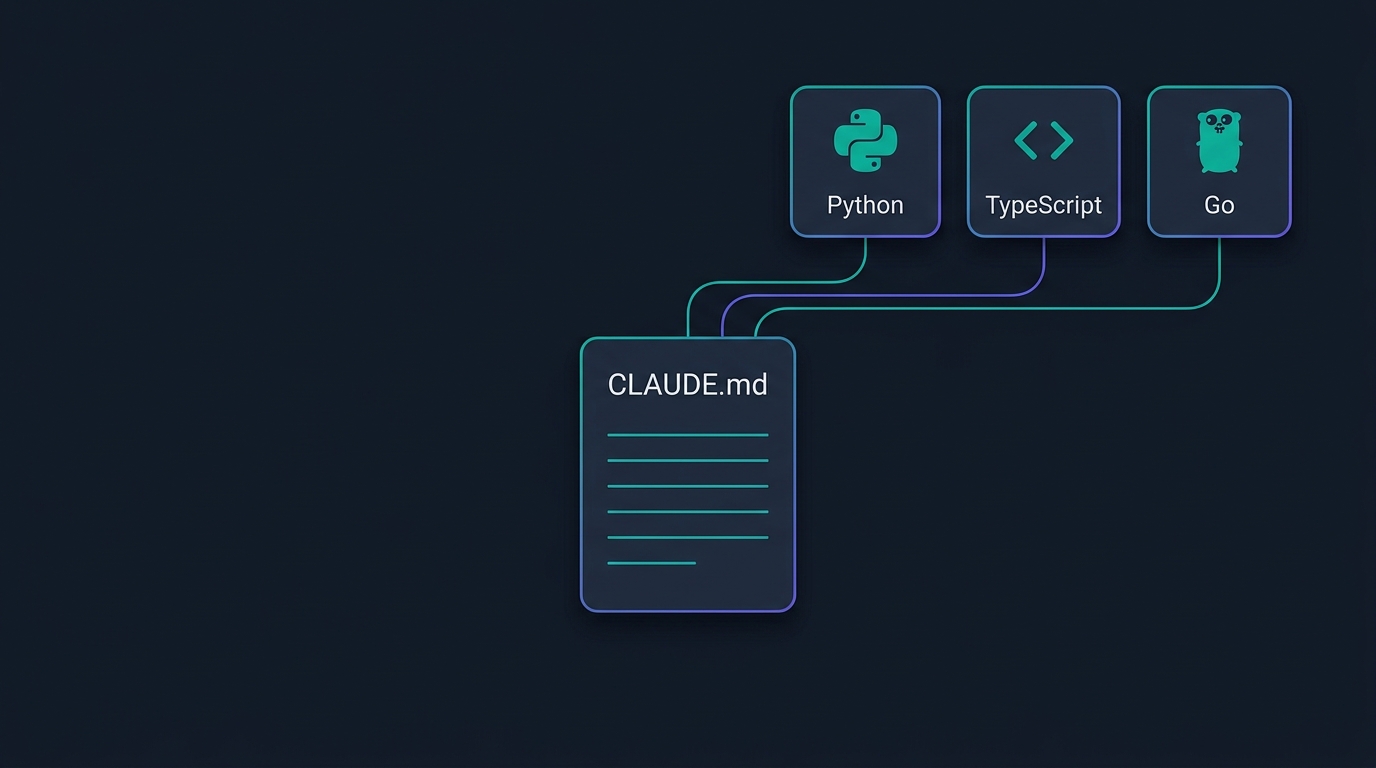
@docs/xxx.md 로 분리 임포트🎨 Image Prompt: "Editorial illustration on dark navy #0f1722 background — three small stack badges arranged as a horizontal row in the upper-right corner of the composition, each rendered as a rounded rectangular chip. Left chip shows a stylized 'Py' glyph labeled 'Python'. Middle chip shows angle brackets glyph labeled 'TypeScript'. Right chip shows a gopher-silhouette glyph labeled 'Go'. Below the badges, a single centered document card labeled 'CLAUDE.md' with five thin horizontal lines suggesting the five standard sections. Thin luminous connectors flow from each badge down to the document — teal #00b894 and purple #6c5ce7 accents, 16:9. CRITICAL: All visible text MUST be in English ONLY. Each label appears EXACTLY ONCE. No mirrored text."
# CLAUDE.md — leads-service
## Stack
- Python 3.11 · FastAPI · SQLAlchemy 2.0 · Postgres 15 · Redis 7
- Test: pytest · Ruff · Mypy (strict)
## Architecture
- `app/api/` — HTTP 핸들러 (얇게, 로직 금지)
- `app/services/` — 비즈니스 로직 (트랜잭션)
- `app/repositories/` — DB 접근 (SQLAlchemy 세션은 여기서만)
- `app/models/` — Pydantic v2 스키마
## Domain Terms
- **Lead** — 예약 확정 전 잠재 고객. status: new · qualified · converted · lost
- **Booking** — 확정된 예약. Lead 가 converted 되면 생성
- **Slot** — 예약 가능 시간대. 매일 자정 배치 생성
## Commands
- 개발: `make dev` · 테스트: `make test` · 마이그레이션: `alembic upgrade head`
## Conventions
- 새 API 는 `app/api/vN/` 아래에
- 모든 서비스 함수는 `async def`
- 예외는 `app/exceptions.py` 도메인 예외로 감싼다
# CLAUDE.md — dashboard-web
## Stack
- TypeScript 5.4 · Next.js 15 (App Router) · React 19 · Tailwind 4
- 상태: Zustand · 데이터: TanStack Query · Auth: NextAuth
## Architecture
- `app/` — App Router (RSC 우선, "use client" 는 명시적으로만)
- `components/ui/` — shadcn 원본, 수정 금지
- `lib/` — 순수 함수 · API 클라이언트
## Domain Terms
- **Widget** — 대시보드 카드 1개 (sm · md · lg)
- **Layout** — Widget 배치, 사용자별 저장
## Commands
- `pnpm dev` · `pnpm typecheck` · `pnpm test` · `pnpm e2e`
## Conventions
- 함수형 · named export 만 (default export 금지)
- 서버 컴포넌트 기본, 필요 시에만 "use client"
📌 Python 예시와 비교하면 섹션 구조는 같지만 스택별 관례가 완전히 다르다. 이 대비가 프로젝트 CLAUDE.md 의 존재 이유다.
# CLAUDE.md — payments-gateway
## Stack
- Go 1.22 · Gin · sqlx · Postgres 15 · Kafka · testify
## Architecture
- `cmd/server/` — main.go
- `internal/handler/` — HTTP 핸들러
- `internal/service/` — 도메인 로직
- `internal/repo/` — DB · Kafka 어댑터
## Domain Terms
- **Charge** — 카드 결제 시도 1건 (authorized · captured · voided · refunded)
- **Idempotency Key** — 재시도 방지 UUID · 헤더 `Idempotency-Key`
## Commands
- `make run` · `make test` · `golangci-lint run`
## Conventions
- 에러는 `fmt.Errorf("%w", err)` 로 래핑
- `context.Context` 는 모든 요청 경로 첫 인자
📌 세 스택을 나란히 놓으면 섹션 5개의 뼈대는 같고 담기는 내용만 다르다. 이 뼈대만 기억하면 어느 리포든 CLAUDE.md 초안을 쓸 수 있다.
<repo>/CLAUDE.local.md로컬은 개인이 이 리포에서만 유지하고 싶은 규약 이다. git 에 커밋되지 않으므로 팀원과 공유되지 않는다.
⚠️ 위치 주의. CLAUDE.local.md 는 repo 루트 에 둔다 — .claude/ 아래가 아니다. 잘못 두면 로드되지 않는다.
# CLAUDE.local.md — 개인 규약
## 개인 명령
- alias: `dev` = `make dev` · `t` = `make test -x`
## 개인 서버
- 개인 스테이징: https://staging-$USER.internal.co.kr
- 개인 DB 덤프: `~/dumps/leads-*.sql`
## 실습 규약
- 실험 코드는 `experiments/YYYY-MM-DD/` 아래에
# .gitignore
CLAUDE.local.md
.claude/settings.local.json
.env 로memory 자동 fact 저장 · @file·@folder·@URL · /compact 와 /clear 의 성격 차이.
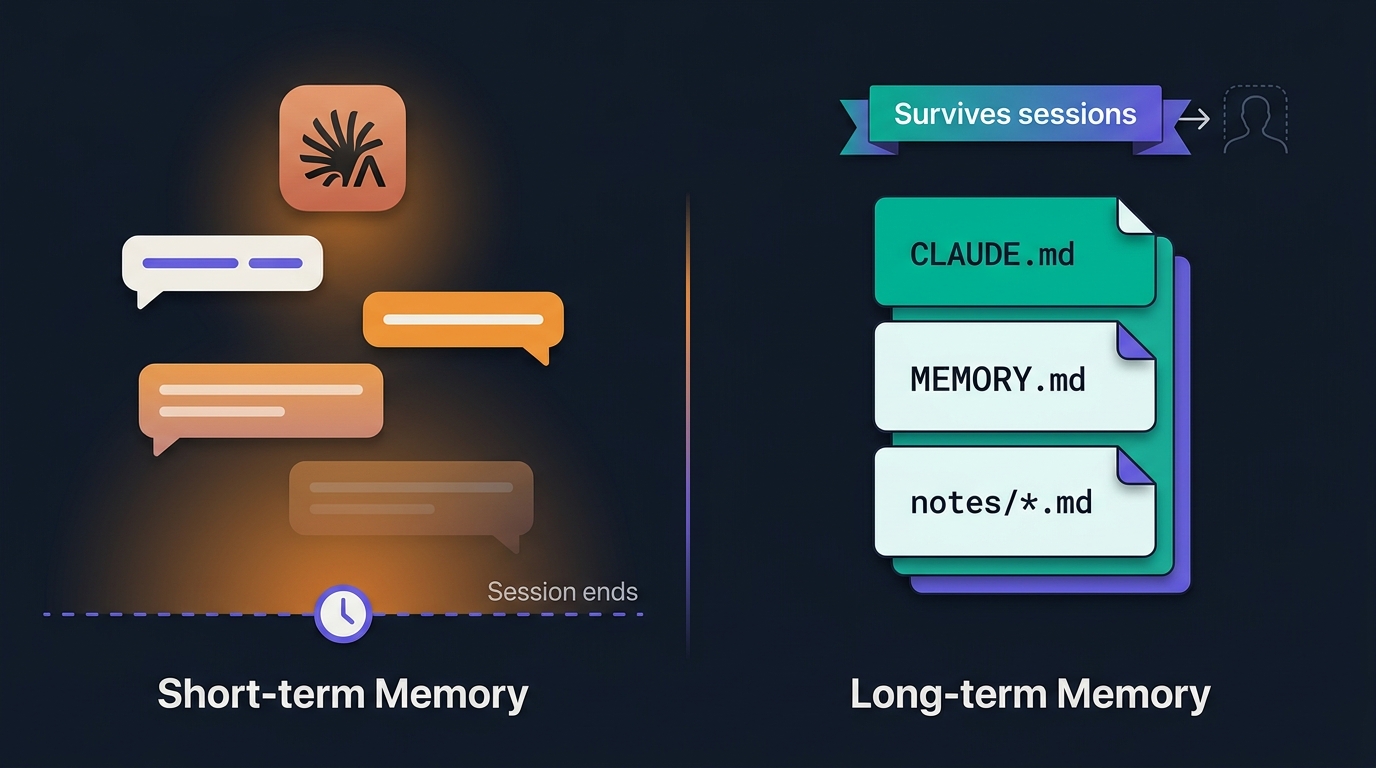
memory 는 CLAUDE.md 와 다른 축이다. CLAUDE.md 가 정적 규약 이라면, memory 는 세션 중 사용자가 명시한 fact 를 자동 저장하는 동적 기억 이다.
> 내 이메일은 me@example.com 이야. 기억해둬.
Claude: 저장했습니다. ~/.claude/projects/.../memory/MEMORY.md 에 추가됨.
> 이 리포의 스테이징은 stg-leads.co.kr 이야.
Claude: 저장했습니다.
> 내 계정 이메일 me@example.com 이야.
Claude: 알겠습니다. (저장 안 됨 · "기억해둬" 명시 문구 없어 이번 세션에만 유지)
~/.claude/projects/<repo-path>/memory/MEMORY.md
자동 인덱싱되어 이후 세션 시작 시 로드된다.
편집·삭제는 /memory 로.
📌 memory 는 사용자가 명시적으로 "기억해둬" 라고 해야 저장된다. 자동으로 아무 사실이나 축적되는 것이 아니다.
🎨 이미지 프롬프트: "Editorial illustration on dark navy #0f1722 background split into two mirrored halves. Left half labeled 'Short-term Memory' shows a Claude icon at top surrounded by three floating chat message bubbles that fade progressively toward the bottom. A small clock icon and dashed line labeled 'Session ends' cross the bottom, and the fading bubbles suggest disappearance after a session. Right half labeled 'Long-term Memory' shows a stable stack of three document cards: 'CLAUDE.md', 'MEMORY.md', 'notes/*.md'. A ribbon at the top of the right half reads 'Survives sessions' with an arrow pointing to a small silhouette outline of the next session. A vertical accent divider separates the two halves. Clean editorial illustration style — teal #00b894 for the right half (persistent), warm orange #f39c12 fading gradient on the left half (ephemeral), purple #6c5ce7 accents. 16:9. CRITICAL: All visible text MUST be in English ONLY (no Korean characters). Each label appears EXACTLY ONCE — no duplicates. No mirrored or reversed text."

단기 vs 장기 메모리 — 세션이 끝나면 사라지는 것 vs 남는 것
@file · @folder/ · @URL — 즉시 로드@ 는 프롬프트 안에서 파일 · 폴더 · URL 을 즉시 로드 하는 문법이다. Claude 가 스스로 파일을 찾는 것보다 명시적 @ 참조가 훨씬 빠르고 정확하다.
@README.md # 파일 하나
@src/ # 폴더 재귀
@https://docs.python.org/3/ # URL 읽기 전용
💡 실전 팁 — @ 뒤 tab 으로 파일명 자동완성.
@file 이 이긴다@a.py @b.py 두 함수 차이@folder/ 크기 주의@node_modules/ · @dist/ · @venv/) 는 컨텍스트를 통째로 소모한다.gitignore 대상은 절대 @ 하지 않는다@ 임포트 — 파일 얇게 유지CLAUDE.md 가 커지면 섹션을 문서로 나누고 @ 로 임포트한다.
## Stack → @docs/stack.md
## Architecture → @docs/architecture.md
## Domain Terms → @docs/domain.md
@ 는 무시⚠️ @import 은 절약이 아니라 모듈화다. @ 임포트 문서는 세션 시작 시 전량 로드(eager)된다 — 파일을 쪼개도 컨텍스트 총량은 그대로다. 이점은 오너십·유지보수 분리이지 토큰 절약이 아니다. 진짜 절약(lazy) 은 세부 문서를 @import 없이 docs/ 에 "참고"로만 두어 필요할 때 Claude 가 Read 로 불러오게 하거나, Skill 로 감싸 발동 시에만 로드하는 것이다.
/compact vs /clear — 성격이 완전히 다르다컨텍스트 창이 한계에 가까워지면 두 명령 중 하나를 고른다.
| 명령 | 하는 일 | 남는 것 | 언제 |
|---|---|---|---|
/compact |
이전 대화를 요약본으로 압축 | 요약 · 파일 상태 · 결론 | 같은 태스크 계속 · 토큰만 절약 |
/clear |
대화 이력 통째로 초기화 | 파일 편집만 | 다른 태스크 전환 · 완전 리셋 |
/compact 실전큰 리팩토링 중 컨텍스트가 80% 넘어가면 압축. Claude 는 이전 대화의 핵심 (파일 변경 이력 · 결정 사항 · 남은 할 일) 을 요약본으로 유지한다.
감량 감각. 실측치는 세션 성격에 따라 변동. 대략 50k → 8k 토큰 수준 (80% 이상 감소). 코드 변경 이력·파일 리스트는 남고 잡담·검토 초안은 잘린다.
/clear 실전리팩토링 끝나고 완전히 다른 기능 으로. 예: 인증 → 결제. 실수로 남발하면 대화 통째로 소실.
⚠️ 판정 한 줄. 같은 태스크 계속 → /compact · 다른 태스크로 → /clear. 헷갈리면 /compact 를 먼저 시도한다. /clear 는 되돌릴 수 없다.
/rewind — 프롬프트 단위 되감기Accept All 로 편집을 연달아 수락하다 코드가 어긋나는 순간을 대비한 세션 단위 안전장치. 별도 명령 없이 자동으로 쌓인 스냅샷으로 프롬프트 단위 되감기가 된다.
프롬프트 하나 = 체크포인트 하나. 보낼 때마다 직전 코드 상태 를 자동 저장한다. 추적 대상은 Claude 의 편집 도구 (Edit · Write) 가 바꾼 것뿐. 세션당 최근 100 개 를 유지하고, 세션을 닫았다 다시 열어도 되감을 수 있다.
/rewind 를 치거나, 입력창이 빈 상태에서 Esc 를 두 번. 프롬프트 단위로 시점을 골라 복원한다. 선택지 세 가지 — 코드 + 대화 · 대화만 · 코드만.
⚠️ 한계 — Bash 삭제·이동은 못 살린다. rm · mv · cp 로 지우거나 옮긴 파일은 /rewind 로 복원되지 않는다 (편집 도구 변경만 추적). git 대체가 아니다 — 체크포인트는 세션 안의 로컬 undo · git 은 영구 이력. 위험한 삭제·이동은 git 커밋으로 방어선을 둔다.
설정 키는 fileCheckpointingEnabled · 기능이 목록에 안 보이면 이 값과 클라이언트 버전을 확인한다.
정의 · 왜 필요한가 · 표준 subagent 3종 · frontmatter 5필드 · 개인 subagent 자작 예시 2종 · 오답 노트.
subagent 는 개별 시스템 프롬프트 · 개별 도구 세트 · 개별 모델 로 격리된 하위 세션이다. 메인 세션이 특정 태스크를 위임하면, subagent 는 자기만의 컨텍스트에서 작업을 마치고 결과만 되돌려준다.
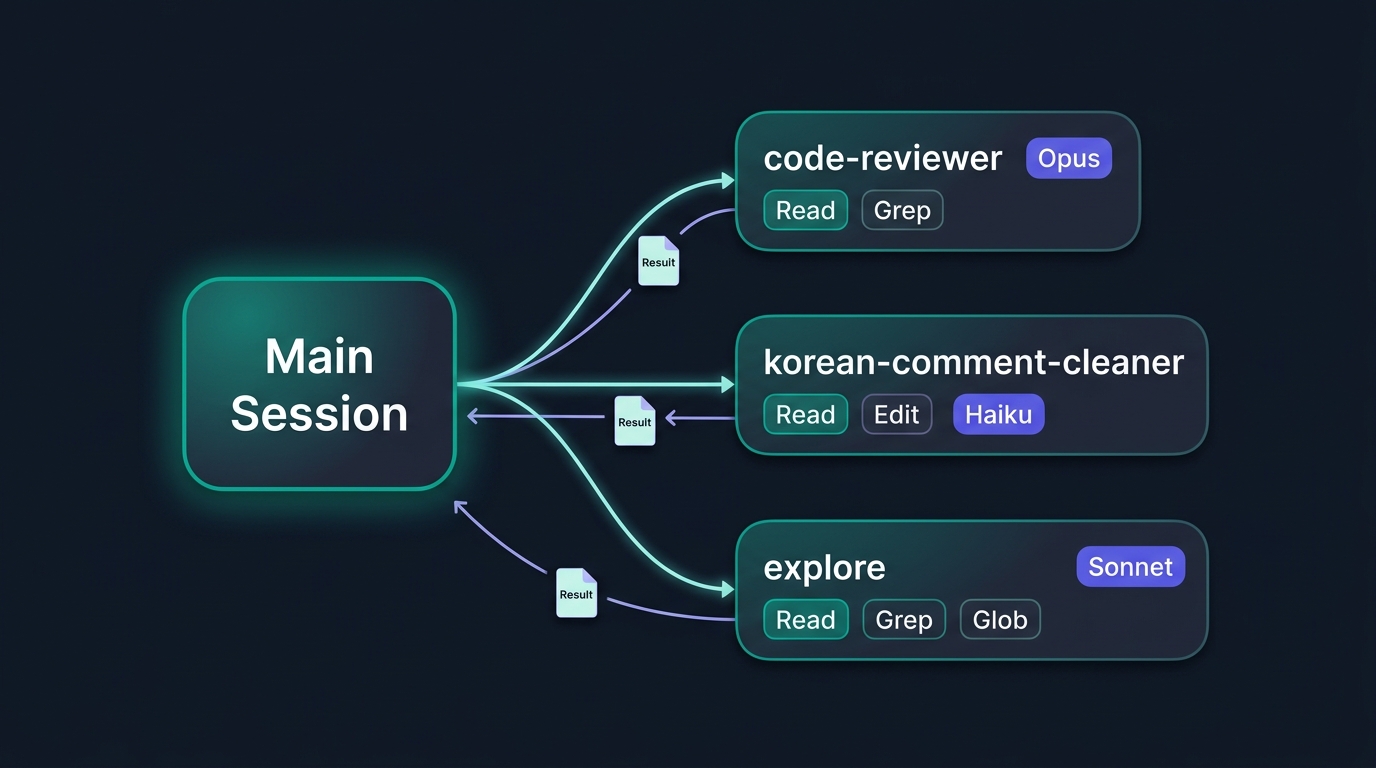
subagent = 시스템 프롬프트
+ 허용 도구 세트
+ 사용 모델
큰 검색·리뷰 태스크가 메인 세션을 오염시키지 않는다.
리뷰 subagent 는 Read·Grep 만 · 파일 수정 금지.
어려운 리뷰는 Opus · 반복 정리는 Haiku.
🎨 Image Prompt: "Editorial illustration on dark navy #0f1722 background — on the left, a large central node labeled 'Main Session' as a rounded panel with soft glow. Three thin luminous branches fan out to the right to three separate smaller nodes stacked vertically. Top branch reaches a node labeled 'code-reviewer' with two chip labels 'Read' and 'Grep' underneath and a model badge 'Opus'. Middle branch reaches a node labeled 'korean-comment-cleaner' with chips 'Read' and 'Edit' and a model badge 'Haiku'. Bottom branch reaches a node labeled 'explore' with chips 'Read', 'Grep', 'Glob' and a model badge 'Sonnet'. Small return arrows from each subagent back to Main Session carrying tiny 'Result' document icons. Clean editorial style — teal #00b894 and purple #6c5ce7 accents, 16:9. English ONLY, each label EXACTLY ONCE, no mirrored text."
Claude Code 는 몇 개의 표준 subagent 를 기본 제공한다. 자기 subagent 를 만들기 전에 이 표준부터.
| subagent | 하는 일 | 도구 | 모델 |
|---|---|---|---|
explore |
리포·문서 탐색·요약 | Read · Grep · Glob | Sonnet |
Plan |
계획 수립·편집 금지 | Read · Grep · WebSearch | Sonnet · Opus |
code-reviewer |
코드 리뷰·개선 제안 | Read · Grep | Sonnet · Opus |
/agents 로 목록·편집// SDK/JSON 레벨 표기 — CLI 사용자는 자연어 or /agents
Task(subagent="explore", prompt="이 리포 아키텍처 3줄 요약")
→ 결과 스니펫: "cmd/server → handler → service → repo. Kafka 이벤트 발행..."
메인 세션이 요약만 받아 계속 진행
개인 subagent 는 ~/.claude/agents/*.md 에 마크다운 파일로 정의한다. YAML frontmatter 로 이름·설명·도구·모델을 지정하고 본문에 시스템 프롬프트.
~/.claude/agents/*.md
<repo>/.claude/agents/*.md
📌 CLAUDE.md 의 3계층과 대칭 구조. 파일 형식은 개인·프로젝트 동일.
| 필드 | 필수 | 설명 |
|---|---|---|
name |
✓ | subagent 이름 (자동 스폰 시 매칭 키) |
description |
✓ | 언제 이 subagent 를 쓸지 (Claude 가 판단 근거로 사용) |
tools |
선택 | 허용 도구 목록 (생략 시 모든 도구 상속) |
model |
선택 | opus · sonnet · haiku · inherit |
disallowedTools |
선택 | 금지 도구 목록 |
description 은 트리거Claude 가 언제 자동 스폰할지 판단하는 근거. "인증 코드 작성 후" 처럼 명시적으로.
tools 는 allowlistRead, Grep 만 적으면 그 둘만. 파일 수정 자동 차단.
model 은 태스크 성격에리뷰·아키텍처는 Opus · 반복 정리는 Haiku.
---
name: security-reviewer
description: 보안 관점 코드 리뷰.
인증·인가·세션·입력 검증 관련
코드 작성 후 자동 호출.
tools: Read, Grep, Glob
model: opus
---
당신은 보안 코드 리뷰어다.
## 검토 기준
- 인증·인가 우회 · SQL 인젝션 · XSS · CSRF
- 세션 관리 · 토큰 보관 · 시크릿 하드코딩
## 출력 형식
- 심각도 (Critical·High·Medium·Low)
- 파일·라인·재현·수정 제안
## 금지
- 파일 수정·실행 (Read·Grep·Glob 만)
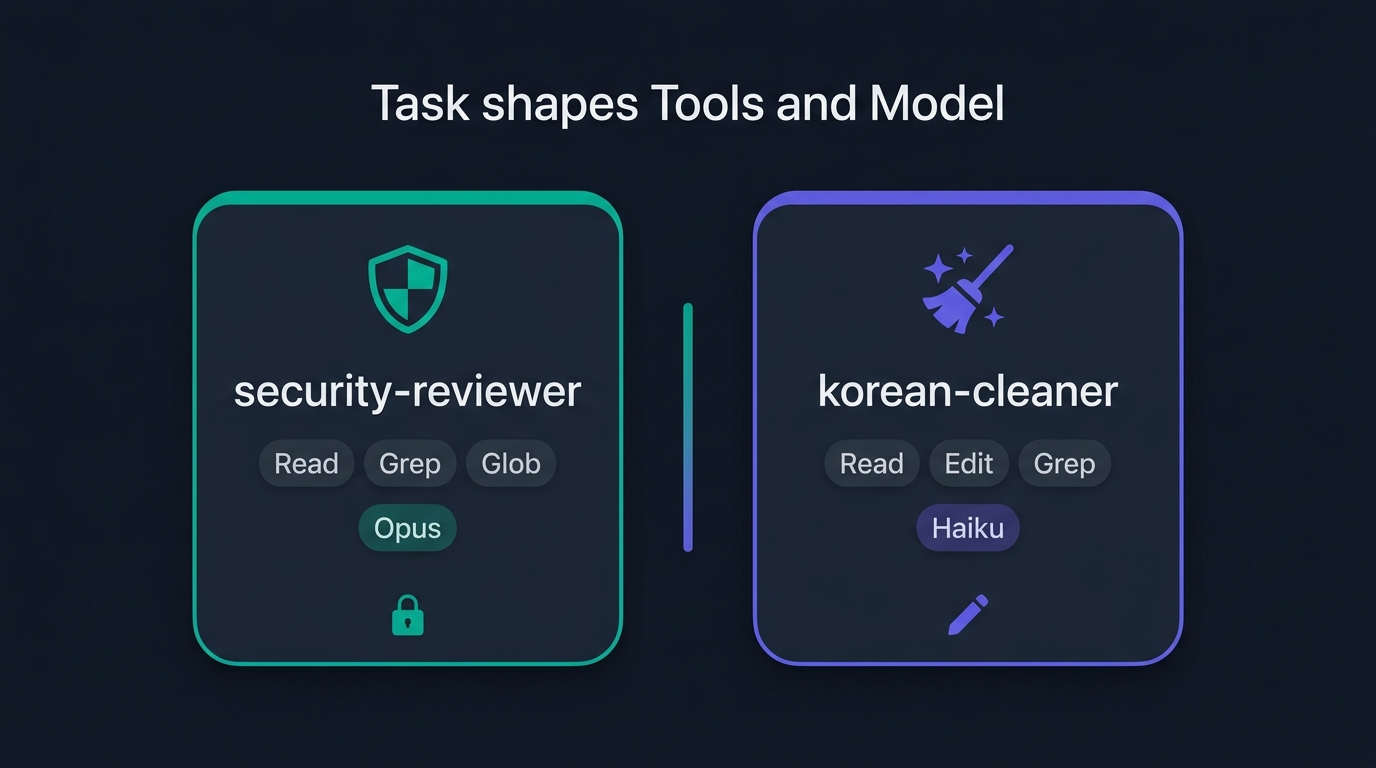
📌 Opus · 읽기 전용. 리뷰는 격리된 Opus 로, 도구는 Read·Grep·Glob 만. 파일 수정 권한이 없어 코드에 손대지 않는다.
🎨 Image Prompt: "Editorial illustration on dark navy #0f1722 background — two rounded card panels placed side by side and separated by a thin vertical accent divider. Left card carries a shield glyph at the top and a title 'security-reviewer'. Beneath the title, three small chips read 'Read', 'Grep', 'Glob' and one model badge reads 'Opus'. A small padlock icon sits at the bottom of the left card. Right card carries a broom-and-sparkle glyph and a title 'korean-cleaner'. Beneath, three chips read 'Read', 'Edit', 'Grep' and a model badge reads 'Haiku'. A small pencil icon sits at the bottom of the right card. Above the two cards, a single centered caption reads 'Task shapes Tools and Model'. Clean editorial illustration style — teal #00b894 for the left card and purple #6c5ce7 for the right card, 16:9. CRITICAL: All visible text MUST be in English ONLY. Each label appears EXACTLY ONCE. No mirrored text."
---
name: korean-comment-cleaner
description: 파이썬·TS 코드의 한글 주석을
IT 전문서 문체로 정리.
리팩토링·문서화 태스크에 자동 호출.
tools: Read, Edit, Grep
model: haiku
---
당신은 한국 IT 전문서 편집자다.
## 정리 규칙
- 번역체 금지 ("본인" · "당신의")
- AI 말투 금지 ("자, 이제")
- 구어체 금지 (강조 부사 남발)
- 단정 · 명사 중심 · 한 문장 1주제
## 작업 흐름
1. 대상 파일 Read
2. 주석만 대상, 코드 로직 변경 금지
3. Edit 으로 한 군데씩 수정
4. 변경 라인 수 보고
Haiku · 편집 허용
# 자, 이제 유저의 입력값을 본인이
# 검증해봅시다. 여기서는 정말 중요한데,
# 당신의 세션 토큰이 만료되었는지 체크.
def validate(user_input, session):
...
# 사용자 입력 검증.
# 세션 토큰 만료 여부 확인.
def validate(user_input, session):
...
📌 태스크 성격에 따라 모델·도구가 갈린다. 리뷰는 격리된 Opus 읽기 전용(예시 ①) · 반복 정리는 Haiku 편집 허용(예시 ②).
| 실수 | 문제 | 조치 |
|---|---|---|
| description 너무 짧음 | 자동 스폰이 안 됨 | 트리거 문구 명시 |
| 모든 도구 다 허용 | 격리 이득 없음 | allowlist 좁힘 |
| 한 subagent 너무 넓은 역할 | 프롬프트 모호 | 태스크당 하나 |
| 반복 태스크에 Opus | 요금·속도 손해 | Haiku |
글로벌 CLAUDE.md · 프로젝트 CLAUDE.md · 개인 subagent · @file 확인.
mkdir -p ~/.claude
$EDITOR ~/.claude/CLAUDE.md
작성 지침 · 30 줄 이하 - 응답 언어 (한국어·영어·혼용) - 개인 커밋 메시지 스타일 - 로그·주석 취향 - 코드 스타일 개인 선호
관찰 포인트. 세션을 새로 시작하면 자동 로드. /status 로 확인.
cd ~/my-repo
claude
> /init
초안이 나오면 5 섹션을 채운다 - Stack · Architecture - Domain Terms - Commands · Conventions
관찰 포인트. 편집 후 git status 로 CLAUDE.md 가 커밋 대상에 뜨는지 확인 (팀 공유용).
mkdir -p ~/.claude/agents
$EDITOR ~/.claude/agents/security-reviewer.md
두 후보 중 하나
- A. security-reviewer (보안 리뷰)
- B. korean-comment-cleaner (주석 정리)
호출 테스트
> /agents
> Task 로 security-reviewer 를 띄워서
app/auth/ 아래를 리뷰해줘
관찰 포인트. subagent 의 컨텍스트 창은 메인과 분리. 500 개 파일을 훑어도 메인은 요약만.
> @~/.claude/CLAUDE.md 이 파일 요약해줘
> @./CLAUDE.md 이 리포 규약 요약해줘
성공 판정 3개
- ~/.claude/CLAUDE.md 가 새 세션에서 자동 로드
- <repo>/CLAUDE.md 가 자기 리포 세션에서 자동 로드
- ~/.claude/agents/xxx.md subagent 가 /agents 목록에 뜬다
📌 4단계 다 통과한 참여자는 짝을 지어 서로 CLAUDE.md 를 리뷰한다. 남의 규약을 읽으면 자기 규약 다듬을 지점이 보인다.
세션 전체를 한 장 지도로 요약하고, 축을 한 문장에 담는다.
┌─────────────────────────────────────────────────┐
│ 로컬 <repo>/CLAUDE.local.md │ ← 가장 강함
│ (개인 실험 · gitignore) │
├─────────────────────────────────────────────────┤
│ 프로젝트 <repo>/CLAUDE.md │
│ (팀 공유 · 스택 · 도메인 · 관례) │
├─────────────────────────────────────────────────┤
│ 글로벌 ~/.claude/CLAUDE.md │ ← 가장 약함
│ (개인 취향 · 30줄 이하) │
└─────────────────────────────────────────────────┘
동적:
memory 자동 fact /compact 같은 태스크 · 압축
@file 즉시 로드 /clear 다른 태스크 · 리셋
subagent:
~/.claude/agents/*.md (개인)
<repo>/.claude/agents/*.md (팀 공유)
📌 이 한 장이 이번 세션의 지도다. 정적(3계층 CLAUDE.md) · 동적(memory·@file·/compact·/clear) · 위임(subagent) 세 축이 모두 담겨 있다.
여기까지 마치면 참여자 노트북에 CLAUDE.md 3계층이 갖춰지고, 개인 subagent 하나가 정의되고, @file · /compact · /clear 를 상황에 맞게 골라 쓸 수 있다.
자기 워크플로에서 세 번 이상 반복하는 지시 가 있으면, 그 지시가 어느 축에 놓일지부터 먼저 정한다.
CLAUDE.md 3계층 - 글로벌 · 프로젝트 · 로컬 - 팀 컨벤션·스택·도메인
memory · @file · /compact - 세션 중 fact 저장 - 즉시 로드 · 압축
subagent - 컨텍스트 격리 - 도구 최소화 · 모델 최적화
🎨 이미지 프롬프트: "Editorial illustration on dark navy #0f1722 background of a clean minimalist workspace scene. In the center, a stylized document labeled 'CLAUDE.md' floats with soft glow. Three thin luminous lines connect from the document outward to three small icons: a folder labeled 'Static', a spinning arrow labeled 'Dynamic', and a small branching node labeled 'Delegate'. A subtle English caption at the bottom reads 'Write the rule once'. Clean editorial illustration style, teal #00b894 and purple #6c5ce7 accents with warm orange highlights, 16:9. CRITICAL: All visible text MUST be in English ONLY (no Korean characters). Each label appears EXACTLY ONCE — no duplicates. No mirrored or reversed text."